Implementing and Upgrading an Information System
Madeline Araya, Meera Subash and Nathan Yung
Abstract
This chapter begins with a historical perspective of health information technology implementation and proceeds with process analyses for implementing a clinical health information system, centering on the electronic health record (EHR). The foci of clinical information system implementation and upgrading continue to focus on decision support, thereby (1) providing safe and up-to-date patient care, (2) promoting interoperability, and (3) leveraging advanced levels of clinical decision support (CDS). Implementing EHRs entails an effective internal and external communication process, multiple layers of decisions during each stage of the implementation, and a clear understanding of the project’s complexity to ensure appropriate decision-making. Major decisions begin with a focus on what patient care needs are supported, usability, vendor and system selection, go-live options, workflows and processes redesign, and developing procedures and policies. The timeline and scope of the project is primarily dictated by expenses, staff, resources, and the drop-dead date for go-live. Success depends on a well-thought-out and detailed project plan with regular review and updating of the critical milestones, unwavering support from the organization’s leadership, input from users during the design and build phases, thorough testing, end-user education, mitigation of identified risk factors, and control of scope creep. The implementation of an EHR is a continuous process requiring management and maintenance. Medication orders, nonmedication orders, and documentation screens or fields will continuously need to be added, modified, or inactivated; disruptions may require patch installation and tweaks to workflows and functionality. New virtual modes of care delivery are being integrated into preexisting EHR builds to address the changing needs of patients and utilize new reimbursement structures.
Keywords
Superuser; go-live; big-bang go-live; phased go-live; data abstraction; change freeze; at-the-elbow support; information blocking; scope creep; milestones; analysts; change control; legacy system; user acceptance testing; e-iatrogenesis
At the completion of this chapter, the reader will be prepared to:
- 1. Summarize the genesis of electronic health record policy in the late 2000s in the United States.
- 2. Discuss how the phases of software development lifecycles influence the implementation or update of an EHR.
- 3. Describe the roles of superusers and informatics professionals in training and go-live activities.
- 4. Discuss factors to consider when planning for future system maintenance tasks.
- 5. Discuss potential future EHRs’ technical requirements with increasing technology specifications.
Key Terms
big bang, 315
change control, 312
change freezes, 317
data abstraction
e-iatrogenesis, 310
information blocking, 308
milestones
phased go-live, 315
scope creep, 311
superuser, 314
user acceptance testing, 314
Introduction
There are several reasons why a health organization (hospital organization, physician office, or clinic) may decide that a major change is needed. A careful review of the reasons for the change will start the process of deciding whether to install a new information system or upgrade the current system. Clinical information systems, specifically the electronic health record (EHR), are essential for the delivery of evidence-based care (EBC). EBC is patient-centered, relying on diagnostic information to provide cost effective and appropriate care. Information provided by EHRs facilitate effective patient-centered care through management of clinical activities resulting in reduction of medical errors and costs.
Historical Review of the Electronic Health Record
The American Recovery and Reinvestment Act (ARRA)
The American Recovery and Reinvestment Act (ARRA), enacted in 2009, spawned the Health Information Technology for Economic and Clinical Health (HITECH) Act. One of its primary goals was that each person in the United States would have a certified digital medical record by 2014, including the electronic exchange of health information across healthcare institutions, to improve quality of healthcare. As discussed in detail in Chapter 29, the HITECH Act created a $27 billion federally funded incentive program that provided Medicare and Medicaid payments over 5 to 10 years to three groups: (1) eligible providers (EPs), (2) eligible hospitals (EHs), and (3) critical access hospitals (CAHs). CAH were defined as rural hospitals certified to receive cost-based reimbursement from Medicare. Within the HITECH Act, two EHR incentive programs were developed, specifically the Medicare EHR Incentive Program administered by the Centers for Medicare and Medicaid Services (CMS) and the Medicaid EHR Incentive Program, which was governed by individual states and territories. It is important to note that these government incentive programs were not established to cover the total cost of implementing an EHR system but rather to encourage or “incentivize” healthcare organizations and healthcare providers to use an EHR in a meaningful way—called Meaningful Use (MU) (this term is now referred to as “promoting interoperability”)—and to foster faster rates of adoption across the nation (One Hundred Eleventh Congress of the United States of America, 2009). Other terms often used for this incentive program were “stimulus funds,” “stimulus package,” or simply “ARRA funds” (Healthcare Information Technology Standards Panel [HITSP], n.d.).
CMS established the criteria for MU or promoting interoperability, including minimal thresholds for select objectives. There were three stages in the EHR Incentive Program. Stage 1 began in 2011 and emphasized capturing patient data that was expected to be shared with other healthcare professionals and the patient. Stage 2 began in 2014 and focused on advanced clinical practices and providing patient portals where patients could access their medical records. Stage 3 began in 2017 and accentuated data interoperability and patient outcomes while increasing the thresholds for the objectives and clinical measures (Centers for Medicare & Medicare Services [CMS], 2015). Additional requirements included the submission of detailed and timely reports demonstrating interoperability adoption to CMS and the appropriate state offices.
CMS requirements for promoting interoperability mandate that the EHR be a “certified complete EHR” or have individual modules that are “certified EHR modules.” This means that they are certified by the Office of the National Coordinator for Health Information Technology (ONC). Complete EHR certification means that the system was required to prove it was functional with the appropriate data elements and logic to support all facility departments. EHR module certification means that the ancillary application met one or more requirements. Most hospitals and physician offices purchased commercial systems that incorporated all essential capabilities. A list of certified products can be found at CHPL (https://chpl.healthit.gov/#/search).
The Certification Commission for Health Information Technology (CCHIT) began testing and certifying new software applications in 2006. In 2014, it ceased testing and certifying EHRs for financial reasons and changed its role to advising healthcare providers on how to comply with the government’s regulations and providing guidance to health IT developers on how to meet the government’s requirements for a certified EHR. The CCHIT worked with the Health Information and Management Systems Society (HIMSS) to advance programs and policies that strongly promote interoperability and to advocate using IT between patients and providers as another tool to transform healthcare (Terry, 2014). CCHIT ceased all operations in 2014.
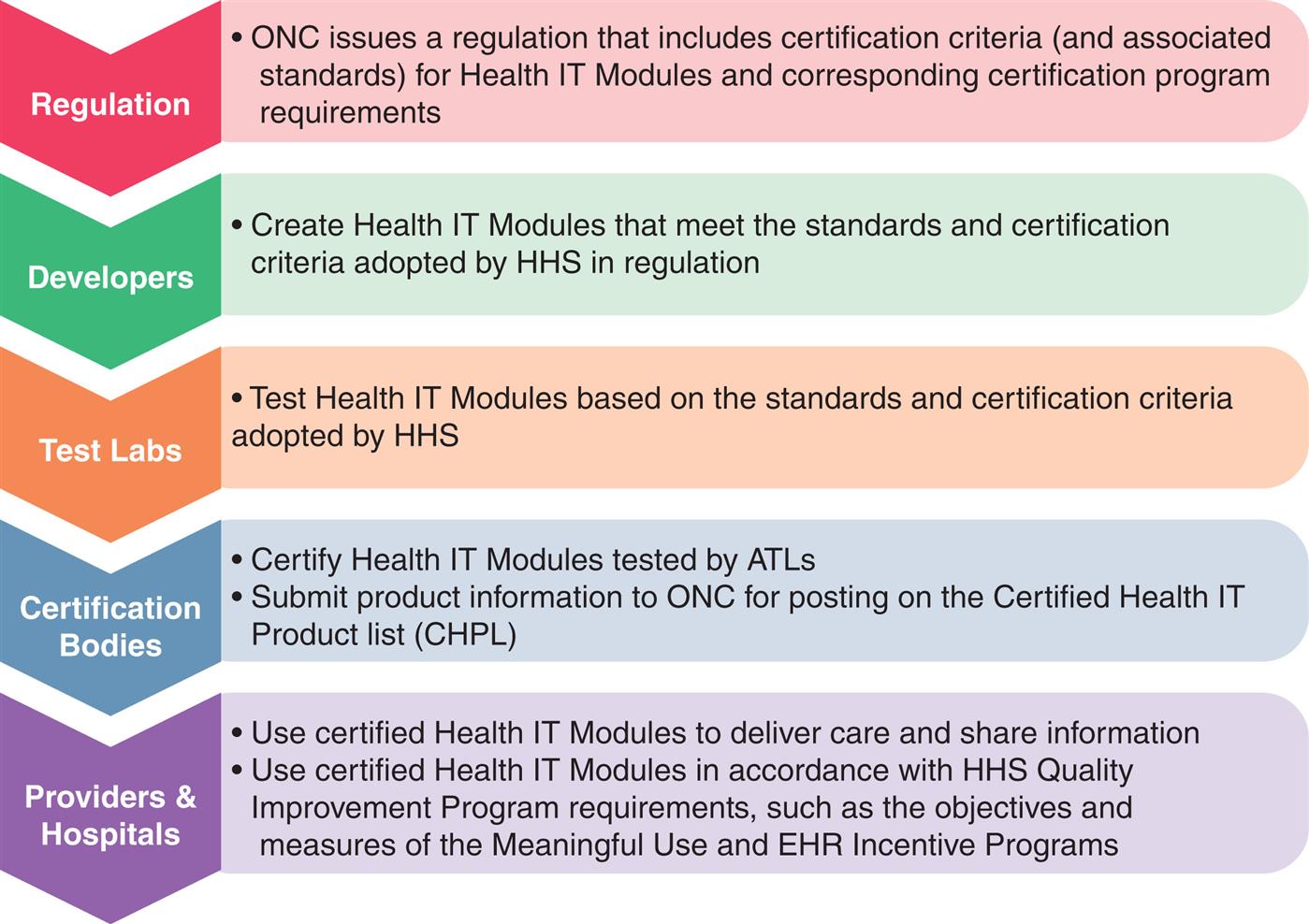
The ONC now manages the EHR certification program—which first began in 2010—using the process shown in Fig. 20.1. The ONC has increased the use of this program to other CMS and non-CMS programs. There are multiple editions of the program, each more robust than the last, to improve interoperability standards, increase transparency, and moderate costs for the programs and systems it supports. Modifications to this system have been instituted and documented in the Final Rule by the 21st Century Cures Act: Interoperability, Information Blocking, and the ONC Health IT Certification Program.
However, the MU criteria did not require purchasing a commercial, certified product. A few hospitals and EPs had developed their own “homegrown” EHRs that may or may not have included commercial components. CMS welcomed organizations to certify their systems using the EHR Alternative Certification for Healthcare Providers (EACH) program. The EACH program was a three-step program to certify homegrown systems or existing EHR technology not already covered by a vendor certification. The program provided a mechanism to obtain certification by demonstrating that the system met the U.S. Department of Health & Human Services (HHS) MU requirements (US DHHS Office of the National Coordinator [ONC], 2015). For example, the Regenstrief Medical Record System (RMRS) in Indiana is an EMR system that began in 1972 and expanded to several additional major hospitals (Duke, et al. 2014). Other medical centers that successfully opted for this alternative include Geisinger Health System, Marshfield Clinic Health System, Landmark Hospitals (Chartpad), and Brigham and Women’s Hospital (Braunstein, 2015; Mace, 2016).
U.S. hospitals, while initially slow to adopt an EHR system, found that the HITECH could be clearly implemented. A 2011 survey conducted by the American Hospital Association found that EHR use doubled from 16% to 35% between 2009 and 2011. By 2014 the ONC reported that 76% of hospitals implemented at least a basic EHR system, and almost 97% of those implemented a certified EHR technology (Charles et al., 2015). The American Hospital Association in a 2019 report noted that 9 of 10 hospitals used the EHR to inform their practice (https://www.aha.org/news/headline/2019-04-17-onc-nearly-all-hospitals-use-ehr-data-inform-clinical-practice).
The 21st Century CURES Act
On December 13, 2016, the 21st Century Cures Act (“Cures Act” for short) was signed into law with the goal of improving electronic access, exchange, and utilization of health information for patients and providers (ONC Cures Act). Specifically, the ONC enacted the Cures Act Final Rule to implement the interoperability and health information transparency terms of the Cures Act. The ultimate goal of the Final Rule was to facilitate patient control and engagement of their own health information. In addition to providing patients and their healthcare providers with access to health information, the Final Rule also aimed to increase incentives towards developing a health application ecosystem, such as a call to use more standardized application programming interfaces (APIs) to access structured healthcare data on smartphone applications. Furthermore, the rule required that patients have the ability to securely access their electronic health information (EHI) at no cost to them and in a timely fashion. Section 4004 of the Cures Act identified the role of information blocking and eight activities (Table 20.1) that do not qualify as information blocking according to this piece of legislation. Information blocking is a practice conducted usually by a health IT developer of certified health IT, health information network or exchange, or healthcare provider that is likely to interfere with the access, exchange, or use of EHI.
Table 20.1
Federal rules implemented under the bipartisan Cures Act also specified eight types of clinical notes (as outlined in the United States Core Data for Interoperability) required to be available to patients free of charge. The eight note types included (1) consultation notes, (2) discharge summary notes, (3) history and physical, (4) imaging narratives, (5) lab reports, (6) pathology reports, (7) procedure notes, and (8) progress notes. Additional note type exceptions apply to protect patient confidentiality and sensitive matters (i.e. psychotherapy notes, those notes used in court proceedings).
The Cures 2.0 Act draft was released as follow-up legislation in June 2021. The Act aimed to galvanize medical product innovation, institute appropriate regulations for safety and quality, and modernize FDA and CMS processes. Additional aspects of the Act included bolstering future pandemic preparedness, supporting digital health technologies, and streamlining Medicare coverage processes (Locke et al., 2021).
Best Practices: Incorporating Evidence-Based Content and Clinical Decision Support Systems
With each new release, information systems become more complex and robust, enabling them to incorporate evidence-based content (called evidence-based practice [EBP]) and to use clinical decision support (CDS) features in the system. Detailed information on EBP and CDS is included in Chapters 11 and 12, respectively; however, one of the most frequently quoted definitions for EBP is one proposed by Sackett et al.—EBP is “the conscientious, explicit, and judicious use of current best evidence in making decisions about the care of individual patients. The practice of evidence-based medicine means integrating individual clinical expertise with the best available external clinical evidence from systematic research” (Sackett et al., 1996). EBP involves making decisions for clinical care based on the most current recommended treatments for specific diagnoses. These recommendations are derived from an ongoing review and analysis of high-caliber, peer-reviewed scientific studies in the literature. While entering orders from an EBP order set, the practitioner may override any of the recommended diagnostic or treatment options based on the individual needs of the patient. Some healthcare providers strongly object to a preconfigured EBP order set, referring to it as “cookbook medicine,” and resist incorporating it into practice. Berner offers an analogy of CDS, including EBP similar to the nursing process of the traditional “five rights” for medication administration: “The clinical delivery system should provide the Right information to the Right person in the Right format through the Right channel at the Right time” (Berner, 2009).
A major challenge to EBP is remaining current due to the continuous discovery of new knowledge and the resulting changes to recommended best practices guidelines that are embedded in EHRs. Commercial products can assist organizations in updating protocols by providing current EBP clinical solutions, such as order sets and care plans. Most major EHRs have been upgraded with common CDS features that help meet some of the specific MU mandates, such as alerts for critical lab results or a history of methicillin-resistant Staphylococcus aureus (MRSA) on new admissions, pregnancy warnings on select medications and diagnostic tests, drug allergies, drug–drug interactions, drug–diagnosis warnings, dosage range limits, the capture of specific data such as smoking status and advance directives, and immunization reminders.
The advantages of using a system that incorporates evidence-based content and CDS include the following: Defines standardized, appropriate care and reduces variability of care for common diagnoses.
- 1. Defines local or facility-owned orderables (elements that can be ordered using computerized provider order entry [CPOE] available at that facility.
- 2. Triggers alerts and other CDS features based on locally built logic (rules). For instance, an alert may be triggered if (1) blood products are ordered on patients who request no blood products be administered, (2) pregnancy category teratogenic medications are ordered on patients of childbearing age with an unknown pregnancy status, or (3) the potassium level is below a preset level on patients receiving digitalis medications.
- 3. Collects detailed metrics for specific reports required to meet MU criteria. These reports address a variety of MU requirements, such as patient education, smoking status assessment, native language, discharge instructions, deep vein thrombosis prophylaxis in select patient populations, and the use of thrombolytic and antithrombotic medications in stroke patients.
- 4. Enables a more timely update of treatment plans based on best practices. The study Translating Research Into Practice (TRIP), conducted by researchers sponsored by the Agency for Healthcare Research and Quality (AHRQ) in 1999, concluded that it took an average of 10 to 20 years to incorporate new clinical findings into general clinical practice (Agency for Healthcare Research and Quality [AHRQ], 2001). This time lag between the discovery of new treatment options and the use of this new knowledge at the point of care is sometimes called the “lethal lag” or “fatal lag.” CDS and EBP are likely to accelerate the incorporation of new findings into clinical practice.
Patient Safety and Improved Quality of Care
Before MU rules were initiated, most healthcare leadership and professionals cited patient safety as the primary reason for implementing an EHR; however, with the rapid adoption of EHRs it may appear to some healthcare professionals that the sole reason for implementing an EHR is to qualify for the incentive package. In response to this concern, leadership needs to communicate to staff that the primary deciding factors for implementing or upgrading an EHR include patient safety, improved quality of patient care, and efficiency.
EHRs help decrease medication errors, especially if closed-loop bedside barcoding medication administration is an integral piece of the system (Poon et al., 2010). Quality of care and outcomes improve when decision-support mechanisms, standardized order sets, and care plans based on best practices are incorporated in the EHR. Besides being aware of all the positive functionalities and advantages of the EHR, staff also need to be well informed on what the EHR cannot do.
Major implementations can elicit strong pushbacks from hospital staff for a variety of reasons. A primary reason is that a major implementation often involves changes in well-established workflows and processes, resulting in a temporary decrease in productivity, particularly in the early stages when clinicians are still learning the system. In addition, while the new system may offer significant advantages to the institution (e.g., a decrease in medication errors, reduced time between order entry and delivery of services, or a dramatic decrease in telephone calls from nursing and pharmacy to physicians about illegible or questionable orders), individual practitioners may focus on the disadvantages that personally affect them, such as an increase in time to enter admission orders or immediate post-op orders.
In a previously paper-based-records world, some healthcare providers created their own personal order sets for their practice and titled them using their name, such as Dr. Smith’s Routine Admission Orders for Surgery. Once records became electronic, personalized order sets were discouraged or even less likely to be made available in production. Each specialty benefits from creating a standardized order set for each of its common procedures, diagnoses, surgeries, and admissions, incorporating EBP. This approach minimizes wide variances in care and avoids an IT maintenance challenge to keep individual physicians’ order sets up to date. One of the most important success factors in the implementation of an electronic health system is to involve as many users as possible in the design and planning of that system and discuss the inevitable changes to workflows, processes, policies, and procedures (Menachemi & Collum, 2011).
Using the EHR to perform a task for which it is not designed or using a poorly designed system may produce poor results or outcomes. Published studies report a variety of unintended consequences for EHRs. Ash et al. identified nine types of unintended consequences and corresponding interventions to minimize each of these risks (Ash et al., 2009). A few of the unintended consequences are associated with human error, such as selecting the wrong patient or the wrong medication from a list. They refer to this type of error as a juxtaposition error. Recommended strategies to decrease unintended consequences are very similar to the best practices for a successful implementation discussed later in this chapter (Ash et al., 2003). Weiner et al. coined a new term, e-iatrogenesis, to describe the most critical of the new type of errors seen in EHRs (Weiner et al., 2007). Other types of errors include users who fail to validate or read the list of all orders entered during a session before final acceptance or who accept the defaults for select orders without review.
The EHR may use Tall Man lettering (i.e., the use of mixed-case lettering) for look-alike names of medications recommended by the Institute for Safe Medication Practices (ISMP). Studies indicate that using mixed-case lettering in similar drug names helps decrease medication errors during order entry, medication dispensing, and medication administration by highlighting the differences in the drug names. A few examples of medication names using Tall Man lettering are NiFEDipine versus niCARdipine, DOBUTamine versus DOPamine, and CISplatin versus CARBOplatin (Institute for Safe Medication Practices [ISMP], 2011).
Another safety benefit associated with the implementation of an EHR is that it can enforce the use of CMS-approved abbreviations. In addition, EHRs can incorporate real-time updates or revisions to the order item master (a master list of orderable items) and electronic order sets. For example, Darvon and Darvocet were recalled in 2010 because of serious cardiac arrhythmias. Institutions with EHRs were able to quickly remove these medications from the pharmacy formulary, automatically inactivating Darvon and Darvon equivalents on all electronic order sets.
HIPAA legislation that was originally drafted in 1996 mandated unique national patient identifiers (NPIs) to ensure patient safety and promote interoperability. However, privacy advocates voiced strong opposition, and Congress passed laws preventing the development of unique NPIs. HIMSS has recently reintroduced a strong argument for an NPI and patient matching strategy using demographic attributes that are considered relatively stable and unlikely to change. Many proponents believe that we cannot achieve true interoperability until it is in place (Ritz 2013). Examples of attributes include first name, middle name, last name, maiden name, date of birth, gender, driver's license number, street address, city, state, ZIP Code, and phone number (Terry, 2015). Both proponents and opponents can cite scenarios in which data attributes may prove unstable, and the algorithms that are used do not address enough data elements. An ONC report found that patient matching accuracy oftentimes depended on whether it was matching patients internally or externally across organizations. The error rate varied widely from 10% in IT sophisticated organizations to an alarming 40% to 50% rate when matching across enterprises (Office of the National Coordinator for Health Information Technology, 2014).
Advances in EHR infrastructure have impacted the patient’s experience with the healthcare system. The development of EMR-tethered patient portals for viewing lab results, messages from healthcare providers, and other notes has been associated with several reports of positive patient experiences, lower no-show rates, and self-reported decreases in healthcare system use (Graham et al., 2020). With the advent of the COVID-19 pandemic, telemedicine also came to the forefront as a necessary tool to continue providing healthcare to the masses. Systematic reviews and meta-analyses prior to the pandemic also identified that patients participating in telehealth visits described improved healthcare outcomes, increased ease of use, lower costs, and improved communication with healthcare providers (Kruse et al., 2017). E-visits have also been implemented in certain settings where patients can receive detailed diagnostic or treatment recommendations in an asynchronous messaging format with their healthcare provider team. Literature is pending on the effects of these visit types on long-term cost effectiveness and utility.
Planning an Ehr Implementation or Health Information System Upgrade Project
Project Planning
While this section is going to be a brief overview of a structured planning process, it is our view that dedicated time by project management professionals who focus on coordinating the different phases within a project will be an invaluable resource. Although the typical training for project managers is designed to address a broad set of project types, a manager familiar with health care systems will have a combination of project management skills with the basics of software development lifecycles (SDLCs) which provides a more tailored outline for the vast number and types of health information systems and technologies that one may try to implement. This section hopes to shed light on the similarities between project management and SDLCs and to provide a framework to plan a system upgrade or new implementation.
Fundamentals of Project Management and Software Development Life Cycles
The PMBOK guide (Houston, 2017), which is a resource by the Project Management Institute for such professionals, divides the process of managing projects into five parts called process groups. The first two are the Initiating Process and the Planning Process (Houston, 2017). Briefly, the initiation process will ask important questions that weigh what the needs of the organization are; how the project will impact the organization; and risks, benefits, constraints, limitations, and contingencies at a broad level. This starting outline will require the assembly of a variety of stakeholders. During the planning process group, the outline from the initiation process is further defined with objectives and a basic course of action to complete the project. The outcome is of these process groups is a project charter that recruits organizational resources to complete the project.
Similarly, SDLCs are also grouped into overlapping phases. Table 20.2 highlights the main roles of the phases of project management and SDLC to illustrate the similarities (Gechman, 2019). While there are many ways to conceptualize and plan around software development and the software development life cycle, older conceptual approaches required more upfront knowledge, like in the traditional Waterfall Model. There have been gradual shifts towards more iterative approaches that allow for more flexibility, given that many of the facts are not yet known at the start of the development cycle. Some of the newer conceptual models include Spiral, Rapid prototype, Incremental, and Agile (Houston, 2017).
Table 20.2
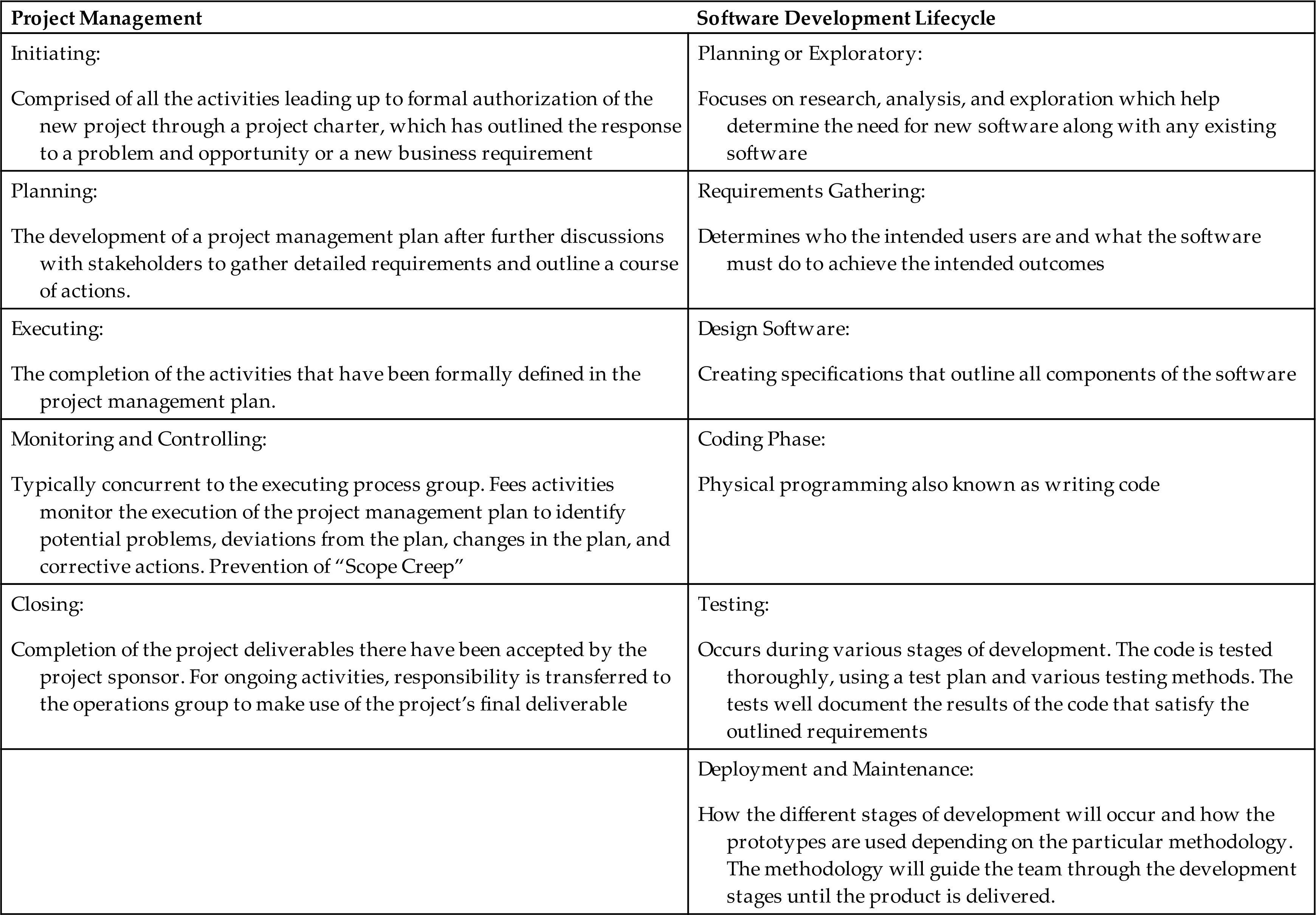
Regardless of which SDLC you are using to conceptualize the process, the major components addressed will always include system integration, testing, and verification processes. If your organization has decided to create a custom software, then the coders and developers will work closely with you to complete each phase of the SDLC.
Scope, Project Planning, and Change Control
This initiation process group is supposed to design a project charter that will ultimately create the list of objectives, the deliverables, a rough duration, a forecast of the resources necessary, and most importantly, the delegation of organizational resources for the completion of the project. Not all projects will require a charter, but it is likely that any new EHR or networked information system such as a laboratory information system (LIS) or picture archiving and communication system (PACS) will be complex enough to require formal project management and charter creation. A project charter will not only define the scope of the project but will also aid in the prevention of scope creep. Scope creep is the uncontrolled expansion to product or project scope without adjustments to time, cost, and resources (Healthcare Information and Management Systems Society, 2017). Scope creep can also be mitigated through tight change-control processes. It is in the group’s best interest to mitigate scope creep because it commonly leads to burnout by team members or a project becoming delayed or over-budget.
Since the federal government introduced certification of EHRs, it has become more common for large health systems to implement a commercial-off-the-shelf (COTS) system. The 21st Century Cures Act outlined changes to the testing and certification requirements of EHRs. While many organizations may use a commercial system, there are still information systems that are home-grown. For the purposes of this section, we will mostly assume that the implementation will be a single COTS system but will comment on more custom system design and implementation. If multiple systems are being implemented simultaneously or in success, it may be less common to select a single COTS system.
When starting to plan these projects, the correct stakeholders should be gathered for a variety of views and to define the boundaries of the project. This is also called creating a scope for the project. Defining what is included and excluded from the plan will aid in keeping the project from experiencing delays by trying to address too many issues. The planning process will require multiple different types of stakeholders, depending on what system is being implementing and how the organization’s governance is structured. Table 20.3 is a list of potential stakeholders and some typical roles the stakeholders may play.
Table 20.3
It is not uncommon for multiple problems to drive the need for changes or adjustments during and after the initial planning stage. Change control is a tool that should be agreed upon and implemented very early on to aid in the prevention of scope creep. Multiple stakeholders will identify different needs that are important to each one of them. Additionally, as work is done, new information not previously known during the planning will come to light. This continual problem of incomplete information during initial planning stages is one of the drivers of iterative SDLCs, such as Agile methodologies.
Milestones
In addition to defining the boundaries of the project, the charter or software master plans will also include milestones with approximate deadlines to ensure that progress is being made throughout the life of the project. Box 20.1 notes some examples of different milestones common to healthcare information system projects, but it is important to note that each project and the theoretical method used to plan it will determine the order or parallel completion of these tasks. The unique requirements of each project will determine the issues and work breakdown structure (WBS)—which is a common phrase both in PM and SDLC, but it has slightly different meanings and interpretations depending on the individual background. To software developers, the WBS breaks down all the project tasks into smaller, more manageable, and controllable components and displays them in a hierarchical structure (Gechman, 2019). In project management, the various team members detail the activities or tasks needed to complete the objectives and the necessary resources and time. It is a listing of all deliverables and project work divided into manageable components with deadlines to maintain timely project deliverables.
If your organization is implementing a COTS system, much of the initial developments have already been decided and finalized into a finished product. The COTS system will fit a general need in the marketplace but will need local tailoring to your organization. The organization that identifies a new regulatory requirement or a new reason to change systems will need to evaluate if a COTS system’s base functionality satisfies its needs. If so, the start of the project is focused on planning the local customization, upgrades, and tailoring to fulfill those strategic needs. Additional features may cost the organization additional licensing fees to obtain more prebuilt functionality. Once the selected features of the COTS have been decided upon, the local customization and integration starts. Most vendors will provide resources to guide and assist with planning the implementation, local customization, training, and rollout.
Analysis, Design, and Build
Analysts and Workflow Assessment
The analyst is going to be key in the development of the WBS, and their role in process design has been emphasized and outlined by the ONC. Carrying the ONC title of Practice Workflow and Information Management Redesign Specialist, they will be critical in designing the workflow that takes the most advantage of the features of the system. The successful analyst will understand the current clinical workflow, the data system, and the individual processes that need to be completed.
Processes have several important key characteristics. Each process contains steps, inputs, and outputs, has a particular sequence or order, and is repeated multiple times for routine operation. Performing a process analysis can be part of the needs assessment prior to final selection of the new information system. Process analysis is the study of a current process to develop a report of the major observations, a list of the necessary functions, and suggestions describing how current processes can be improved. Process mapping documents the process analysis and commonly creates a visual diagram to illustrate the current process and workflow to allow for a redesign, considering the new information system. (Amatayakul, 2012). The act of process mapping can be divided into the type of task that underlies the process: physical, informational, and mental. The type of task and the process map will overlap with the current workflow for processes to be completed (Healthcare Information and Management Systems Society, 2015).
Informatics is a healthcare discipline that continues to grow while blending information science, computer science, and health care. Informaticists can be from any medical specialty or from any health care roll. There are nursing, pharmacist, physician, and PhD informaticists who may all play a role in these projects. Informaticists are typically early adopters and are very aware of the processes that analysts are trying to understand and redesign for the new system. They can serve as stakeholders outlining the needs requirements, change-management champions, and communication liaisons between analysts and end-users.
Components of System Configuration
There are multiple aspects that must be considered during this planning stage. Ideally, the architecture, security, and privacy teams are going to be involved early-on to address some design infrastructure and to ensure that there is good access, reliability, backup options, redundancies, and recovery times. Each system is unique, just like the HIT enterprise of the organization utilizing the new system. The following is a list of things that deserve some consideration for a generic system: the workstation, client technology, server, storage area network, disaster recovery, planned availability, network connectivity, interface with other components, and multiple sandbox, development, or testing environments (Houston, 2017). Tailoring describes the process of going through the unique requirements to match applicability of a broad checklist of tools and methods for the specific project. Depending on the size of the project and the role the new system will play in the day-to-day operations, the installation is relatively straightforward.
For systems that are very large and have a long list of requirements that it must meet for different end-users, such as an EHR, the maintenance of the system needs to be considered. Typically, an EHR will have development environments, testing environments, redundancies, and backups that will all need their own maintenance at regular cadence. It will take a significant amount of time and resources to maintain the operations of each environment, so forethought about aligning the skills of the analysts and IT personnel will pay off later.
Legacy Systems
The complex arrangement of health information systems and the interconnected nature of these systems make the legacy IT systems a unique challenge. Any system decommissioning or sun-setting process will also take careful planning. It is not uncommon that the integration of a new system replaces the now-inadequate functions of the old system. Understanding the usage of the old system and the workflows that depend on that system is vital to providing a potentially smooth transition. While complex, the disposition of these systems should ideally have a repeatable process in place at your organization. Typically, the team will include members representing the network, architecture, security, privacy, system and database administration, business analysts, application owners, vendors, application portfolio office, and IT leadership (Houston & Kennedy, 2020).
It may be the case that only parts are deactivated or removed as some specific pieces may be retained for a temporary time frame to allow smooth transitions from one system to another. Hopefully, any revisions or changes to the system over time will be documented to support the identification of the existing workflows in preparation for the sun-setting. The existing data with retained value needs to be identified and a plan to retain, store, or migrate the data should be developed by the architecture team, application owners, and possibly vendors depending on the individual architecture and destruction requirements. In addition to addressing the data, plans for the existing hardware should also be created.
Much of the planning around the legacy system will depend on the approach chosen for implementation or go-live.
Testing
Testing is integral to having a functional health information system, from small code updates to installation of a replacement system, to even full EHR implementations. The type of tests performed are determined by the functions that the system will do and how the system is addressing the identified business need. Regardless of the individual type of test, testing should be deployed heavily during the local customization of a COTS system or the development of a custom in-house system. Which type of system will also determine which kinds of tests will be necessary to ensure as much functionality in anticipation of the implementation step.
Table 20.4 details many different types of testing and what the role each type of test plays. Regardless of the system being implemented (custom versus COTS), some testing will be common to both scenarios. Internal testing techniques are commonly done before release to the customer including unit testing, function testing, and regression testing. A COTS developer will do this in isolation, but similar testing is done when the organization is planning for the implementation.
Table 20.4
Prior to implementation or go-live, having a testing plan or phase ensures that the project will perform to the predetermined specifications for the project to be a success. Test plans will also commonly have phases and checks to ensure timely delivery of a functional system. As the project continues through the timeline, it is important to perform integration testing throughout system development to ensure that necessary interfaces between software systems are functioning appropriately. This can apply to both unit integration and system integration.
One of the major components to the testing plan before go-live is user acceptance testing (UAT). This is the final stage of testing prior to go-live where the software manufacturer slash vendor and health care organization can further debug the software to ensure final functionality of the system. It is the closest testing to the end-user to identify any remaining problems. UAT is not one particular test, but it is considered the last step of tests before the general roll-out. Three important features in UAT are the strategy, scenarios, and scripts (Healthcare Information and Management Systems Society, 2015). The strategy is the details of who will be involved, what equipment or software is needed, which procedures will be followed, and what support is necessary for a successful test. The scenarios should be a representative number of events to simulate the requirements of the software. The test scripts are the step-by-step instructions that will be used for each test and the associated expected results.
Implementation/Go-Live
Informatics Training Plan
Education of all end-users is a mini project and is best assigned to an education department to coordinate and oversee all components. A training plan must address the development of teaching plans, training manuals, and any training materials, like tip sheets, to provide instructions on common tasks to be used during training and on the job. Training falls into three major categories:
- • Superuser training—Staff from the organization who take additional training and not only learn the EHR but understand the new workflows.
- • Role-based training—Training focused on the roles of the user, such as a physician, nurse, therapist, unit clerk, or medical assistant.
- • Process-based training—Workflow or a process, like an admission to a hospital (HealthIT.gov, 2019).
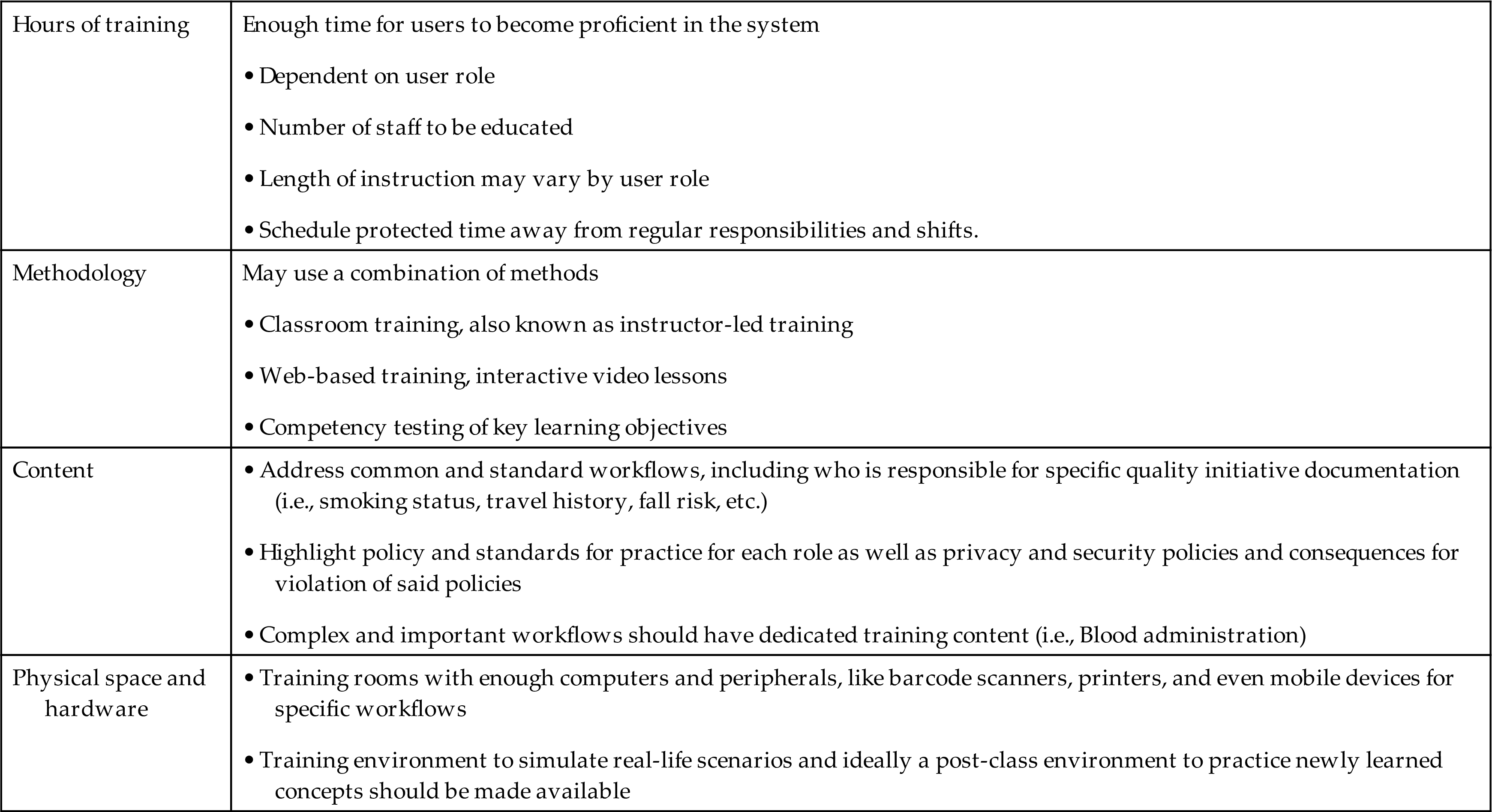
Training should be a requirement for any staff using the system, and policy and procedures should be developed for dealing with those who do not complete and/or pass the training. Considerations in planning training and education should include time for training, methodology of training, content, training rooms, and hardware needs (Table 20.5).
Table 20.5
Trainers and the Role of Superusers/Informaticists
Depending on the organization’s structure, the trainers might be in-house staff, vendor educators, temporary consultants, superusers, or a mix of these. In-house trainers are very familiar with the organization’s policies and procedures and usually have experience and background in adult education. Sometimes organizations may need to bring in temporary trainers to get all users trained and then revert to in-house educators or superusers following go-live for new hires, system upgrades, and remediation training. Vendor educators and consultants frequently know the application very well but are not familiar with the organization’s workflows and policies. Organizations may choose to leverage informatics professionals, such as nursing or provider informaticists, and use these informaticists as superusers. Superusers take additional training in addition to project team responsibilities and are typically present at go-live and can be assigned as “at-the-elbow” support with staff who are having difficulties during the first few days of implementation. They have been trained in advance on the basics as well as complex workflows introduced by the system. They can be valuable assets not just in training classes but also during the go-live and beyond. Typically, the role of the superusers does not end at go-live but will continue with future projects, and they may also be used as new staff is hired and needs training. Training is an ongoing process which will continue post the go-live phase for any EHR project.
End-User Training
Most organizations use a combination of training methods. Using a variety of methods allows your training team to reach a broader audience for many purposes all at once. A drawback to using a variety of approaches is the constant need to update all the training materials with the introduction of new functionalities or upgrades. No matter the approach, the use of competency tests to assess proficiency is recommended. Education should be conducted as close to the go-live date as possible to facilitate retention of the new knowledge and skills, with a goal of no more than 4 to 6 weeks pre-go-live. Additionally, after class a practice environment should be made available where users can perform competency exercises; this ensures they are able to practice what they’ve learned. A learning management system (LMS) can be used to track how much training has occurred and by whom prior to go-live.
Training Modalities
Online Education Materials
Online materials or video-based learning are used by some institutions to teach EHR basics before attending an instructor-led class, or they can be used for more complicated or niche workflows after an instructor-led class which might be too generic or broad for a specialized group. For example, a phlebotomist would learn the basics of how to collect a specimen and complete a lab order (something a nurse, phlebotomist, and a respiratory therapist would also need to learn—role-based learning). But a more niche subject like how to process the lab specimen within the lab system would be a good candidate for an online module only available to those who perform this task. Or vice versa, the more generic workflow could be a great on-line module made available to a broad group of people, and in-person learning would be more specific. Online education materials like “FYI,” “How Tos,” and “Tip Sheets” may also be used as mini-refreshers or primers for later upgrades.
In-Person Training
One of the most popular methods is an instructor-led class in a classroom that contains all the equipment needed to demonstrate essential functionalities, including printers, barcode scanners, identification bands, medication labels, etc. The advantages of instructor-led training include the ability for end-users to ask questions, quick clarification of complex concepts, and easy identification of users who may need additional help. The primary disadvantages are the expense and resources needed to have multiple instructor-led classes. In addition, the number of students per session is limited. If users must attend class during their off-duty time, organizations will have to consider paying overtime. Alternately, if user education is incorporated into the 40-hour workweek, replacement staff may be required.
Preparing for Go-Live
Preparing for go-live involves deciding on the go-live approach, developing the go-live plan and support schedule, and preparing the end-users.
Deciding on the Go-Live Approach
There are two approaches to a go-live: big bang or incremental (also called a phased or a staged approach). The big bang approach occurs when all applications or modules are implemented at once. The advantages of the big bang approach are that it is usually less expensive and implementation time is shorter, allowing staff to return to a new normal and see early improvements in the project metrics more quickly. The negatives associated with the big bang approach are the significant reductions in productivity seen immediately at go-live and for a short time afterwards due to users’ unfamiliarity with the new system and a large influx of requests to tweak the system (Box 20.2). With a phased go-live approach, both the old and new processes exist at the same time within the healthcare institution; the existence of both forces the clinician to use different workflows in patient units that have implemented the new system than in units that have not, potentially creating safety concerns. The incremental approach is usually selected when a facility has limited resources that cannot support a house-wide implementation or when the facility has a low tolerance for or ability to respond to institutional changes. Advantages of the incremental approach are that it allows time to make changes to the build or the workflows and does not decrease productivity house-wide while creating constant change for end-users. The disadvantages include the potential for errors due to multiple systems and the possibility that the project can be protracted and workflow disruptions will occur over a longer period, although on a smaller scale (Box 20.3).
Advantages and Disadvantages of the Big Bang Approach

Advantages and Disadvantages of the Incremental Approach

Go-Live Plan
A detailed go-live plan includes each planned activity as a line item assigned to a specific individual or team with a completion date and time for each task. The go-live plan should include critical tasks that are scheduled to be completed a few days to a few weeks before the go-live date. Some project managers may break down the immediate days before go-live to the number of hours before go-live, marking tasks that must precede other tasks. Some of these may include cross-checking the patient census between the new and old systems, build migration, and data abstracting. Often the timing of tasks discovered during the practice migration events are accounted for in this plan. Avoid a go-live date that falls on a weekend, a Monday or Friday, or close to a major holiday when vendor support personnel may be less available. Two exceptions to this guideline are the implementation of a new financial system, which must start at midnight on the first day of the month for billing purposes, and a big bang implementation, which is typically scheduled to start on a weekend to minimally affect surgery and procedural services. When a go-live date is determined, it should be communicated to the organization and end-users as soon as possible, especially within the last 2 to 3 months of the project.
Practicing Build Migration
In large-scale projects much of the development and testing is done in a test environment by many teams and people. Prior to the go-live it is wise to have a build migration practice event. These events give all persons from the project team a chance to move and migrate the build into a production-like environment. The purpose is to ensure all build is migrated appropriately, expose issues the teams may run into the night of go-live, and provide the project leadership timing of how long this portion of the go-live event will take. Often this means interfaces will need to be shut down and paper processes will need to be activated during the time it takes to migrate the new content or turn on the new system. For example, in a large-scale project like replacing a lab system, an admission order set (grouping of commonly placed orders on admission) would not be able to be migrated until all single lab orders are migrated first and exist in the target environment. For smaller projects like code upgrades or updates to an already existing system, the practicing of build migration may be scaled down; there could be content that can be moved into the live system “silently.” This means the content can be made available by “activating” a newer version active during the go-live; this may be an automated process, or it may require manual updates. This should also be practiced prior to the go-live date to ensure no hiccups occur during the “activation” of the silent build.
Data Abstraction
Data abstraction is “the process of entering or ‘populating’ the electronic chart with clinical data from the traditional paper record or other sources” (Kushinka, 2017). Abstraction provides practice for end-users in entering critical data needed for a smooth transition, such as scheduling known surgical cases or future appointments for patients to be seen in clinic during the first days or weeks of the go-live date. Lab results and prescribed medications may be added into the new EHR, including any standing and future orders for patients in the new EHR. For inpatient locations like hospital units, data abstracting may need to be done in the hours before the go-live. Many EHRs require height, weight, and allergies to be entered on a patient before placing orders via CPOE. Having these data points for currently admitted patients in the new system will expedite the ordering process for providers when managing orders in the hours after go-live.
Change Freeze/Moratoriums
“Also known as ‘Change Freezes,’ moratoriums are often used to protect the core business from breaking changes during low staff resourcing times (public holidays etc.), major data migrations, facilities upgrades/maintenance and other disruptive situations (like office relocations, external infrastructure changes etc.)” (“Change moratorium” vs. organisational needs, 2018). Moratoriums ensure no unexpected consequences occur while making large changes for end-users. Working within the institutions’ change management practices is critical. Placing the moratorium a week or two prior to data migration through the go-live date and even for a week or so after go-live ensures no other factors negatively affect the implementation and the go-live success. It’s imperative that project managers engage with change management entities of the institution, as there may need to be negotiations between project managers and change management groups to justify any and all changes during go-live.
Marketing and Communication
Ensure people know the date and time of when the switch will happen and what to expect. Change moratoriums should also be communicated and expectations managed for all institutional projects. If users won’t have access to electronic charting for 4 to 6 hours on the go-live date, it’s important for all affected users to know and understand how they will manage and care for their patients during this time. Plans for how to continue with business as usual are imperative. Will they be charting on paper during that time? What will they be expected to chart in the new system once the system is up? A highly publicized helpdesk number or web conference (Zoom, Teams) for assistance should also be included in the communication for users to know whom to call if help is needed. Use of posters or banners in main lobbies, atriums, and waiting rooms as well as electronic messaging on the institutions’ intranet and email distribution lists are common ways to advertise the go-live date.
Go-Live
This is the phase of the project when the system is made live and the older system is retired. This can extend to process or workflow; an old process is retired in favor of the newly developed process or workflow.
Command Center
Traditionally this is the physical space—a central location with adequate desk space, phones, computer screens, printers, wi-fi, and network access for the project team to be able to work during the go-live and the days or weeks after. Superusers, trainers, at-the-elbow (ATE) support, project teams, subject matter experts, analysts, vendor-supplied staff, contracted staff, and sometimes even stakeholders make up the personnel in the command center during the go-live activities. This is the project hub; it is typically staffed 24/7 for the first week or two after go-live. The purpose is to provide users and staff a central place to access project team members and knowledge experts as they get accustomed to the new system and workflows. The job of the command center staff is to gather, troubleshoot, and fix issues as they arise. Typically, during the go-live, many requests will be documented, and the project team will take the list and review with the organizational leaders each day to determine if a change will be required immediately or if the change can wait after the go-live phase. The command center may host daily or twice-daily meetings to review issues, fixes, and workarounds and provide quick tips/training if needed to all users and staff. A 100% virtual command center is possible. With the pressures of the 2020 worldwide pandemic, it became evident some institutions would need to proceed with implementation of projects without the ability to meet and support their staff in person in the traditional way. Innovation and technology made this possible. Valley Children’s Hospital continued with their go-live activities via virtual support rooms, webinars, and one-on-one virtual sessions (Leventhal, 2020). The company ReMedi Health Solutions devised a successful virtual command center model for supporting clients and providing ATE support to staff via tablets, webcams, calls through Microsoft Teams, and remote screen access (Remedi Health Solutions, 2020). A hybrid approach would entail staffing a command center in person at a specific central location with minimal key staff (project manager, key stakeholders, superusers, and ATE support) who have a direct line to staff working remotely. The staff who is remote would need to be able to gain full access to the command center and end-users to timely work through any issues; this can easily be done via video conferencing tools like Teams and Zoom. Good candidates of roles to work remotely are IT analysts and vendor support who easily have access to remote tools.
At-the-Elbow (ATE) support
During the initial weeks of the go-live, organizations must plan to provide close support (“elbow-to-elbow” support) for end-users. Many institutions will provide 24/7 support for a week or two. Issues, questions, and misunderstandings should be reported to the project team, which then catalogs, prioritizes, and tracks them for resolution and future reference. This is a group of superusers, trainers, or even consultants who are familiar with the organization’s workflows and software. They are key for an EHR implementation’s success. They can resolve questions and frustrating issues quickly, which in turn allows your clinical staff to return to their other duties. They are typically roaming in clinical areas, or they can be available to staff via phone call to guide them through the more intricate workflows or the items forgotten since training. This group should be engaged early; they should be trained on the new system, and they should be supported during the go-live. They should have a direct line of communication with the command center or project team in case they do need to clarify a workflow or system issue (Jaimes, 2017).
Issue Tracking
A system for reporting, cataloging, assigning critical issues, and assigning skilled resources to identify issues and problems is critical to the success of the go-live phase. It is important to have a way to track what issues users are reporting. Most institutions have a helpdesk system for tracking the reporting of problems and issue resolution. Leverage the use of the tools already in place. You should be able to at minimum review the issue and what the resolution was (fix to system or training). It is important to report known issues and unresolved problems to project team leadership, stakeholders, and superusers. Immediate changes may be necessary if fixes are required; a mechanism for approving and updating build is needed. In addition, sending staff updated information via tip sheets of these fixes and changes is imperative. Emails with tip sheets should be distributed in a timely manner and discussed in debriefing meetings. If the resolution is deemed to be an enhancement, care needs to be taken to determine if the problem is due to an intentional change made by the new system or if the system is lacking in functionality. These “unresolved” issues should be reported, prioritized, and included in the future maintenance phase of the project.
Post-Go-Live and System Maintenance
Post-Go-Live Maintenance
Maintenance is an ongoing process that involves a variety of tasks such as code updates, patches for identified defects, and a continuous revision of the system in response to users’ requests, as well as new regulatory requirements and initiatives. The maintenance phase is an iterative process and will be ongoing. As a retrospective study reviewing changes made over a 6-year period of the Kaiser Permanente Institution points out, significant resources, expertise, and interdisciplinary collaboration are key. Over this time frame the number of changes tracked was significant and affected many users within the organization (Liu, 2019).
Change Control and Enhancements
Governance established during the build phase of the project should continue to oversee changes and be involved in changes to the system post-go-live. Users’ requests captured during the go-live and the days post-go-live plus any items cut from scope should be considered as part of future enhancements. Engage users and their ideas for system improvement. Informatics staff often round and engage with end-users to learn what needs improvement in the system. Continue to leverage end-users’ experience to improve the EHR usability. Review the success criteria set out during the planning phase; review reports and data after the stabilization phase of the project to measure success. Define opportunities for improvement and include these in future projects or in future system enhancements.
Future Directions
Impact of COVID-19
The role of the CIO expanded greatly during the COVID-19 pandemic to include a rapid pivot to remote work, increased virtual care, and public health data management. A recent review of “10 Emerging Trends in Health IT for 2020” in Becker’s Hospital Review suggests that the CIO’s role will also include more operational and strategy components as the modern digital workforce continues to grow. IT teams serving with CIOs also have changed significantly in recent years to include more diverse members, including clinicians, data scientists, and cybersecurity professionals.
Integration Challenges
Voice Assistants
Health care systems had to react to the global pandemic of 2020, and many did by expanding telehealth functionality and integrating it with EHRs. The use of voice assistants (Google Assistant, Apple, Siri, and Amazon Alexa) tools could help improve healthcare by allowing users to dictate notes, manage and place orders, and assist providers in navigating the EHR hands-free (Sezgin et al., 2020). EHRs of the future will need to be able to meet the demand of ever-changing popular technologies like voice assistants to provide efficiencies to end-users while keeping patients’ data safe and secure.
Standardized Application Programming Interfaces and Cybersecurity
The 2015 Edition Cures Update also introduced new technical certification criteria necessary for implementation of the 21st Century Cures Act. The goal is to advance interoperability between certified health IT systems and promote easy access to personal EHI. The technical criteria focus on the ability to export EHI to support patient access and requires the use of HL7 FHIR Release 4 Standard. In addition to these changes that promote a patient’s access to their EHI, there were two cybersecurity criterion as well. These cybersecurity criteria focused on encryption and multi-factor authentication.
Conclusion and Future Directions
As of this writing, the number of Ransomware attacks targeting health systems has been increasing due to the recognized value of information stored in the EHRs. Health information systems will need upfront planning around keeping health information both secure from malicious actors but also broadly available to health care providers and patients to make the most informed decisions possible.
Acknowledgment
The authors wish to acknowledge the contribution of Christine D. Meyer to the previous edition of this chapter.
Discussion Questions
- 1. Discuss the reasons why some institutions experience significantly more satisfaction or dissatisfaction during an implementation than do others.
- 2. What are some of the approaches that can be used to coordinate care during an incremental go-live as patients are transferred from units that have gone live to units still waiting to go live?
- 3. When developing new workflow processes using a systems approach, the work of patient care or specific tasks often shift from one department to another. While the new workflows can make the care provided to patients more efficient and effective for the institution as a whole, certain departments may experience more rather than less work. What are some approaches that can help users accept the new workflow?
- 4. Should insurers offer incentives to patients to select healthcare providers who are using EHRs to engage patients in managing their own care?
- 5. What are the advantages and disadvantages of a Healthcare Information Technology Standards Panel (HITSP)-certified health IT system versus a homegrown IT system that meets certification standards?
- 6. Should employees who have repeatedly failed to attend go-live classes be subjected to disciplinary measures?
- 7. Identify creative strategies to encourage physicians and other clinicians to participate in the implementation of a new health IT system.
- 8. Discuss ramifications and causes regarding interoperability issues among electronic health systems and applications.
- 9. Discuss the advantages and disadvantages of “information un-blocking” of clinical notes from both the patient and provider perspective. What would be important training considerations for physicians since the Cures Act Final Rule implementation?
Case Study
You are a clinical informaticist and have been asked to work with your hospital to implement the clinical notes transparency element of the ONC Cures Act Final Rule. All clinical notes (as qualified under USCDI) written by attending providers for inpatients will be shared with the patient at discharge. This feature will be implemented in 2 months, and your team will be collaborating with the IT staff for patient portal modifications, HIM group, nursing informatics, risk management, provider leadership, and project managers to make this EHI available to patients.
Discussion Questions
- 1. How will you prepare adult, adolescent, and pediatric patients to understand and access the information newly available through their patient portal?
- 2. Develop a training plan for staff/providers taking into account the anticipated low acceptance rate of the new regulatory requirements.
- 3. How are you going to modify the patient-facing components of the EHR portal to ensure that patients maintain access to their information but are able to maintain a relationship with the providers?