Communicating at the Point of Care
Application of eHealth Information Technology
At the end of the chapter, the reader will be able to:
1 Identify types of wireless technologies of use in decentralized “point of care” nursing.
2 Discuss the advantages and disadvantages of various assistive technologies for continual communication.
3 Describe advantages to staff nurses for using clinical decision support systems software, especially with regard to potential to increase communication in health care.
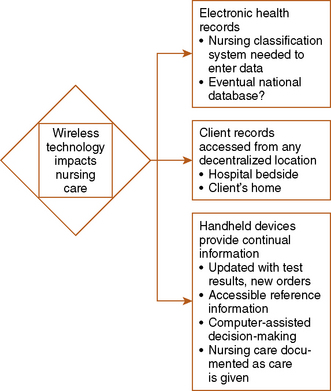
Three major transformations are occurring in use of Health Information Technology [HIT] that will greatly change traditional patterns of nursing communication:
• Electronic health record (EHR) and accompanying ordering and taxonomy (discussed in Chapter 25)
• Decentralized access to client information at the point of care
• Handheld wireless devices allowing continual real-time exchange of information
According to Dr. David Blumenthal, National coordinator for HIT in the United States, no healthcare provider can practice effectively without use of eHealth technology (2009). Nurses are expected to be competent in HIT use and keep abreast as innovations are introduced to help us meet professional standards (Fetter, 2009). Broad use of HIT can improve our communication, the quality and safety of our care, and our efficiency. At the same time, HIT can decrease costs of health care in the long term.
This chapter focuses on using electronic HIT to enhance communication between nurse and client or between nurse and other professional health care providers. Communication is the cornerstone for teamwork, safety, and support. New emerging technologies facilitate our communication. Portable electronic devices with Internet access small enough to be easily carried are referred to in this textbook as “handheld” devices. Decentralized access to information and ability to document at your client’s location are referred to as “point of care” capability. You can use your handheld device to access nursing information databases or to document care while at your client’s bedside and in his or her home. Content in this chapter also covers other HIT tools such as computerized clinical decision support programs (CDS), secure messaging, telehealth, remote monitoring, Internet client education and support, and Internet professional education. Discussion of these emerging technologies is limited to a focus on their relation to communication.
Basic concepts
Decentralized access technology for communication at the point of care
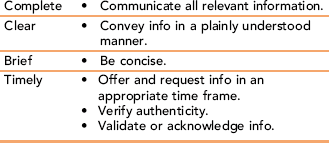
Available electronic technology is revolutionizing our nursing care communication (Figure 26-1). In addition to the EHR discussed in Chapter 25, new handheld devices with Internet capability allow nurses decentralized access to client records. Nursing practice now incorporates Point of Care Information and Documentation, allowing continual use of updated client information and reference material at any client location via the Internet. Communication in a timely manner is one of four standards of effective communication (Table 26-1). Communication in “real time” is the new hallmark of bedside nursing in the age of new technology. With fiscal cutbacks, fewer nurses per client, and increased acuity of client situations, use of technology can enhance our critical thinking, clinical decision making, and delivery of safe, efficient care (Carter & Rukholm, 2008; HIT, http://healthit.hhs.gov/portal/server.pt, accessed 1/2/10).
TABLE 26-1
TeamSTEPPS: Standards of Effective Communication
Online: www.ahrq.gov/teamsteppstools/instructor/fundamentals/module6/
Development of technology is advancing hundreds of times faster than at any previous time in history. This chapter describes a few of the current choices. The goal is to improve health care outcomes and in the long range to decrease the cost of health care. Governmental agencies in many countries have been funding use of eHealth technology and giving incentives to providers. Government programs mandate use of aspects of HIT. For example, in the United States, the Medicare Modernization Act [MMA] requires that e-prescribing be done for Part D–covered clients. EHRs must be in use before 2014. Statutes address the delivery of information to the point of care to enable more informed decisions about appropriate, more cost-effective medications. Active electronic participation by clients is seen as a way to alleviate demands on staff. Among others, the American Academy of Family Physicians supports the concept of a “medical home” embodying active client participation via e-mail, client use of Internet portals, and remote monitoring.
Wireless devices in health care: access to information at the point of care
Unlike other industries such as banking, health care was slow to adopt new technology. But now that wireless handheld devices with Internet access are commonly used, the transition to HIT is making rapid progress. Box 26-1 presents a summary of advantages and disadvantages for use of wireless technology by nurses. As a new generation of wireless technology comes into common use, nurses have continual access
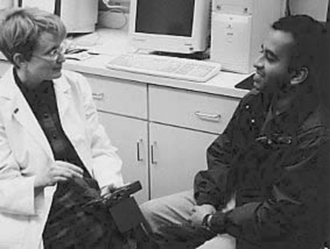
Personal digital assistants (PDAs) are handheld electronic devices that may contain multiple databases, possibly including a language translator for use when interviewing a patient from another culture. With these devices, data can be entered at the point of care, whether it is in a clinic or a patient’s home, then transmitted wirelessly to a central agency computer or printer. (Photo courtesy Adam Boggs.)
to client records. HIT will transform our nursing care, enhancing our ability to give quality care, reduce risk for making errors, and improve our communication competency.
Personal Digital Assistant: Personal digital assistant (PDA) is a generic term for any of several brands of small, handheld computerized electronic devices that fit in the palm of the nurse’s hand. First introduced in the mid-1990s as the U.S. Robotics Pilot (Palm Pilot), PDAs organize and retrieve information. PDAs store assessment and diagnostic tools, best practice guidelines, and references for nursing and drug information. They reduce paperwork and help the nurse save time tracking client information, leaving more time to focus on client care (Stroud, Smith, & Erkel, 2009). PDA applications can check for drug interactions, calculate dosages, analyze laboratory results, schedule procedures, order prescriptions, serve as a dictionary, or provide language translation, among other functions. It is easy to upload reference sources, such as the latest medication information or disease treatment protocols, making them akin to a portable medical and nursing library. PDAs can be taken to wherever the client is located.
PDA operating systems incorporate various types of handwriting recognition, allowing the user to tap, draw, or write on the screen using a stylus. The great advantage of PDAs over laptop computers is they are small, lightweight, and easy to carry. Because they are wireless, they can be used in the client’s hospital room, in an outpatient clinic, or in the community—even in the client’s home. Most PDAs can send stored information to another PDA, to the agency computer, or directly to a printer.
PDAs are used to record client data. You can enter your client’s history, your assessment of this client, compile a problem list, update data, and write nursing notes. Your wireless handheld device can also be used to track information such as client’s medications and dosages or laboratory test results in a flow sheet format. In the community, PDAs with Internet capability can be used to access client records. For example, a nurse practitioner using a PDA can call up a client’s previous prescriptions, renew them at a touch, record this new information in the agency mainframe computer, correctly calculate the dosage of a new medication, write the order, and send this prescription to the client’s pharmacy instantly—all without writing anything on paper.
Nursing programs and agencies worldwide are beginning to require use of portable devices such as PDAs. For example, a survey of emergency department nurses in Australia showed they find PDAs a useful tool in their practice (Gururajan, 2004). Some study findings indicate that providers using PDAs make more accurate judgments and write more complete reports than do control groups without access to a PDA (Skeate, Wahi, Jessurum, & Connelly, 2007).
A number of brands of hardware are available to run operating systems like Palm OS or Windows CE Pocket PC. Downloadable health care information programs are available, as well as programs that support the documentation of client care data. Limited battery life and incompatibility of software uploadable programs are limitations that need to be considered before adoption.
Cellular (Mobile) Telephones or Pagers: Some staff nurses use tools of convenience such as cell phones or pagers in their daily work. Ordinary cell phones can be used to locate clinicians, or verify and clarify information. Some hospitals are issuing mobile phones to staff nurses to use at work so they can directly contact physicians or other hospital departments from the client’s bedside, give condition updates, or obtain verbal orders. The major cost is not the actual phone device but the monthly service provider cost. Nurses working in the community use cellular phones to contact clients on the way to give home care. Phones provide easy access from the field back to the agency, to the client’s primary physician, and to other resources.
In the United Kingdom, nurses making home visits use mobile phones to improve communication with agencies and community services and to transmit client data (Blake, 2008a, b). Some community nurses prefer pagers, which notify them of telephone messages so they can return calls. Cellular phones equipped with cameras and picture transmission capabilities have potential for long distance diagnosis, a “snapshot” version of telemedicine/telehealth interactive video and vocal transmissions.
Smartphones: Smartphones represent the convergence of cellular mobile phones and mobile computers. These devices, such as the Blackberry Storm, have three functions: They enable you to download and access PDA-type information resources, provide Internet access to client information (new laboratory results or physician orders), and make and receive telephone calls or instant messages. Some downloaded applications provide “alerts” by beeping when there are new orders or newly available test results. In addition to housing downloaded reference programs such as those described for the PDA, smartphones with large enough memory may even house computer-assisted decision support systems. Downloadable programs such as Epocrates, a free drug information program, not only provide drug information, but when you type in client information such as age, weight, and diagnosis, they provide you with guidelines for correct dosage, contraindications, and side effects. New information “alerts” are sent to your device in a timely manner. National guidelines for best practice can also be downloaded. Smartphones are now outselling PDAs by a wide margin. Busis (2010) suggests a barcode reader as an add-on application for a smartphone.
Phones may also increase direct access to health care for the client. Companies such as TelaDoc, provide access to a physician’s advice or treatment by telephone to its members for a nominal annual fee.
Laptop Computers: Laptop computers are more powerful than PDAs, yet are still small and portable enough to be taken into the client’s home. They are used to chart and transmit your client’s care. If a laptop with a networking card is near a wireless Internet transmitter, information can be sent in a wireless fashion. Another option is to use a telephone to transmit your nursing documentation.
Computerized clinical decision support systems
A most important asset of HIT adoption is the provision of computerized clinical decision support systems, which the authors refer to as CDS. A CDS is defined as an electronic information technology–based system designed to improve clinical decision making to enhance client care and safety. More sophisticated CDS systems give interactive advice, after comparing entries of your client data with a computerized knowledge base. The information offered to you is personalized to your client’s condition (filtered) and is offered at appropriate times in your workday. Multiple research studies indicate that integrated decision support systems offer timely information, improve provider performance, and result in better outcomes for clients (Poissant, Taylor, Huang, & Tamblyn, 2010). Computerized physician order entry systems have been heavily promoted as assets in prescribing medications because they reduce the incidence of adverse outcomes. In addition to helping you provide safer care, outcomes include reduced costs, increased adoption of best-practice care, and improved treatment responses (Bertsche, 2009).
Since the Institute of Medicine and the Canadian Institutes of Health Research began advocating CDS programs or supporting research into CDS effect on client care, suggested types of data in the CDS system have come to include:
• Diagnosis and care information displays with care management priorities listed
• A method for communication, that is, for order entry and for entering client data (system offers prompts so you enter complete data; offers “smart” or model forms)
• Automatic checks for drug-drug, drug-allergy, and drug-formulary interactions
• Ability to send reminders to clients according to their stated preference
• Medication reconciliations and client summary of care at transitions of client care
• Ability to send you electronic “alerts” or prompts if problem occurs or you haven’t acknowledged receipt of information, such as client’s laboratory test results
The hardware can be a computer terminal on your hospital unit or wireless handheld device, such as a PDA or smartphone. A software database can be information residing in the agency server, or a central repository such as a disease registry or government database (Berner, 2009).
For the nurse, CDS software generates specific information for your client care including assessment guidelines and forms, analyses of their laboratory test results, and use of best practice protocols to make specific recommendations for safe care (Hayes & Wilczynski, 2010). Ideally, this is integrated into the EHR system you are using. Based on input about the current condition of your client (coded data), the system is programmed to provide you with appropriate reminders. For example, after you complete care for your first assigned client, specific information is presented to you if you have not yet documented a needed intervention. This assists you in preventing treatment errors or omissions and helps improve your documentation. Blaser and colleagues (2007) demonstrated that their computerized decision support system based on clinical pathways could also speed up the time to intervention. More timely interventions should lead to fewer client complications.
CDS technology is slowly being adopted. Early systems were “stand-alone”; but technology is rapidly advancing, leading to more user-friendly, integrated systems that provide timely, relevant content. Because the system stores your information about your activity, you can obtain reports about your overall compliance with standards of care or provide data for research. More studies on CDS effects on client health outcomes and client provider communication are needed. Current research results show better client outcomes and more accurate, complete documentation (Eslami, Abu-Hanna, de Jonge, & de Keizer, 2009; Gerard et al., 2008). Key CDS issues are speed and ease of access.
Searchable references for nursing information
Nurses have the opportunity to search databases when they need information, using computers or smartphones. There are many free, downloadable guides to care. One example is “The Guide to Clinical Preventive Services,” which has care recommendations. You can search by age, sex, and risk factors (U.S. Preventive Services Task Force: www.epss.ahrq.gov). Many regional nurse associations have or soon will have such databases. Most hospitals and larger agencies have resident experts such as medical librarians or clinical nurse specialists to help staff nurses access information about evidenced-based care guidelines.
Remote client health monitoring
Rapid upgrades in electronic applications are changing the way we deal with our clients. A few examples are described here.
“Smart room” technology
“Telecare” programs have been implemented that communicate client vital signs, monitor whether nurses wash hands, or signal you if a client falls and does not get up via sensors embedded in the hospital room or client’s house. Families in America and England are using such sensors placed throughout the client’s home to monitor for potential problems such as stove burners left on, doors left open, a too cold house, or a client crisis, such as an epileptic seizure. In the literature, this is referred to as “Smart Rooms” a form of automated medical technology.
Remote monitoring
Wireless technology extends decision support into the client’s home. Use allows for self-monitoring, reduces time client spends in physician offices, reduces demands on staff time, and promotes efficient monitoring of your client’s status (Blake, 2008a,b). A variety of monitors worn by clients can periodically transmit data directly to a primary provider or nurse in a health agency via ground telephone lines or even using wireless technology (Yao, Schmitz, & Warren, 2005). Such devices include 24-hour heart monitors, pacemakers, uterine contraction monitors, and respiratory function peak flow readings, among others. Nurses are assuming increased responsibilities for interpretation of these data and for instituting interventions.
Electronic communication
According to the American Medical Association (AMA, 2004), e-mail can be a convenient, inexpensive method of communicating follow-up instructions, test results, and educational information to the client in his or her home. Almost all clients express a desire to communicate with their health care providers via e-mail, but only a small percentage of physicians actually use e-mail for scheduling appointments, providing prescription refills, and other routine tasks. Physicians express concern about lack of income generation, confidentiality, malpractice, and the belief that it would be too time-consuming (Gerstle & AAP Task Force on Medical Informatics, 2004). Yet, studies show e-mail access to physicians improves communication, is desirable, decreases phone calls, may improve health outcomes, and does not impede client satisfaction (Goldman, 2005; Stalberg et al., 2008). Nurses also use e-mail as a way to communicate with clients, for example, in tracking the response of clients who are on new medication, instead of waiting until their next office appointment. AMA guidelines (2004) suggest that electronic or paper copies be made of e-mail messages sent to clients.
Secure messaging
Text instant messaging (IM) is commonly used in daily life, but IM can also be used to improve communications between clients and providers as a part of eHealth. IM can be used by clients to communicate self-monitored information to their care provider. The provider can also text message reminders to the client. Nurses provide personalized IM to clients as one intervention in preventive or chronic care, such as weight management, smoking cessation, or drug rehabilitation. IMs are also used as interventions with clients managing their cancer, asthma, diabetes, or other chronic diseases (Blake, 2008a,b).
Electronic referrals and consultations
With computerization and Internet, making eReferrals is easy. The Internet provides a common platform among agencies, even those that do not have integrated systems. Technology offers great potential for nurses, nurse-practitioners, and physician assistants, especially those who comprise a significant portion of the rural health care labor force. Rural populations comprise 20% in the United States, and tend to be poorer and medically underserved. Use of HIT discussed in this chapter can increase resources available to rural providers (Effken & Abbott, 2009). This form of communication needs guaranteed privacy protection and reimbursement provisions for the professionals for time spent to become successful (Bodenheimer, 2008).
Telehealth
Telehealth is also called telemedicine, or occasionally, telenursing (eHealth in England). Telehealth is a broader term encompassing any use of the Internet for health purposes. Telecommunication technology is used for exchanging information across geographic distances with professional health care providers. It can be used to diagnose and treat illness, provide preventive health care, or provide medical consultation. It initially was used to provide care to clients in rural areas but is now also used in urban areas. The goal is to increase care to the underserved, while eliminating long trips to providers, especially to emergency departments. Many studies show use of this technology reduces hospitalizations, emergency department visits, and health care costs (Dansky, Vasey, & Bowles, 2008; McConnochie, Wood, Harendeen, Noyes, & Roghman, 2009).
Telehealth provides live, real-time audio and visual transmissions from one care provider to another or to a client. This technology is hailed as a boon to rural practitioners, facilitating long-distance consultations by expert specialists. Telehealth nursing communicates monitoring data to the nurse from the client (Prinz, 2008). There is some evidence that communication devices can improve client health outcomes, but more research is needed. It requires expensive hardware equipment at both ends of the transmission, as well as the infrastructure to support its use, but has the potential to reduce the cost of conventional health services (Wang, 2009). Privacy and information secuirty are concerns expressed by potential users (George, Hamilton, & Baker, 2009).
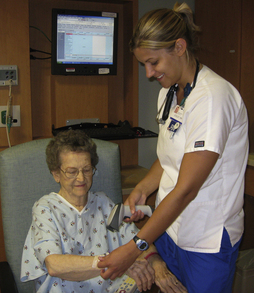
Client health education and support
People are willing to access the Internet for self-education to meet their health care needs. The Pew Internet and American Life Project (2005) found that about 80% of Internet users search for health information, especially on specific medical problems, wellness information, or treatment procedures. Many Web sites provide consumer health information. There is strong potential for improved health learning associated with interactive computer teaching programs.
Lifestyle management
Not only do these educational programs increase client knowledge about their disease and their role in health promotion and disease management, but computers have been shown to positively impact client outcomes. Support and reminders about health self-management have already been described. Many Web sites provide interactive management. Others provide access to client support groups, such as the National Institute of Health. Nurses frequently recommend Internet sites to clients.
Agency for Healthcare Research and Quality’s analysis of 146 studies of the impact of computer health modules on client outcomes found that these programs succeeded in engaging client attention, but more significantly they improved client clinical health (AHRQ, a). Just as studies have documented positive health outcomes after telephone support from nurses, contact with providers using interactive computer programs for Client Health Education using Webcam technology real-time (synchronous) communication between nurse and client can deliver health maintenance information, provide answers to illness-related questions, and lead to positive health outcomes.
Provider and client communication
Web portals for client education
Many health care systems use portals to allow their clients access to communicate both with physicians and nurses. Most major pharmaceutical companies have portals that provide consumer and health care provider access to drug information.
Alerts
Using the Internet, you can send electronic “alerts” to your clients who need medication renewals, screening examinations or other health services. A 2009 Kaiser Permanente study showed a marked decrease in primary care office visits after implementation of an electronic system with intensive provider-client communication via a secure Web site. They cite a separate Kaiser survey showing that 85% of users reported that being able to communicate electronically with their physicians improved their ability to manage their own health (Kaiser, 2004). A personalized Web site can be used by an agency for far broader functions than providing business hours or travel directions. In an American Hospital Association study report, O’Dell (2005) says that nearly all health care organizations now have their own Web sites. Such sites can include health assessment tools and allow clients to schedule appointments. Another primary function is to provide health information. Web sites can have hyperlinks embedded that clients can use to access general information about their condition, medications, or treatment. They can also contain an e-mail link so that clients can directly contact the nurse responsible for patient education.
Group communication as support
Computers are used to mediate support groups for families and clients with various health problems. These formal Internet groups provide information, but they also importantly have been shown to provide improved social support for the ill client. Rains and Young’s 2009 analysis of 28 research studies showed Internet group participants report less depression, increases in quality of life, as well as improved ability to manage their disease condition. Technologies associated with providing support include e-mail, instant (text) messaging, chat rooms, and discussion forums. The chat rooms are usually synchronous, in real time, providing immediate feedback. Usually discussion forums are asynchronous with time delays between postings and responses, allowing for more reflection before posting. Communication with group members over the Internet has been shown to be associated with lower levels of reported stress, especially in older adults. More studies are needed before we can specify the needed frequency, duration, or quality of content for optimal client support.
Professional education
In addition to the portals used by clients, most professional organizations and government agencies offer free access to health care information dealing with protocols, standards of practice, and medication information. The American Nurses Association provides a popular, useful resource (www.nursingworld.org).
Applications
In 2004, the U.S. National Coordinator for HIT set several goals, including the need to use new technology to improve health by facilitating quality of care monitoring and quickly disseminating research findings into practice. Competency in HIT use has broadly been cited by national nursing and policy organizations as an essential of basic nursing practice (Fetter, 2009). In addition to employers, regulatory agencies, professional agencies, and academic agencies, individual nurses themselves are responsible for attaining competency (ANA: role competency statement issued 3/12/09; accessed 1/11/10).
Point of care
Wireless entry of data at the point of care can increase your access to and use of evidence-based resources in your practice. If smartphones are used for personal business, as well as in work situations, separate e-mail/messaging accounts would be needed. Study results suggest that after an initial learning period, you will save time spent documenting care. Handheld devices at point of care provide timely access to client information, are convenient, and are cost-effective in the long run. Their prompts should help you provide safer, more comprehensive care.
Wireless handheld computer use
Electronic Mail: Guidelines are available for physician use of e-mail to communicate with clients (AMA, 2004); these guidelines are also appropriate for nurses. No one knows how many nurses are accustomed to using wireless technology devices in their care of clients. Guidelines for their use in giving client care still need to be developed.
Personal Digital Assistants and Smartphones: Although just about every nursing student has seen or used a wireless or cellular telephone, not everyone has used them as an aid to giving client care. These devices can save time, decrease errors, and simplify information retrieval at the point of care. Nursing is just beginning to deal with guidelines. Ethically, you do not send personal, non-professional messages.
Electronic Messaging: Electronic provider-client IM can be used to communicate simple data. This may promote better quality care and improved client utilization. Multiple articles in the literature describe the efficacy of using personalized IM for helping clients manage their conditions. In one example, your hypertensive client taking a new medication could text message his blood pressures to you today after self-monitoring, or your diabetic client could send today’s glucose results after testing his or her blood sugar. Potentially, this could lead to better control, as in Harris et al.’s 2009 study in which clients who sent electronic messages to providers had better glycemic control. In addition, you can use IM to send personalized reminders to your client to schedule an appointment or take a medication.
Clinical decision support systems
CDS systems were introduced in the 1970s but have not yet matured into widespread use. Various CDS systems include knowledge management, triage systems, assessment forms, prescribing systems, or systems for test ordering and analysis. Multiple studies show that CDS provision of information based on evidence-based best practice improves quality of care (Damiani et al., 2010). This is most likely to occur when the CDS system is integrated into existing EHR systems and automatically provides care recommendations. The “active” or automatic provision of suggestions or prompts to the nurse to support his or her decisions is more effective than “passive” systems, which wait for the user to request data. Access to CDS programs by staff nurses is improving but still limited in most countries, including the NHS agencies in England surveyed by Mitchell and colleagues (2009).
For staff nurses, suggestions about care are offered as “pop-ups” or “alerts” when you access the client’s record. For example, when you access a medication order on your client’s EHR, you can use the CDS system to verify the five rights before administering the drug (Table 26-2). This reveals whether there would be any possible harmful interactions with other medications your client is already taking. CDS “reminders” integrated with your work flow gives you suggestions about interventions that are based on researched best practice. Perhaps the CDS offers you a suggested alternative to the intervention you plan. In another example, nurses working with pediatric cancer clients have long used calculators to determine correct fractional dosage based on the child’s weight. Now instead, they can use this automated support system because it automatically predetermines the correct doses.
TABLE 26-2
Five Rights of Medication Administration as Communicated by Clinical Decision Support
| 1 | Right information | • Use of this medication is evidence based, pertinent, and suitable for my client’s current condition or circumstance, as well as cost-effective. |
| 2 | Right person | • Was ordered by the appropriate provider. (Nurse will verify right client via coded ID bracelet on client, preferably with his or her picture attached; CDS matches this with bar code on the medication container.) |
| 3 | Right format | • CDS does automatic check for contraindications, allergies, etc. Matches drug with laboratory data. Checks correct dose/amount, correct form for ordered route (oral, injection, rectal suppository, etc.), and verifies that there are no harmful interactions with other drugs client is receiving. |
| 4 | Right channel | • Communicated to all via electronic health record disseminated through computer terminal, laptop, or handheld wireless device. |
| 5 | At the Right time | • Order and drug received by nurse at the right time in her work flow; before administration, nurse is prompted to assess any needed information, such as the client’s blood glucose level. (Nurse will document as administered at the approximate time specified in the order.) |
Barriers
Current handheld devices and CDS software programs are somewhat cumbersome to use. It may take too much time to input the data the program needs to make recommendations to you. Another problem is that the CSD system might send you clinically irrelevant information or it might send you so many alerts that you ignore them. Studies suggest that customizing alerts to your client assignment is more effective (Tamblyn et al., 2008). A number of studies show positive results, especially in areas of drug-dosing alerts or reminders about preventive care. More studies are needed to examine effects of CDSs on communication, but data suggest a positive effect. In a Canadian study, nurses used PDAs to access the Registered Nurses Association of Ontario best-practice guidelines specific to their assigned clients’ outcome assessments. Overall study results indicated communication was improved and nurses were more likely to receive information in a timely manner when their client’s condition changed (Doran & Mylopoulos, 2008). Interestingly, the majority of participating nurses had not accessed the best practice resource in the month before the Doran study when they began using PDAs.
Cost and usability are the main issues in adopting CDS technology. Of course, a nurse needs the hardware, as well as easy access to the CDS software program. Access needs to be user friendly, integrated into your work flow, relevant to your care, and provide information quickly at times that really fit into your existing work flow. Some current CDS systems are cumbersome to use, provide information that is irrelevant or in too much detail to be visualized on small handheld device screens. If your CDS requires separate access from your client EHRs, provides details you did not seek or want, or repeatedly sends you alerts that are not useful, you would probably not find it helpful. On the other hand, if CDS use improves your work environment and client care, you would probably support its use. Bakken and colleagues (2008) suggest that effective use begins when this technology is integrated into the student learning experience.
Internet use
We are just beginning to realize the positive impact that Internet use can have on client health.
Cyber health care for health promotion
There is considerable evidence about the efficacy of providing health care education and information online. The Internet can be used to remind clients of appointments, replacing telephone calls. Limited areas of the client’s EHR can be accessed for information. Clients could sign on and obtain results of laboratory tests. One advantage is that this information would be available at all times, rather than just during office hours. Appointments can be made and reminders given via the Internet.
Cyber education for client disease management
Disease self-management using computers will greatly change the way nurses deliver health education. Health information about preventive health or about controlling their chronic disease conditions can be provided to clients effectively, quickly, and inexpensively via the Internet. Van der Meer and colleagues (2009) studied outcomes of an Internet-based education program for asthma self-management and found that the Internet group had better quality-of-life scores and, more importantly, maintained better asthma control than did the traditional care group. Consider other conditions that might have similar outcomes.
Client education programs via the Internet are so popular that entire companies have sprung up to provide for this need. Commercial companies produce many software packages that nurses could use to supplement their own teaching. Client learning would need to be evaluated. Outcome studies show some clients learn more from computer-based programs than from traditional teaching. One example is the HIV/AIDS program described by Marsch and Bickel (2004). PDAs can be used to play videos to educate clients about their health care. In Brock and Smith’s 2007 study, clients reported PDAs were an appropriate medium for learning, regardless of their literacy skills. They demonstrated increased knowledge after watching. One problem for clients accessing health information using general Web search engines is that not all online information is accurate or easy for the user to verify. Refer to Chapter 16 for in-depth discussion of health education.
Cyber support for clients
Caregivers or clients with chronic conditions can use Internet support groups, chat rooms, or direct communication with care providers to gain support. Also, nurses can gain insight and better understand the “lived experiences” of their clients by participating in these Internet opportunities. Clients are accustomed to accessing support from friends when they use Facebook, Twitter, and so on. Because support via telephone has been shown to be a cost-effective method for improving functioning and quality of life for diabetic clients, the same effects need to be documented for cyber support. For example, use of cyber support opportunities has been shown to empower asthma caregivers (Sullivan, 2008). Client use of CDS programs that provide information about treatment options and the benefits and risks for each option can help them clarify their choice and can improve nurse-client communication (O’Connor et al., 2009).
Cautions or barriers to application of new technologies
The transition to use of eHealth technology in nursing implies a learning curve. Some providers cite problems such as the time involved in use, equipment design limitations, access issues, and fears about losing handheld devices. Australian and Swedish studies suggest that administrators need to educate and support nurses while addressing the impact of computerization on nursing work flow (Dahm & Wadensten, 2008; Eley et al., 2008).
Outcomes
Is the cost involved in adopting new technology worth it? Measurable effects such as work efficiency and effects on client health need to be carefully evaluated to determine the effectiveness of use of these new communication technologies.
Illiteracy
Illiteracy could be a barrier to consumer use. For example, in some developed countries, one-fifth of the population may be reading below fifth-grade level. Although the number of citizens who have no access to the Internet is shrinking, there are those who have yet to learn use. Experts suggest that availability of technology will have a significant, widespread, positive impact on citizen health in Third World countries. In all cases, our communication needs to be tailored to the needs and literacy level of our client (Neuhauser & Kreps, 2008).
Liability issues
Use of the Internet presents many questions about how to maximize its communication potential with an increasingly diverse population. Liability and regulatory issues are outmoded, relevant to the century gone by. For example, if transmission (and treatment) crosses state lines, in which region does the provider need to be licensed? If malpractice occurs, in which region or state would legal action occur?
Privacy
As with any computer use, we are also concerned about security. Today, concerns about maintaining privacy are linked in people’s minds with the ability of agencies to maintain secure records. Many surveys of consumer concerns cite breach of privacy as their biggest concern. See the Ethical Dilemma box at the end of this chapter for an exercise that explores this problem.
Professional online nursing practice guidelines
A number of nursing organizations provide policy and procedure information to nurse users. One example is the Visiting Nurse Association (VNA) which offers telecare protocols used by more than 900 agencies.
Professional online nursing education
Some nursing programs are offered entirely online, but most have incorporated at least some computer-enhanced courses in response to student demand. Students say they prefer asynchronous (not in real time) courses that they can access at their convenience. After graduation, would you prefer this method to earn continuing education credits as required for your relicensure or recertification? How about for work-related meetings? Gross and Gross (2005) have suggested using the asynchronous format for meetings, especially when content is controversial or has emotional aspects. This format may increase participation. Try Exercise 26-1 as practice.
Summary
HIT is an emerging new technology transforming the way nurses communicate with other professionals, with clients, and with data. HIT provides nurses with new tools to deliver nursing at the client’s point of care. Moreover, it is anticipated that use of HIT will improve the quality of care. Tools discussed in this chapter include CDS programs, messaging, telehealth, and remote monitoring. HIT gives clients new ways to educate themselves, to manage their health, and to communicate with health care professionals.
References
AHRQ, a. Evidence Report, Publication No.10-E019 www.ahrq.gov/clinic/tp/chiapptp.htm. [Accessed December 23, 2009].
AHRQ, b. TeamSTEPPS www.ahrq.gov/teamsteppstools/instructor/fundamentals/module6/. [Accessed March 11, 2010].
American Medical Association, [online]. Guidelines for physician-patient electronic communications, 2004. Available online:, http://www.ama-assn.org/ama/pub/category/2386.html. [[type title into the search box]. Accessed August 18, 2010].
ANA. American Nurses Association statement on nursing practice. www.nursingworld.org/NursingPractice. [Accessed January 11, 2010].
Bakken, S., John, R., Currie, L.M., et al. Advancing evidence-based practice and patient safety through integration of personal digital assistants into clinical nursing education. Nurs Outlook. 2008;56(1):3840.
Berner, E.S. Clinical decision support systems: state of the art. Rockville, MD: Agency for Healthcare Research and Quality, 2009. [AHRQ Publication No. 09-0069-EF].
Bertsche, T., Askoxylakis, V., Habl, G., et al. Multidisciplinary pain management based on a computerized clinical decision support system in cancer pain patients. Int Assoc Study Pain. 2009;147:20–28.
Blake, H. Innovation in practice: mobile phone technology in patient care. Br J Community Nurs. 2008;13(4):160. [162–165].
Blake, H. Mobile phone technology in chronic disease management. Nurs Stand. 2008;23(12):43–46.
Blaser, R., Schnabel, M., Biber, C., et al. Improving pathway compliance and clinician performance by using information technology. Int J Med Inform. 2007;76:151–156.
Blumenthal, D., Speech at the 2009 National Conference of Health Information Management Association, October 6, 2009. [Dallas, TX].
Bodenheimer, T. Coordinating care—a perilous journey through the health care system. N Eng J Med. 2008;358(10):1064–1071.
Brock, T.P., Smith, S.R. Using digital videos displayed on personal digital assistants [PDAs] to enhance patient education in clinical settings. Int J Med Inform. 2007;76:829–835.
Busis, N. Mobile phones to improve the practice of neurology. Neurol Clin. 2010;28:395–410.
Carter, L.M., Rukholm, E. A study of critical thinking, teacher-student interaction, and discipline-specific writing in an online educational setting for registered nurses. J Contin Educ Nurs. 2008;39(3):133–138.
Dahm, M.F., Wadensten, B. Nurses’ experiences of and opinions about using standardized care plans in electronic health records—a questionnaire study. J Clin Nurs. 2008;18:2137–2145.
Damiani, G., Pinnarelli, L., Colosimo, S.C., et al. The effectiveness of computerized clinical guidelines in the process of care: a systematic review. BMC Health Serv Res. 2010;10:2.
Dansky, K.H., Vasey, J., Bowles, K., et al. Impact of Telehealth on clinical outcomes in patients with heart failure. Clin Nurs Res. 2008;17(3):182–199.
Doran, D.M., Mylopoulos, J. Outcomes in the palm of your hand: improving the quality and continuity of patient care, Ottawa, Canadian Health Services Research Foundation, 2008. Available online:, www.chsrf.ca/final_research/ogc/documents/DoranReport1_3_25_FINAL.pdf. [Accessed September 13, 2009].
Effken, J.A., Abbott, P. Health IT-enabled care for underserved rural populations: the role of nursing. J Am Med Inform Assoc. 2009;16(4):439–445.
Eley, R., Fallon, T., Soar, J., et al. Barriers to use of information and computer technology by Australia’s nurses: a national survey. J Clin Nurs. 2008;18:1151–1158.
Eslami, S., Abu-Hanna, A., de Jonge, E., et al. Tight glycemic control and computerized decision-support systems: a systematic review. Intensive Care Med. 2009;35:1505–1517.
Fetter, M.S. Improving information technology competencies: implications for psychiatric mental health nursing. Issues Ment Health Nurs. 2009;30:3–13.
George, S.M., Hamilton, A., Baker, R., et al. Pre-experience perceptions about Telemedicine among African-Americans and Latinos in South Central Los Angeles. Telemed J E Health. 2009;15(6):525–530.
Gerard, M.N., Trick, W.E., Das, K., et al. Use of clinical decision support to increase influenza vaccination: multi-year evolution of the system. J Am Med Inform Assoc. 2008;15:776–779.
Gerstle, R.S. AAP Task Force on Medical Informatics: E-mail communication between pediatricians and their patients. Pediatrics. 2004;114(1):317–321.
Goldman, R.D. Community physicians’ attitudes toward electronic follow-up after an emergency department visit. Clin Pediatr (Phila). 2005;44(4):305–309.
Gross, D., Gross, C. Impact of an electronic meeting system on the group decision-making process. Comput Inform Nurs. 2005;23(1):46–51.
Gururajan, R. A study of the use of hand-held devices in an emergency department. J Telemed Telecare. 2004;10(Suppl 1):33–35.
Harris, L.T., Haneuse, S.J., Martin, D.P., et al. Diabetes quality of care and outpatient utilization associated with electronic patient-provider messaging: a cross-sectional analysis. Diabetes Care. 2009;32(7):1182–1187.
Hayes, R.B., Wilczynski, N.L., Effects of computerized clinical decision support systems on practitioner performance and patient outcomes: methods of a decision-maker-researcher partnership systematic review. Implement Sci, 2010;5(12). Available online:, www.implementationscience.com/content/5/1/12. [Accessed March 9, 2010].
Kaiser Family Foundation/AHRQ/Harvard School of Public Health. National survey on consumers experiences with patient safety and quality info, 2004. www.kff.org/kaiserpolls/pomr111704pkg.cfm
Marsch, L.A., Bickel, W.K. Efficacy of computer-based HIV/AIDS education for injection drug users. Am J Health Behav. 2004;28(4):316–327.
McConnochie, K.M., Wood, N.E., Harendeen, N.E., et al. Acute illness patterns change with use of Telemedicine. Pediatrics. 2009;123(6):e989–e995.
Mitchell, N., Randekk, R., Foster, R., et al. A national survey of computerized decision support systems available to nurses in England. J Nurs Manag. 2009;17:772–780.
Neuhauser, L., Kreps, G.L. Online cancer communication: meeting the literacy, cultural and linguistic needs of diverse audiences. Patient Educ Couns. 2008;71:365–377.
O’Connor, A.M., Bennett, C.L., Stacey, D., et al. Decision aids for people facing health treatment of screening decisions. The Cochrane Library. (3):2009.
O’Dell, G.J. American Hospital Association environmental assessment. Hosp Health Netw. 2005;79(10):69–71.
Pew Internet and American Life Project Report. Doctor, doctor give me the Web. Smart Comput Plain English. 2005;16(8):6.
Poissant, L., Taylor, L., Huang, A., et al, Assessing the accuracy of an inter-institutional automated patient-specific health problem list. BCM Med Inform Decis Mak 2010;10:10. Available online:, www.biomedcentral.com/1472-6947/10/10/abstract.
Prinz, L., Cramer, M., Englund, A., et al. Telehealth: A policy analysis for quality, impact on patient outcomes, and political feasibility. Nurs Outlook. 2008;56(4):152–158.
Rains, S.A., Young, V. A meta-analysis of research on formal computer-mediated support groups: examining group characteristics and health outcomes. Hum Commun Res. 2009;35:309–336.
Skeate, R.C., Wahi, M.M., Jessurum, J., et al. Personal digital-enabled report content knowledgebase results in more complete pathology reports and enhances resident learning. Hum Pathol. 2007;38:1727–1735.
Stalberg, P., Yeh, M., Ketterridge, G., et al. E-mail access and improved communication between patient and surgeon. Arch Surg. 2008;143(2):165–169.
Stroud, S.D., Smith, C.A., Erkel, E.A., et al. Personal Digital Assistants use by nurse practitioners: a descriptive study. J Am Acad Nurse Pract. 2009;21:31–38.
Sullivan, C.F. Cybersupport: empowering asthma caregivers. Pediatr Nurs. 2008;34(3):217–224.
Tamblyn, R., Huang, A., Taylor, L., et al. A randomized trial of effectiveness of on-demand verses computer triggered drug decision support in primary care. J Am Med Inform Assoc. 2008;15(4):430–438.
Van der Meer, V., Bakker, M.J., van der Hout, W.B., et al. Internet-based self-management plus education compared with usual care in asthma. Ann Intern Med. 2009;151(2):110–120.
Wang, F. The role of cost in Telemedicine. Telemed J E Health. 2009;15(10):1–7.
Yao, J., Schmitz, R., Warren, S., et al. A wearable point-of-care system for home use that incorporates plug-and-play and wireless standards. IEEE Trans Inf Technol Biomed. 2005;9(3):363–371.