Assistive Technologies for Cognitive Augmentation
Kim Adams, Roger Calixto, Al Cook, Lui Shi Gan, Andrew Ganton, J. Andrew Rees, Tyler Simpson and Rebecca Watchorn
DISORDERS THAT MAY BENEFIT FROM COGNITIVE ASSISTIVE TECHNOLOGIES
Attention Deficit Hyperactivity Disorder
COGNITIVE SKILLS RELATED TO SPECIFIC DISORDERS
CHARACTERISTICS OF ASSISTIVE TECHNOLOGIES THAT ADDRESS COGNITIVE NEEDS
Considerations for Individuals With Mild Cognitive Disabilities
Considerations for Individuals With Moderate to Severe Intellectual Disabilities
Considerations for Individuals with Acquired Disabilities
Cognitive Skills Assisted by Technology
Concept Organization and Decision Making
On completing this chapter, you will be able to do the following:
1 Apply the human activity assistive technology model to help identify appropriate assistive technologies for individuals with cognitive disabilities
2 Identify cognitive skills that underlie functional performance for persons with cognitive disabilities
3 Understand what cognitive faculties are commonly compromised in specific disorders
4 Understand the role of assistive technologies in aiding cognitive function
5 Identify and describe some of the assistive technologies that are currently available to assist individuals with cognitive impairments
The majority of currently available assistive technologies are designed to meet the needs of individuals who have motor or sensory limitations. Those assistive devices are the subject of most of this book. Recently, designers of assistive technologies have turned their attention to the needs of individuals whose limitations are primarily cognitive. An example of this type of technology is shown in Figure 10-1. This chapter explores cognitive applications of assistive technologies beginning with a description of the primary cognitive disorders that lead to assistive technology needs. After the description of disorders, several cognitive skills, the major characteristics of cognitive assistive technologies, and applications that aid or replace specific cognitive abilities are described.

Figure 10-1 A specially programmed PDA can help an individual with a cognitive disability to achieve a greater level of independence. (Courtesy AbleLink Technologies, http://www.ablelinktech.com/.)
Recall that the human activity assistive technology (HAAT) model (see Chapter 2) consists of four elements: human, activity, context, and assistive technology (see Figure 2-2). This chapter focuses on the human skills in the area of cognition. To apply the HAAT model, a desired activity would be identified. For example, the activity might be carrying out a sequence of steps such as for making a bed. The context would also be identified, and in this example it is the home. Given the activity and the context, the required set of skills to accomplish the activity can be determined. If there is a gap between the skills required to complete the task and the skills that the individual brings to the task, the use of assistive technologies to aid or replace the required skill should be considered. In this case, if the person has an intellectual disability that affects his or her ability to remember the required sequence of steps to make the bed, then a prompting device might be helpful. For any particular disability a skill set and possible limitations can be identified. Note that the expected skills and limitations presented in this chapter are general and that every individual is unique. The process of identifying and applying assistive technologies for cognitive assistance is illustrated in the case studies of William and Darrell.
COGNITIVE SKILLS
The basic mechanisms of human thought are important in understanding human behavior in many different circumstances. Understanding the underlying thought processes that are involved in various tasks can help us understand why an individual may find a seemingly simple task to be very difficult, whereas a seemingly difficult task may be carried out virtually effortlessly. The field of cognitive psychology attempts to discover mental representations and the processes that operate on them (Willingham, 2001). Unfortunately, cognitive psychology is still a relatively new field, and therefore many possible representations and processes are waiting to be discovered. Thus, a complete atlas detailing all mental processes is impossible to provide at this time. There is a solid research-based foundation in key areas such as memory, attention, information processing, and problem solving (Sternberg, 2003). Box 10-1 highlights some of the cognitive skills for which assistive technologies may serve as a compensatory device. This list of cognitive skills is not meant to be exhaustive, nor is it the only way in which cognition might be depicted as being partitioned, but it serves the purpose here of categorizing the needs to be met by assistive technologies. Each skill listed will be described briefly in this section; for more detailed descriptions, refer to a cognitive psychology textbook (e.g., Sternberg, 2003).
Perception
Perhaps one of the most fundamental questions in cognitive psychology involves how our sensory systems identify what is in the outside world and how we then make sense of that information. Sensation refers to the signal that arrives at the body, such as those to the eyes, ears, and skin; technologies that meet sensory needs are discussed in Chapters 8 and 9. Perception involves interpretation of the sensory information (Anderson, 2000). There are assistive technologies designed to aid people in the area of perception. For example, if someone with an intellectual disability has a weakness in visual perception, then enlarged letters and auditory feedback may aid the person when using a computer for word processing. As technologies gain sophistication, especially in interpretation of input data according to more and more complex algorithms, there will be an increasing ability to aid individuals whose primary needs are perceptual.
Attention
Attention can be understood to mean the mechanism for continued cognitive processing (Willingham, 2001). It can also be thought of as the ability to focus on a particular stimulus and incorporates several different levels. At the lowest level, attention is the ability to detect and respond to a stimulus. At higher levels it refers to the shifting attention between competing tasks (also called divided attention), sustaining attention and selectively attending to a stimulus while ignoring another (Golisz and Toglia, 2003). Many different models of attention have been proposed, which can broadly be classified as bottleneck theories, which explain how information selection occurs when a certain information processing stage becomes overloaded, or capacity theories, which explain our limitations as a function of a limited amount of mental effort that we can distribute across tasks (Reed, 2000). The characterization of different types of attention provides insight into different areas in which people may have strengths and weaknesses and for which assistive technologies may be able to help.
Three main types of attention are signal detection, selective attention, and divided attention. Signal detection is a process by which an individual must detect the appearance of a particular stimulus. Signal detection occurs in two ways, one requiring vigilance, or paying close and continuous attention over a prolonged period, and the other requiring search, the active scanning of the environment, in pursuit of particular stimuli or particular features. Although vigilance requires the person to wait for the signal to appear, search requires the person to actively, and sometimes skillfully, seek out a target. For example, after an earthquake a person might be vigilant in watching for smoke, and if smoke were detected, he or she might then actively search for the source of the smoke (Sternberg, 2003).
Selective attention is the process by which we filter out distractions and focus on the event we have chosen (Ashcraft, 1998). How a person can attend to what one person is saying while ignoring what other people are saying is referred to as the “cocktail party problem” (Cherry, 1953). Cherry found it was relatively easy for most people to accurately repeat a message they were attending to, but not surprisingly, they were not able to recall much from a second message they were intentionally ignoring. However, Cherry was surprised to find that very few people picked up even seemingly obvious changes to the distracter message, such as reversing the speech or changing it to another language. In their day-to-day lives many people probably experience variability in their selective attention skills and it is easy to imagine that some people may struggle with selectively attending more than others. For example, children with attention deficit disorder have difficulty focusing on the teacher in class. Assistive listening devices (see Chapter 9) in which the child wears headphones hooked up to a microphone that the teacher wears can help to better focus attention and minimize distractions.
In contrast to selecting only one stimulus to attend to, at some times it is necessary to allocate attention to multiple stimuli at one time. This is referred to as divided attention, such as listening to a lecture and taking notes. Research in this area has shown there are serious limits to the number of things people can do at one time. Often, rather than attending to multiple stimuli simultaneously, people actually switch their attention back and forth between tasks so rapidly that they are unaware of the switching. As the individual tasks become more and more cognitively demanding, it becomes harder to do and they are less likely to be able to truly perform the tasks concurrently (Galotti, 2004).
Memory
Many people are aware of a certain amount of variability from task to task within their own memory abilities and how their memory abilities differ from others around them. Many models of memory, such as the modal model, account for this variability, in part by distinguishing between kinds of memory on the basis of the length of time the information is stored. The modal model assumes that information is received, processed, and stored differently for each kind of memory (Atkinson & Shiffrin, 1968). When information is first presented, it is held in the sensory store, but only for a very brief moment. Short-term memory is where information that is attended to is stored for up to about 20 seconds. Various strategies, such as rehearing the information to be remembered, can be used to maintain information in the short-term store. To remember something for a longer period of time it is necessary for it to be transferred to long-term memory.
Distinctions have been made between the encoding of a memory, which is how a physical or sensory input is transformed into a representation that can be stored in memory, and the actual storage of a memory, which refers to the movement of encoded information into memory and the maintenance of information in storage. Although one person might experience memory problems as a result of difficulty in the storage or maintenance of the memory, another person’s memory problem may result from a difficulty encoding the information into a representation that had the possibility of being stored. Stored memory is accessed through a retrieval process, by which stored information is moved into consciousness for use in active cognitive processing. Often people are aware of their memory retrieval and are able to accurately report that they are using information they have previously stored. This is referred to as explicit memory. A second type of memory, implicit memory, is demonstrated when an individual shows enhanced performance on a task as a result of prior experience, despite having no conscious awareness of the prior experience. Many devices make use of implicit memories in one form or another. Implicit memory can be demonstrated through word-stem completion tasks where a person is given the first few letters of a word and asked to fill in the rest of the letters to complete the word, where at least two possibilities would work. This type of memory plays a key role in word completion and word prediction used in some assistive devices for cognitive function described later in this chapter and augmentative communication (Chapter 11) and computer access for motor disabilities (Chapter 7). People are more likely to complete the word stem to form a word they recently saw, or were primed to think of, even if they have no conscious recollection of this word. People who have amnesia have difficulty with explicit memory but perform as well as nonamnesic participants on implicit memory tasks (Shimura, 1986). Thus, it seems that amnesia may selectively impair explicit memory while sparing implicit memory. Another example of implicit memory is procedural memory, for example, knowing how to ride a bicycle. Although people are quite capable of performing the action, most people are unable to consciously say what it is they have learned (Anderson, 2000). Amnesia also tends to leave procedural memories intact.
There are two common ways of probing memory. In a recall task the participant is asked to state what he or she remembers. Free recall tasks provide virtually no hints at all, whereas cued recall tasks add in a small amount of information about the material the participant is supposed to recall (Willingham, 2001). Recognition tasks, on the other hand, provide the target (material to be remembered) along with other material meant to distract the person. Free recall is generally the most challenging, followed by cued recall, and then recognition. In everyday life, distracters may mislead someone’s memory, although not intentionally. An awareness of how these different types of probing aid memory and how distractors hinder it is important in certain assistive technology tasks. For example, symbols on an augmentative communication display serve as recognition probes for vocabulary content, but too many choices could deteriorate performance.
Further distinctions in memory were made by Tulving (1972, 1983), who claimed that there are separate and distinct, yet interacting, systems for memories for events and memories for general knowledge. Memories for events are termed episodic memories and include personal experiences of events or episodes, such as memories from the last birthday party or a first date. Semantic memories are a person’s general knowledge, or “mental dictionary and encyclopedia combined” (Ashcraft, 1998, p. 132). For example, knowledge of the fact that the capital of Canada is Ottawa is a semantic memory. Semantic memories also include language and the conceptual knowledge that relates concepts and ideas to one another (Ashcraft, 1998). An example of semantic memory is the effective use of pictures that trigger memories and lead to increased vocabulary use in storytelling by individuals with aphasia (McKelvey et al, in press). Placing a familiar picture (e.g., a family photograph of a trip to Hawaii) in the center of an augmentative communication display triggers the use of vocabulary that was unavailable to be retrieved by the person without the prompt of the picture.
Orientation
The human mind constantly receives information related to its surroundings. A simple walk down the street during lunch hour provides an abundance of information about the noisy construction site, the smell of the flowers, or the number of cars waiting at a stoplight. These things, as well as all the other information that the mind attends to on a constant basis, require the series of skills defined so far. We need perception to notice the sights and sounds; attention also plays a role as the person focuses on different stimuli, and memory helps to recognize and relate things. This information processing happens continuously throughout the day.
In this little walk down the street, or while driving to work, the person must constantly be aware of where he or she is and where he or she is going. Usually a person finds the way on the basis of a series of clues such as streets and landmarks or by knowing that home lies east, but, more important, people have the ability to guide themselves from point A to point B. This ability, called orientation to place, is what people rely on to orient themselves, and other objects or people, in their surroundings (World Health Organization [WHO], 2001). Assistive technology can aid people who have limitations in this ability, for instance, with the use of way-finding devices.
A similar concept, but applied to the abstract notion of time instead of physical space, is orientation to time, the temporal processing awareness of time and date (WHO, 2001). It is what permits us to know it is lunch time and that we can go on our daily walk. Assistive technology developers have created devices to aid people with time scheduling without the user having to know how to read a clock. Recognition of self, or the awareness of our own identity and that of others in the environment, brings us to the last of the orientation skills: orientation to person (WHO, 2001). This particular mental facet is most commonly affected in disorders such as dementia and traumatic brain injury (TBI), where people forget not only who others are, but also who they are. An example of low-tech assistive technology for people who become lost and cannot tell others how to help them find their way home is a card listing the person’s address and phone number, which they can present to a passerby if they become lost.
If we are looking at the number of cars at an intersection, we may consciously decide there are too many to allow a safe crossing of the street or we might notice the number of people on the sidewalk around which we have to navigate. This numerical processing is what we call quantitative orientation and constitutes the mental activities involving numbers (counting) and other incremental problems.
Knowledge Representation
An individual’s acquired knowledge is all the information and skills that have been learned, including the alphabet, how to wash the hands, that gravity makes things fall, and the colors of the rainbow. These are all knowledge representations, which help us relate to things, ideas, and events. The mental representation of facts, objects, and skills is also related to memory and can further be divided by the type of memory used. For example, declarative memory is used when recollecting what something is (e.g., a ball). Procedural memory is the mental capacity to correctly remember a sequence of operations necessary for performance of a task or procedure (e.g., tying a shoe or washing hands) and does not necessarily require conscious recollection. Declarative memory is related to knowing what something is, whereas procedural memory is knowing how to do something. Both of these can be important in the application of assistive devices to aid cognitive function.
The cognitive processes involved in grouping play a role in the design and application of assistive devices. As an example of grouping, a bag with red blocks and yellow balls is given to a boy. If he is told to group them, he will go through a process of evaluation of the characteristics of these objects and how they relate to each other. This cognitive process, called categorization, is the basis for ordering and organizing objects, concepts, or thoughts. In this case the child would most probably group the blocks and the balls, exercising the second step of grouping, called sorting. Sorting is the cognitive process of organizing objects, concepts, or thoughts into defined categories. There are numerous alternative categories that could be used. The child may sort them into the blocks and balls he likes and those he doesn’t like, which is still a valid sorting even if it may appear to be random to an observer. If these objects had numbers on them, the child could be asked to put them in order. In this case the order is much more rigid as the task of sequencing requires items to be placed in the correct numerical order. Sequencing requires the ordering of objects or activities according to a set of rules, rather than to a user-defined category. People who have intellectual disabilities may benefit from assistive technology that aids these skills. For instance, many workshop activities require sorting of items into boxes, and a slot which only allows items of a particular shape to pass through into a box could be helpful.
Problem Solving
There are several ways of looking at problem solving from the cognitive psychology point of view. One of these ways focuses on how people think about the relationships between elements of a problem. “Gestalt” is a German word that translates very loosely to the concept of a whole pattern or configuration. Thus, the Gestalt approach focuses on the reorganization of the elements of the problem. One aspect of intelligence in the Gestalt approach may be seeing the relationships among stimuli that prove to be useful rather than focusing on individual elements, or meaningless relationships (Ashcraft, 1998). In contrast, the information-processing approach deconstructs problem solving (for example, examining successful problem-solving computer programs) in an attempt to discover processes that contribute to problem solving (Hunt and Ellis, 1999). From the systems perspective, information processing has three components: input (sensory input), throughput (the processing component), and output (the motor action or verbalization). The processes are influenced by both feedback and feed-forward loops.
Newell and Simon (1972) identified three general characteristics of problem solving. The first is the task environment, which refers to how the problem is presented to the person and includes not only the context in which the problem is presented, but also the information, assumptions, and constraints presented (Hunt and Ellis, 1999). These factors may influence the cognitive processes a person goes through in solving a problem and must be taken into account. In assistive technology design this implies that steps required for operation of a device must be logical and intuitive from the user’s point of view, not just from the designer’s point of view. For example, a navigational aid designed for someone with intellectual disabilities needs to present information by voice in simple direct commands (e.g., “go to the white building”) rather than in more abstract general terms (e.g., turn right 45 degrees and walk 20 meters, then turn right 30 degrees).
Newell and Simon (1972) identify the person’s mental representation of the problem and the various solutions that may be attempted as the problem space. This construct includes the hypotheses and ideas the person develops about how the problem might be solved and the various mental representations of the problem the person holds as progress is made toward a solution. In the hierarchy of Box 10-1, it is suggested that the person must first identify the problem. Various mental skills are required for a person to accurately carry out this important first step in problem solving. If a person has difficulty identifying problems, various devices such as ones that prompt or cue may help (e.g., The Independent Living Suite, Ablelink Technologies, Colorado Springs, Col., www.ablelinktech.com). Both accurate and inaccurate mental representations of what the problem is are included in the problem space. The last characteristic of problem solving that Newell and Simon identify is selection of an appropriate operator, or sequence of operations, to move from one problem state to another, ultimately to the final goal state.
Box 10-1 lists possible skills a problem solver might need in selecting the appropriate operations. Judgment is the ability to make sound decisions, recognizing the consequences of decisions taken or actions performed. Decision making is the cognitive process of selecting a course of action from defined alternatives. Planning is the process of anticipating future events so as to formulate a course of action to achieve a desired outcome. The frontal lobes of the brain are involved in all three of these processes as well as impulse control and controlling and executing behavior. A person’s ability to perform these tasks may be affected in the presence of specific types of injuries or conditions that result from damaged or not yet fully developed frontal lobes. For these individuals, the best approach may be to reduce the number of alternative solutions, make the options clear, and reduce the reliance on anticipation of future consequences of decisions.
Another skill used in problem solving is reasoning. Two types of reasoning include deductive reasoning and inductive reasoning. Deductive reasoning is a process by which an individual tries to draw a logically certain and specific conclusion from a set of general propositions. For example, when using an assistive device that requires touching a screen location (a button) to create an action, the statements, “All buttons make something happen when you push them” and “This is a button” leads to the conclusion, “Something will happen if this button is pushed.” Inductive reasoning is a process by which an individual tries to reach a probable general conclusion on the basis of a set of specific facts or observations. This conclusion is likely to be true on the basis of past experience, but there is no guarantee that it will absolutely be true (Hunt and Ellis, 1999).
Another type of reasoning is analogical reasoning, which is using a solution to a related problem to help in solving the current problem (Reed, 2000). Although one might think analogical reasoning would be a sophisticated skill only developing in mature thinking, there is evidence that even very young children use analogies to solve problems. After watching their parents perform a similar task, 10- to 12-month-old children were able to move an obstacle and pull an appropriate string to obtain a toy, even when the superficial features of the problem presented to the children differed in all aspects from those in the problem they saw a parent solve (Chen, Sanchez, and Campbell, 1997). The problem is illustrated in Figure 10-2. The child was required to remove a barrier by pulling on a cloth, which brought a string attached to a toy close enough for the child to reach. The child then pulled on the string to bring the toy within reach. A second cloth had a string that was not attached to the toy. The three situations in Figure 10-2 differ in all aspect of the superficial features (color and texture of the cloth, the type of barrier [transparent or opaque], and the type of toy). Parents demonstrated the solution to the problem on the first trial, and the babies obtained the toy more readily on each subsequent trial, suggesting that they had a mental representation of behaviors to access out-of-reach objects.
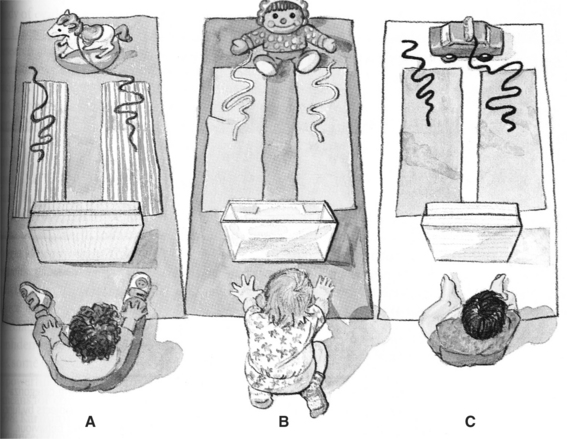
Figure 10-2 An example of analogical reasoning. (Adapted from Chen Z, Sanchez RP, Campbell T: From beyond to within their grasp: the rudiments of analogical problem solving in 10- to 13-month-olds, Dev Psychol 33:792, 1997.)
One of the best predictors of whether people will use an analogy to solve a problem is whether there is surface similarity between the problem seen before and the new problem. Surface similarity is how similar the elements in the problem are to the elements in the analog. Although it encourages analogy use, surface similarity can also interfere with performance when the similarities are only superficial, which often occurs with electronic assistive devices whose generic characteristics may be similar but whose function has significant differences. As illustration of this concept, there are many assistive technology applications that use personal digital assistants (PDAs). For example, PDAs have been programmed to function as augmentative communication devices (see Chapter 11) and as cognitive assists (see Figure 10-1). Both applications use an input method of a touch screen or small keyboards, and they both have an output of either speech or visual characters and text. As these two diverse applications illustrate, these are superficial features that may be operated in many different ways. These surface features of the two applications may appear to be identical, and indeed the same device could be used for both applications with a change in software. However, the function will be very different because of the characteristics of the software loaded into the device. If the user attends only to the existence of the input and output features and the size, color, and shape of the PDA, then some of the operational parameters of the device may not be understood. If he or she has previous experiences with one type of device that uses a PDA, then he or she may assume, on the basis of this superficial characteristic, that a new device operates the same as the previous one just because it also uses a PDA.
Structural similarity, on the other hand, is how similar the content or structure of the two problems are to each other (Willingham, 2001). It is important to establish parallels between the structures of the problems to help the person map elements from the source of the analogy to the target (Ashcraft, 1998). Analogical reasoning is one method of generalization, the carryover of knowledge or skills from one kind of task or one particular context to another kind of task or another context. Knowledge is most likely to be generalized when the conditions under which the knowledge is to be used are very similar to those under which the knowledge was acquired (Hunt and Ellis, 1999). As with many cognitive skills, it would be inaccurate to describe people as “possessing” or “not possessing” reasoning abilities or generalization skills, but we might imagine how certain technologies could aid a person with disabilities in these areas. Examples of these devices are described in a later section of this chapter.
The last step in problem solving involves confirming the successful conclusion of the task. The problem solver must evaluate the outcome of his or her actions and determine whether the task has ended successfully or whether it requires continuation or repetition. In the example of analogical reasoning used above, if the baby did not receive the toy after pulling the string, he might try again after evaluating the outcome of his actions.
Language and Learning
Language is fundamental to cognitive task representation. Through language, the process of exchanging information, we can express our thoughts, needs, and ideas. Language is a method of communication that is composed of rules (grammar) and symbols, expressed by gestures, sounds, or writing. When a skill or task is taught, language is used to portray the desired outcome. Learning is the process by which knowledge, skills, or attitudes are acquired; it can be attained through study, experience, or teaching. In Box 10-1 learning is placed at the end of the hierarchy because it builds on the previously mentioned skills, like building blocks. General learning refers to the basic ability to acquire knowledge, skills, or attitudes, used as a necessity for the more specific types of learning: mathematics, reading, and writing. The ability of someone to learn and comprehend in each of these categories helps define both the features the technology must have and the skills the person needs to use it.
DISORDERS THAT MAY BENEFIT FROM COGNITIVE ASSISTIVE TECHNOLOGIES
This section describes disorders in which a person’s cognitive skills may be compromised. The disorders are broken into two groups: congenital, those that occur at birth, and acquired, those that are acquired after birth. Intellectual or developmental disabilities (DD), learning disabilities (LD), attention deficit hyperactivity disorder (ADHD), and autism spectrum disorder (ASD) are congenital disorders, whereas dementia, traumatic brain injury (TBI), and cerebral vascular accidents (CVA) are acquired disorders. This group of disorders, summarized in Table 10-1, is a representative subset of those for which assistive technology has been found useful to address cognitive limitations.
TABLE 10-1
Disorders That May Benefit From Cognitive Assistive Technologies
| Disorder | Incidence | Characteristics |
| Intellectual disability | 8 individuals per 1000 (http://www.cdc.gov/mmwr/preview/mmwrhtml/00040023.htm) | Limitations in functional skills, impairments in memory, language use, and communication, abstract conceptualization, generalization and problem identification/problem solving (Wehmeyer, Smith, and Davies, 2005) |
| Learning disability | 2% of children | Significant difficulties in understanding or in using either spoken or written language; evident in problems with reading, writing, mathematical manipulation, listening, spelling, or speaking (Edyburn, 2005) |
| ADHD | 4% (Daley, 2006) and 5%-7% (www.adhd.com) | Typical capacity to learn and to use their skills confounded by factors that make it difficult to fully realize that potential; easily frustrated, have trouble paying attention, prone to daydreaming and moodiness; fidgety, disorganized, impulsive, disruptive, or aggressive (Schuck and Crinella, 2005) (www.adhdcanada.com) |
| ASD | 1 child per 165, 25% exhibit intellectual disability, 4 times more prevalent in boys than girls (Chakrabarti and Fombonne, 2001) | Varying degrees of impairment in communication and social interaction skills or presence of restricted, repetitive, and stereotyped patterns of behavior |
| Dementia | 0.5%-1% (<65 years), 7%-10% (65-75years), 18%-20% (75-85 years), 35%-40% (85+ years) | (1) Decline of cognitive capacity with some effect on day-to-day functioning, (2) impairment in multiple areas of cognition (global), and (3) normal level of consciousness (Rabins, Lyketsos, and Steele, 2006) |
| TBI | Mild: 131 per 100,000 | See Table 10-6 |
| Moderate: 15 per 100,000 | ||
| Severe: 14 per 100,000 people (21 per 100,000 if prehospital deaths included) (Dawodu, 2006) | ||
| CVA | 160/100,000 (overall), 1000/100,000 (age 50-65 years), 3000/100,000 (>80 years) (Demaerschalk and Hachinski, 2006) | Visual neglect, apraxia, aphasia; dysphagia; perceptual deficits, impaired alertness, attention disorders, memory disorders, impaired executive function, impaired judgment, impaired activities of daily living (O’Sullivan and Schmitz, 1994) |
There are physical disorders that may have some cognitive involvement. Aging is a physical process that limits motor function and also affects cognitive skills such as memory. Individuals with cerebral palsy (CP) may have a concurrent intellectual disability. People who have multiple sclerosis (MS) may have cognitive involvement, including behavior changes as the disease progresses. Longitudinal studies have evaluated cognitive impairment in relation to the clinical course of the disease. Results of one such study found impairment of specific cognitive functions, most commonly long-term verbal memory, but did not find a global cognitive impairment (Piras et al, 2002).
Congenital Disabilities
Intellectual disability is typically defined as a disability where the person has a below average score on an intelligence or mental ability test and a limitation in functional skills (Wehmeyer, Smith, and Davies, 2005). These functional skills include but are not limited to communication, self-care, and social interaction (http://www.cdc.gov/ncbddd/dd/ddmr.htm). The terms developmental disability, cognitive disability, or mental retardation are often used to describe individuals with intellectual disabilities. Intellectual disability can range in severity from mild to severe.
Learning Disabilities.
LDs are disorders in which the person has near-normal mental abilities in general but a deficit in the comprehension or use of spoken or written language. These disabilities may be manifested as a significant difficulty with reading, writing, reasoning, or mathematical ability. Because students with LDs tend to perform poorly on standardized tests, it was long thought that LDs were a mild form of intellectual disability. This assumption is untrue; LDs can be thought of as a deficit in the processing and integration of information in an area (e.g., reading) as opposed to limitations in the basic ability in that specific area of learning. People with LDs have typical age-related capacity in all areas. Table 10-2 lists abilities associated with learning disabilities. However, processing deficits lead to the hallmark difficulties that are commonly experienced (Johnson et al, 2005).
TABLE 10-2
Categorization of Abilities Associated With Learning Disabilities
| Explicit Abilities | Implicit Abilities |
| Reading skills (dyslexia) | Visual or auditory discrimination |
| Mathematical skills (dyscalculia) | Visual or auditory closure |
| Writing skills (dyslexia, dysgraphia) | Visual or auditory figure-ground discrimination |
| Language skills (dysphasia) | Visual or auditory memory |
| Motor-learning skills (dyspraxia) | Visual or auditory sequencing |
| Social skills | Auditory association and comprehension |
| Spatial perception | |
| Temporal perception |
Attention Deficit Hyperactivity Disorder.
ADHD is defined as a pattern of inattention, hyperactivity, or impulsivity that is more frequent or severe than for typical people of a given age (www.nimh.nih.gov/publicat/adhd.cfm). The delay aversion hypothesis of ADHD posits that the child with ADHD distracts himself or herself from the passing of time when he or she is not in control by daydreaming, inattention, and fidgeting (Daley, 2006). Children (and adults) with ADHD have a normal capacity to learn and to use their skills but have confounding factors that make it difficult to fully realize that potential (Schuck and Crinella, 2005). Particularly, those with ADHD can be easily frustrated, have trouble paying attention, are prone to daydreaming and moodiness, and are fidgety, disorganized, impulsive, disruptive, or aggressive.
Autism Spectrum Disorder.
ASD is a developmental disorder that is characterized by varying degrees of impairment in communication and social interaction skills or the presence of restricted, repetitive, and stereotyped patterns of behavior. A commonly used definition for autism is that of the Diagnostic and Statistical Manual of Mental Disorders–Fourth Edition (DSM-IV) (American Psychiatric Association [APA], 2000), which classifies autism as a pervasive development disorder (PDD). As the term implies, this disorder covers a wide spectrum of conditions, with individual differences in number and kinds of symptoms, levels of severity, age of onset, and limitations with social interaction. Major subtypes of ASD include autistic disorder, Asperger’s syndrome, Rett syndrome, childhood disintegrative disorders, and PDD not otherwise specified (NOS). Individuals with ASD typically demonstrate deficits in communication skills including delay in, or total lack of, spoken language and spontaneous speech; unusual speaking patterns (e.g., echolalia or idiosyncratic language); and underdeveloped social interaction skills (including problems interpreting facial expressions, gestures, and intonation while interacting with other people). They might also seem evasive, avoid eye contact, and appear to lack initiation and desire to share joy or interest. Children with ASD also have inflexible adherence to specific routines and demonstrate unusual persistence and intense focus on a specific subject or activity. Many children with ASD have unusual (hypersensitive or hyposensitive) responses to sensory information, which could lead to the lack of or aversive response to sensory input.
Individuals with ASD also have strengths and unique abilities. For example, some individuals with ASD have unusually good spatial perception and visual recall or accurate and detailed memory for information and facts, are able to concentrate for long periods of time on particular tasks or subjects, and are more attentive to details then most people. These abilities may allow them to excel in areas of music, science, math, physics, and other specialized areas.
Acquired Disabilities
The word dementia comes from the Latin de mens, which means “from the mind.” Dementia is best defined as a syndrome, or a pattern of clinical symptoms and signs, that can be defined by the following three points: (1) decline of cognitive capacity with some effect on day-to-day functioning, (2) impairment in multiple areas of cognition (global), and (3) normal level of consciousness (Rabins, Lyketsos, and Steele, 2006). Dementia is distinguished from congenital cognitive disorders (such as intellectual disability, LDs, etc.) by its age of onset and its degenerative component. It is also important to note that, although it must affect multiple areas of cognition, not all areas are affected. Rabins, Lyketsos, and Steele (2006) define the “three pillars of dementia care.” First is to treat the disease, which helps identify current needs and future necessities as the disorder progresses. Second is treatment of the symptoms. By treating the symptoms, the quality of life of the client will improve in the cognitive, functional, and behavioral domains. Medications and technology are the two main ways to accomplish this task. Third, client support is important and leads to ensuring that the client’s needs are met and quality of life is improved as much as possible.
Traumatic Brain Injury.
People who have a TBI often lose significant cognitive function. A TBI may occur when the head or brain is struck by an external force, such as from a fall, gunshot wound, or motor vehicle accident. The causes of TBI are described in Table 10-3. The extent of the trauma to the brain is the determining factor in diagnosing TBI, not the injury itself. For instance, it is possible to incur TBI as the result of both open-head injuries (the brain is exposed to air) and closed-head injuries (no brain exposure). The effect of a TBI on an individual’s cognitive ability varies from case to case, in terms of both severity and the set of skills affected. Not all head injuries give rise to TBI, and there is an accepted method for diagnosing such an injury. One tool available to assist with diagnosis is the Glasgow Coma Scale (GCS), a rating system used for describing the severity of a coma (Dawodu, 2006). The GCS ranks comas on a scale of 3 (most severe) to 15 (mildest) according to eye response, verbal response, and motor response categories. A score on the GCS of 12 or lower is a mild brain injury and below 8 is considered a severe injury.
TABLE 10-3
Data on Causes of Traumatic Brain Injury (Injury Control Research Center)
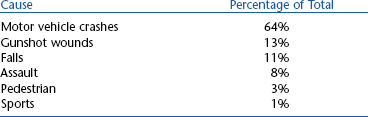
Data from TBI Inform, June, 2000. Published by the UAB-TBIMS, Birmingham, AL. © 2000 Board of Trustees, University of Alabama, http://main.uab.edu/tbi/show.asp?durki=27492&site=2988&return=57898#cause.
If the GCS does not indicate TBI, one of the following two criteria must be satisfied for a TBI diagnosis: either the client has amnesia for the traumatic event or the individual has a documented loss of consciousness. It is common to have a recovery period after the injury. This recovery usually plateaus within 12 months after injury, and the extent of recovery is both variable and unpredictable (Cicerone et al, 2005). A good measure of the extent of an individual’s recovery from a TBI is his or her return to preinjury activities of daily living. Two main recovery indicators are the return to work and the return to driving, both important tasks for independent living. Data on the return to work are summarized in Table 10-4, and similar data for the return to driving are shown in Table 10-5 (Novack, 1999). In both cases, very little improvement was observed beyond 12 months after injury. Typical cognitive and behavioral difficulties that a person with TBI may encounter are listed in Table 10-6 (Novack, 1999; Rehabilitation Engineering Society of North America, [RESNA], 1998). Two areas of importance are memory and language skills because these may benefit from intervention with assistive technology.

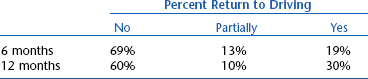
TABLE 10-6
List of Typical Cognitive and Behavioral Difficulties After TBI
| Type of Difficulty | Examples |
| Cognitive | Processing of visual or auditory information |
| Disrupted attention and concentration | |
| Language problems (i.e., aphasia) | |
| Difficulty storing and retrieving new memories | |
| Poor reasoning, judgment, and problem solving skills | |
| Difficulty learning new information | |
| Behavioral | Restlessness and agitation |
| Emotional lability and irritability | |
| Confabulation | |
| Diminished insight | |
| Socially inappropriate behavior | |
| Poor initiation | |
| Lack of emotional response | |
| Projecting blame on others | |
| Depression | |
| Anxiety |
Stroke.
A stroke, or CVA, is an incidence of irregular blood flow within the brain causing an interruption in brain function. A stroke may arise from a lack of blood flow to the brain (known as an ischemic stroke) or from ruptured blood vessels in the brain (a hemorrhagic stroke). The neurological damage incurred as the result of a stroke produces symptoms that directly correspond to the injured area within the brain (O’Sullivan and Schmitz, 1994). A CVA causes acute damage to the brain; there are no degenerative effects after the onset of injury. As with TBI, persons who have sustained a stroke often have a recovery period where portions of the brain learn to compensate for damaged areas. Typical cognitive and behavioral difficulties associated with stroke are shown in Table 10-7. Most recovery (as observed by the return to activities of daily living) occurs within 6 months after onset (Bruno, 2005). The majority of persons with CVA are able to return home after the initial hospitalization period. A summary of discharge locations after hospitalization for stroke is shown in Table 10-8. These data suggest that the number of people returning home after a CVA is increasing, which might be attributed to improvements to hospital care at the onset of stroke. Children may have a more pronounced recovery than adults because their brains have a greater degree of plasticity. Also, women may display greater recovery of lost language skill than men because the language centers of the brain are larger in women than in men.
TABLE 10-7
List of Typical Cognitive and Behavioral Difficulties After Stroke
| Type of Difficulty | Examples |
| Cognitive | Visual neglect, hemianopsia |
| Apraxia | |
| Language problems (i.e. aphasia, dysarthria) | |
| Perceptual deficits (i.e., figure-ground | |
| impairment, disorientation) | |
| Impaired alertness, attention disorders | |
| Memory problems, both short-term and long-term | |
| Perseveration | |
| Decreased executive function | |
| Behavioral | Impaired judgment |
| Impulsiveness | |
| Emotional lability | |
| Confabulation | |
| Poor initiation | |
| Mood alterations | |
| Depression |
TABLE 10-8
Discharge Data for Stroke From the Canadian Heart and Stroke Foundation
| Discharge Destination | 1993 | 1999 |
| Home | 33% | 56% |
| Inpatient rehabilitation | 41% | 32% |
| Nursing home or long-term care | 26% | 11% |
Data from Heart and Stroke Foundation of Canada. Stroke statistics: http://ww2.heartandstroke.ca/Page.asp?PageID=33&ArticleID=428&Src=stroke&From=SubCategory/ Accessed April 16, 2005.
COGNITIVE SKILLS RELATED TO SPECIFIC DISORDERS
Figure 10-3 identifies the skills that are most often affected by different disorders. Cognitive skills are listed along the top row and disabilities and disorders along the vertical axis. The cognitive skills in Figure 10-3 are the same ones covered in the first section of this chapter and are summarized in Box 10-1. The cognitive skills are roughly arranged so that, moving from left to right, the skills build on each other and are higher order. The disabilities listed are those that manifest primarily with cognitive limitations.
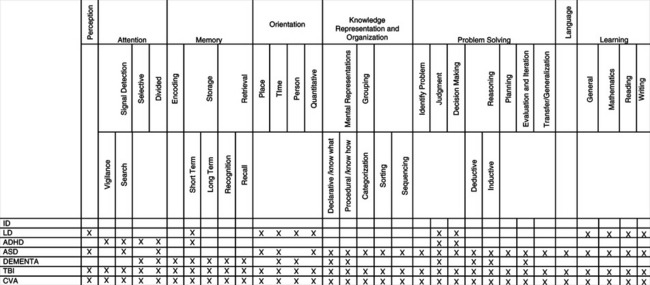
Figure 10-3 Skills versus disorder matrix. ID, Intellectual disability; LD, learning disability; ADHD, attention deficit hyperactivity disorder; ASD, autism spectrum disorder; TBI, traumatic brain injury; CVA, cardiovascular accident (stroke).
This table illustrates possible skills that may be affected for a person with a specific disorder. The inclusion of skills and the definition of categories were based on the applicability of the table to assistive technology applications, and all listed cognitive skills are judged to be those that could be aided or replaced with the help of assistive technologies. Most of the disorders and disabilities that have cognitive implications are quite variable from individual to individual. Thus, not all of the possible limitations included in Figure 10-3 will exist in all cases. In Figure 10-3, items marked with an X are the skills that may be limited or absent in the corresponding disorder. For each entry in this table, the frame of reference is the person with a disability (i.e., the skill is restricted or absent in the person). Figure 10-3 could be used during an assessment as a checklist to ensure that the assistive technology practitioner (ATP) assesses skills that may be affected and to reduce the chance of missing a crucial skill or deficiency. If there is a gap between the skills required to complete a task and the skills that the individual brings to the task, the use of assistive technologies to aid or replace the required skill should be considered. The possible substitution or augmentation for these skills with assistive technologies is discussed in the next section and displayed in Figure 10-3.
CHARACTERISTICS OF ASSISTIVE TECHNOLOGIES THAT ADDRESS COGNITIVE NEEDS
Considerations for Individuals With Mild Cognitive Disabilities.
On one hand, the application of assistive technologies to meet the needs of individuals with mild cognitive disabilities is easier than for more severe disabilities simply because the human skills are greater than for some other disabilities. On the other hand, the needs that these individuals have are more subtle and harder to define than in the case of physical disabilities or more severe cognitive disabilities. For example, learning disabilities typically involve significant difficulties in understanding or in using either spoken or written language, and these difficulties may be evident in problems with reading, writing, mathematical manipulation, listening, spelling, or speaking (Edyburn, 2005). Although there are assistive technologies that are specifically designed to address these areas (discussed later in this chapter), many of the technological tools are useful for all students and are part of instructional technology (Ashton, 2005). Even the so-called assistive technologies have features (e.g., multimedia, synthetic speech output, voice recognition input) that are useful to all learners. Chapter 1 distinguishes between educational technologies (or instructional technologies) and assistive technologies. This distinction works well for sensory and motor assistive technologies. The distinction is much more blurred for cognitive assistive technologies (Ashton, 2005; Edyburn, 2005). For example, some spell checkers, word prediction, and talking word processors have been specifically designed for individuals with learning disabilities (e.g., Co-Writer and Write-Outloud, Don Johnston, Inc, Volo, Ill., www.donjohnston.com. These programs are discussed later in this chapter. As Ashton (2005) points out, each of these technologies is potentially useful to all students, not just those with learning disabilities. In that sense they are educational or instructional technologies. Edyburn has suggested that the term technology-enhanced performance be used instead of assistive technology. The advantage of this conceptual shift is that emphasis is placed on performance and outcomes, not on assessment and selection of the technology. The emphasis on human performance is important and reflected in the HAAT model. However, the move away from assistive technology to technology-enhanced performance does not recognize the unique features of assistive technologies that are described in Chapter 1 (see Box 1-1), particularly that of being an individualized system that meets unique needs for an individual.
Edyburn (2005) carries the concept of technology to enhance performance further by pointing out that many other productivity tools can function as “assistive technologies” for individuals with mild disabilities. He cites the example of the Ask Jeeves Web search engine (www.askjeeves.com), which could provide assistance to a child who has difficulty retrieving information. Edyburn poses the following question: if the student knows that he or she can find the names of all the U.S. presidents using this or another search engine, then isn’t that as useful an educational outcome as having memorized the names for a test? The question of information retrieval using the Web is part of the larger issue of compensation versus remediation in cognitive assistive technologies (Edyburn, 2002). Throughout this text a four-part approach to assistive technology applications has been emphasized: human, activity, assistive technology device, and context (the HAAT model of Chapter 2). When the ATP is dealing with motor disabilities, the starting point is a careful description of the activity to be performed. An evaluation of the individual’s skills relevant to the activity leads to a clear picture of what assistive technology needs he has. The context (physical, social, and cultural milieu and institutional environment) then moderates the choices of assistive technologies. The assistive technology includes both soft technologies (training, strategies) and hard technologies (devices) or, in Edyburn’s (2002, 2005) terminology, remediation (soft technology) and compensation (hard technology).
For sensory or motor disabilities, we don’t much care how the function is accomplished as long as the activity can be satisfactorily completed. Other issues, such as how much energy it takes to walk versus to use a power wheelchair for someone with severe cerebral palsy, are matters of personal choice. The situation changes dramatically, however, in dealing with cognitive assistive technologies. Should the child in our example be required to learn the presidents’ names (remediation) or be allowed to use an assistive technology (Ask Jeeves) as a compensatory tool, and why is its use considered “cheating” by some educators and parents (Edyburn, 2005)?
A related concern is the concept of time in educational contexts. Time is fixed and accomplishment varies (Edyburn, 2005). This is not true in the case of sensory or motor disabilities where additional time (e.g., for an individual who is blind to cross the street using a long cane) is an accepted part of human performance. In vocational settings, completion time for a task also varies from individual to individual and is acceptable within wide limits. Why, then, is this not the case in an educational context? As Edyburn (2005) points out, restricting time, learning activities, instructional approaches, and other classroom variables to a “one-size-fits-all” constraint in educational settings means that high standards of performance cannot be achieved. Although many students with special needs are given extra time to complete an examination, the level of competence they achieve is still variable and time (even expanded time) is fixed. If achievement were to be fixed then each student would be allowed as much time as necessary to complete the task. If uniformly high performance and preparation for later vocational success are the goals, then compensation, using both hard and soft assistive technologies, must be an alternative for individuals with mild cognitive disabilities as it is for their counterparts with motor and sensory disabilities.
Considerations for Individuals With Moderate to Severe Intellectual Disabilities.
Several ways of characterizing cognitive needs have been used in consideration of assistive technology applications for individuals who have intellectual disabilities. One method considers the cognitive impairment exhibited, such as impairments in memory, language use and communication, abstract conceptualization, generalization, and problem identification/problem solving (Wehmeyer, Smith, and Davies, 2005). Assistive technology characteristics that address these impairments include simplicity of operation, capacity of the technology to support repetition, consistency in presentation, use, and inclusion of multiple modalities (e.g., speech, sounds, and graphical representations). Wehmeyer, Smith and Davies (2005) discuss assistive technology characteristics and approaches for each of these impairments. Many of these technologies are covered in the subsequent sections of this chapter.
Granlund et al (1995) take a different approach and define five content areas for technological assistance to individuals who have moderate to severe intellectual disabilities. The content areas, on the basis of cognitive structures, are the following:
Within these content areas, individuals with intellectual disabilities typically have difficulties in organization and reorganization, performing operations with cognitive structures, and symbolic representation. Within these content areas, adults with cognitive disabilities may encounter problems in activities such as choosing a leisure activity, using public transportation, being on time for work, and preparing meals. Typical assessment questions and assistive technology examples for each content area are listed in Table 10-9.
TABLE 10-9
Assessment Questions and Assistive Technology Examples
| Content Area | Typical Assessment Questions | Examples of Applicable Assistive Technology |
| Quality | How does person classify objects? Are one, two, or more dimensions used? | Sorting jigs, graphic symbol labels for categories |
| Causal patterns | How many steps in a process or chain can be understood? Can outcomes of accomplishing a task in different ways be compared? | Sequencing jigs, PDA-based prompting and cuing |
| Space | Can the person find his or her way with a map? Does he or she use shortcuts? Can he or she ask directions? | Paper maps, dynamic display an GPS on PDA with speech output |
| Quantity | How is money handled? Is conservation of volume present? | Money-sorting jigs, matching task rather than counting, parts-counting jigs |
| Time | Can a watch be used? Is the duration of an activity or waiting period understood? | Quarter hour watch, electronic pocket calendars with reminders, PDA with reminder and voice output |
From Granlund M et al: Assistive technology for cognitive disability, Technol Disabil 4:205-214, 1995.
Wehmeyer et al (2004) described eight primary factors of cognitive ability: (1) language, (2) reasoning, (3) memory and learning, (4) visual perception, (5) auditory perception, (6) idea production, (7) cognitive speed, and (8) knowledge and achievement. They argue that the promise of technology for aiding individuals with intellectual disabilities lies in enhancing human capacity in these areas rather than compensating for deficits. An important element in this approach is the application of the principles of universal design (see Chapter 1) to ensure that mainstream technologies are designed in such a way that individuals with a range of intellectual abilities can access them. The design of the human technology interface (see Chapter 2) in the HAAT model is an example of the difference between a compensation approach and the concept of enhancement of the technology characteristics to make it more accessible. If an individual with an intellectual disability has difficulty accessing a screen because of language problems (e.g., reading), one approach is to use a compensatory approach and provide auditory output instead of text, avoiding the necessity for reading. If the problem is too much clutter on the display, then the best approach may be to simplify the display (i.e., enhance it) so that the information is more accessible. The following sections of this chapter describe technology approaches that use both enhancement and compensation strategies. For individuals with intellectual disabilities, Wehmeyer et al (2004) present a thorough literature review of approaches that have been taken to enhance performance in each of the eight cognitive factors.
Considerations for Individuals With Acquired Disabilities.
Individuals with acquired cognitive disabilities resulting from injury (e.g., TBI) or disease (e.g., CVA or dementia) retain a wide variety of remaining cognitive skills. The majority of assistive technologies and strategies that have been used to aid persons with acquired cognitive disabilities are designed to compensate for deficits by building on remaining strengths (LoPresti, Mihailidis, and Kirsch, 2004). Collective technologies and strategies that help a person with cognitive deficits function more independently in certain tasks have been called assistive technology for cognition (ATC) (LoPresti, Mihailidis, and Kirsch, 2004) or cognitive prosthesis (Cole and Mathews, 1999). An ATC or a cognitive prosthesis is an entire system of hardware, software, and personal assistance that is individualized to meet specific needs. A more accurate descriptor would be cognitive orthosis because the intent is to augment cognitive function rather than to replace it. However, Bower (2003) uses “prosthesis” in his description, which states that a “cognitive prosthesis is a computational tool that amplifies or extends a person’s thought and perception, much as eyeglasses are prostheses that improve vision…a cognitive prosthesis magnifies strengths in human intellect rather than corrects presumed deficiencies in it. Cognitive prostheses, therefore, are more like binoculars than eyeglasses.” As the HAAT model (see Chapter 2) implies, a cognitive prosthesis includes a custom-designed computer-based compensatory strategy that directly assists in performing daily activities (Institute for Cognitive Prosthetics, http://www.brain-rehab.com/definecp.htm). It may also include additional technologies such as a cell phone, pager, digital camera, or low-tech approaches.
Cognitive Skills Assisted by Technology
Figure 10-4 relates cognitive skills to categories of assistive technologies. This characterization is similar to that used by others (e.g., Cole and Mathews, 1999; Edyburn, 2005; Granlund et al, 1995; LoPresti, Mihailidis and Kirsch, 2004; Wehmeyer et al, 2004; Wehmeyer, Smith, and Davies, 2005). Cognitive skills are listed along the top row and assistive technology categories on the vertical axis. This table can be used to identify assistive technologies (rows) that aid or replace skills (columns) to enable a person to carry out functional tasks. It can be used to identify both compensatory and enhancement approaches to the use of assistive technologies for individuals who have cognitive disabilities. Entries in Figure 10-4 are marked with X, A, or R, where X indicates that the skill is required by the technology, A indicates that the technology aids that skill, and R indicates that the technology replaces that skill. Figure 10-4 is based on clinical experience and published literature regarding assistive technologies frequently used by people with cognitive limitations. Similar devices are grouped and category names have been assigned.
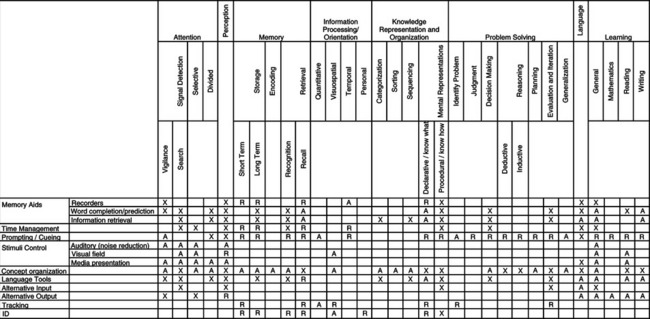
Figure 10-4 Skills versus assistive technology matrix. An “X” indicates means that the cognitive skill is required to use that type of assistive technology. An “A” means that type of assistive technology might aid the cognitive skill in an activity. An “R” means that type of assistive technology might replace the requirement for that cognitive skill in an activity. Note that these entries are with respect to the assistive technology.
Memory.
Memory aids are those devices or software packages that augment or replace memory by providing a means to store commonly used information or aiding in the retrieval of information. These devices can be subdivided into three categories on the basis of their primary tasks: recording, word completion/prediction, and information retrieval. Recorders are devices that store information that can be replayed at a later time to aid in the recall of facts or appointments. The most common devices in this category are those that record voice information as short memos. This feature is often built into PDAs, cell phones, and small dictaphones. Word completion and prediction solutions are software packages that aid memory during a written communication task by giving a user a series of contextually significant words/phrases that he or she may wish to use. This technology is also discussed in Chapter 7, where its use was to speed up time to input text or to reduce the number of required keystrokes.
Information retrieval systems are devices or software packages that categorize and organize words/phrases so that they may be retrieved through associations. A number of information retrieval aids have been designed that use palm top computers (often called personal digital assistants or PDAs). Features of these devices that are particularly useful include small size for portability, flexibility in programming for customization, large storage capacity, a variety of input and output modalities, and interfacing to other technologies (e.g., desktop or notebook computers, cell phones) (Szymkowiak et al, 2005). When PDAs are used with individuals who have disabilities, two usability issues arise: changes in sensory processing and the small size of the keyboards and screens. Individuals with cognitive limitations from aging, injury (TBI or CVA), or dementia often have accompanying visual problems (declining acuity and contrast sensitivity, including color discrimination). The interconnectivity of PDAs provides the opportunity for interfacing with the Internet to retrieve a much wider range of information. However, small screen and keyboard features are particularly limiting in long sessions of data retrieval (Szymkowiak et al, 2005).
PDA daily schedulers and reminder alarm devices (both of which are produced in a wide variety of formats) (Figure 10-5) are technologies that tend to provide the most immediate benefit to people with TBI (Kim et al, 1999; Van Hulle and Hux, 2005), CVA, and aging (Szymkowiak et al, 2005). Software packages for these devices have also been designed to include prompting cues to aid memory (Bergman, 2002). These specially designed systems can be customized to meet the needs of a specific user and they have user-friendly interfaces and are easy to carry (Gorman et al, 2003). The PDA-based information retrieval aids require the user to display some degree of sensory perception, language use, memory, or learning skill to be of practical benefit. Because the software can be customized, the complexity of these functions can be adjusted to fit the skills of a wide variety of users. The following case study illustrates the application of a PDA as a memory and organization aid.
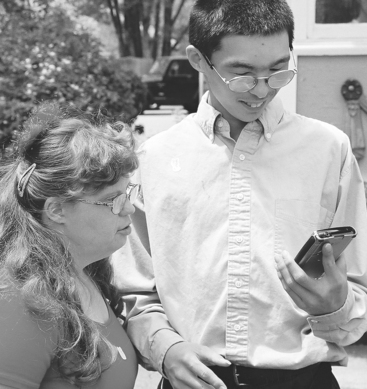
Figure 10-5 PDAs can be used by persons with intellectual disabilities for a variety of tasks. (Courtesy AbleLink Technologies, http://www.ablelinktech.com/.)
Memory Message (Saltillo, www.saltillo.com/) (Figure 10-6) is a commercially available memory aid designed to assist individuals by reminding them of activities and tasks throughout the day. The small size (6.3 inches × 4 inches × 1.1 inches, 12.5 ounces) makes the device easy to carry. A standard clock face is built into the front of the device that shows the current day and time, and a button is available to provide audible time information. Up to 280 alarms can be set with 40 separate recorded instruction messages. When an alarm occurs, the user can either acknowledge the alarm (by pressing “OK”) or have it repeated by pressing (:?”). A caregiver programs alarms and messages through a keyboard. Alarms can be set for a single event or for a recurring activity. The WatchMinder2: Training and Reminder System, which is described in the time management section, can also serve as a memory aid.
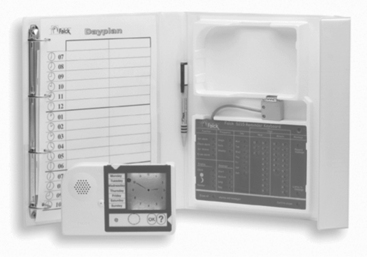
Figure 10-6 The Memory Message system provides reminders of activities throughout the day. (Courtesy Saltillo, www.saltillo.com.)
Time Management.
Time management technologies are those devices that aid in the planning, prioritizing, and execution of daily and time-dependent tasks. One class of devices uses an alternative format for representing time to make it more accessible to individuals with intellectual disabilities. Examples of such devices are the Quarter Hour Watch (made by Handitek AB, Sweden, available from ZYGO Industries, Portland, Ore., www.zygo-usa.com) (Figure 10-7), a device that offers an alternative and potentially more intuitive representation of the passage of time (Granlund et al, 1995). The Quarter Hour Watch uses an entirely different concept of time by presenting a 2-hour time frame in 8 one-quarter-hour steps. Rather than clock hands or numbers, the watch display has eight circles, one for each quarter hour. The user of the watch must understand elapsed time rather than absolute time based on standard clocks. Events are represented by pictures on plastic chips (about the size of 35 mm slides) that are placed into the Quarter Hour Watch. A care provider sets the time of the event on the back of the plastic chip, which is read by the watch. When the chip is inserted into the watch, the display indicates how much time remains until the event should occur. If the time to the event is greater than 2 hours, then all eight circles are dark. After each quarter hour, a circle turns from dark to light until they are all light. At that time a signal sounds and the circles flash. The individual using the watch chooses the chip (e.g., time for favorite TV program, time to go to work) and then is able to tell when that time has arrived.
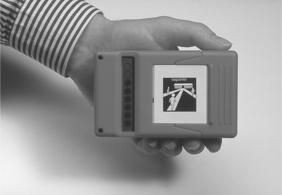
Figure 10-7 The Quarter Hour Watch. (Courtesy ZYGO Industries © GEWA, AB, Portland, Ore., www.zygo-usa.com.)
The WatchMinder (Irvine, Calif., www.watchminder.com) (Figure 10-8) is a device that reminds a user when a given, preprogrammed task or event is scheduled to occur. This device was designed for people with attention deficit disorder, ADHD, LD, chronic diseases, stroke, or brain injury. A silent vibrating reminder system or beeping alert, with 30 programmable alarms, is included with both a training and reminder mode. The reminder mode is for remembering specific tasks such as taking medication and doing homework or chores. The training mode is for behavior change and self-monitoring. Box 10-2 shows preset messages for the WatchMinder2. This device can also be programmed with three personalized messages. The WatchMinder2 has two possible schedule modes: fixed (every 2, 3, 5, 10, 15, 20, 30, 45, or 60 minutes) or random (central processing unit randomly chooses from 2, 3, 5, 10, 15, 30, and 60 minutes). The person programming the device chooses one of these modes and the daily start (S) time and end (E) time.
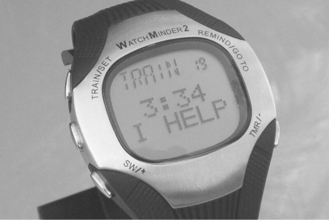
Figure 10-8 WatchMinder. (Courtesy WatchMinder, Irvine, CA, Watchminder.com.)
The 24-hour Electronic Time Panel (Saltillo, www.saltillo.com/) (Figure 10-9) is a planning board or day planner that facilitates the sequencing and organization of an individual’s tasks and events for a given period of time. This panel helps teach concepts such as understanding units of time (e.g., “How long is an hour?”) and elapsed time (e.g., “Why can’t I have lunch now?”). This device also helps individuals to independently answer daily life questions (e.g., “Do I have time to eat before the bus comes?” or “How long until we go swimming?”). Like the Quarter Hour Watch, the 24-hour Electronic Time Panel uses a lighted display on the one side with increments of 15 minutes from 7 am to 11 pm. A similar column of lights on the other side shows the times from 11 pm until 7 am. The time slot adjacent to each light can be labeled with an activity by using text, pictures, or other symbols. The current time is represented either by a column of lights starting with the current time and proceeding in 15-minute intervals or by a single dot of light. The time until a desired activity is indicated by the length of the column of lights from the present time to the start time of the event. Alarms can be set for each 15-minute increment. The Electronic Time Panel can be used in an individual living arrangement, group living setting, or a classroom.
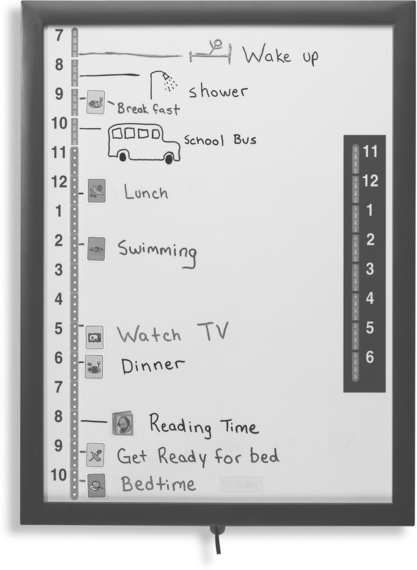
Figure 10-9 The 24-hour Electronic Time Panel. (Courtesy Saltillo, www.saltillo.com.)
Davies, Stock, and Wehmeyer (2002) evaluated a palmtop-based time management and scheduling system (Schedule Assistant, AbleLink technologies, Colorado Springs, Col., www.ablelinktech.com) designed for individuals who have intellectual disabilities. The Schedule Assistant was evaluated in a pilot study with 12 participants who had intellectual disabilities. Each participant was asked to complete an eight-item schedule using the Schedule Assistant and using a traditional written schedule. A care provider entered a schedule of daily events into the Schedule Assistant and the device provided visual and auditory (speaker or earphone) prompts that correspond to those events at the appropriate time. A typical use of this type of device is shown in Figure 10-5. The reminders can be replayed automatically until acknowledged or by a request from the user. Results showed that participants required significantly less assistance when using the Schedule Assistant than with the written instructions, leading to the conclusion that electronic scheduling and prompting systems have value for individuals who have intellectual disabilities.
Prompting/Cueing/Coaching.
Prompting systems are those devices or software packages that inform a user that an action should be taken and provide visual, verbal, or auditory cues as to how to accomplish a task. In most cases the systems allow a care provider to enter the relevant information regarding events, times, and frequency. Some devices also allow collection of data regarding ease of use, and others feature communication with a central station for data logging, emergency assistance requests, or tracking of an individual’s actions and location.
Prompting people to take their medication is one of the main uses of prompting systems. Low-tech medication reminders, boxes with seven or more compartments labeled by the day or type of medication, have been in widespread use for many years. However, these devices do not alert the person that it is time for the medication. If an alert is needed, then electronic medication reminders are required (Mann, 2005). A watch-based medication reminder (e.g., Cadex Medication Reminder Watch, http://www.cadexproduct.com/?source=overture&OVRAW=http%2F%2F%3Acadexproducts.com)%5C&OVKEY=http%20cadexproducts.com&OVMTC=standard) provides up to 12 daily reminders that have an audible alarm and a display of the required medication. Although this format is convenient because of its small size, it has a small display and limited memory. Pagers and cell phones are also used as medication reminders (e.g., MedPrompt Medical Paging System, www.medprompt.com) with dosage, type of medication, and instruction provided by text messaging from a central service. Software for PDAs (e.g., On-Time-Rx of Palm OS, www.ontimerx.com) provides medication alerts with detailed information regarding pill type and dosage, a medication log, refill reminder, and emergency information (Mann, 2005).
The ISAAC Cognitive Prosthesis System is a wearable and highly customizable device that provides procedural information and personal information storage (Cole and Dehdashti, 1998). This system is a fully individualized cognitive prosthetic system that assists the user to live and work more independently through the organization and delivery of individualized prompts and procedural and personal information. A care provider enters the content with use of an authoring system. The content is then delivered to the individual with a cognitive disability in English or Spanish as synthesized speech, audio, text, checklists, or graphics. Prompts can be delivered on the basis of specified conditions, such as the time of day, to prompt for an action by the user. User input is through a pressure-sensitive touch screen.
Mihailidis, Fernie, and Barbenel (2001) developed a prompting system for handwashing to assist individuals who have dementia. The system, called COACH, uses a video camera, personal computer, and artificial intelligence software. The system monitors progress of the person and provides auditory prompts when steps are skipped or mistakes are made. The system also learns the patterns of the individual users and adapts its settings and cues to match them. In a single subject design study with 10 elder participants, the COACH system led to significant improvement in completion of hand washing tasks without caregiver assistance (Mihailidis, 2004).
Individuals with Alzheimer’s disease often have periods of forgetfulness and disorientation. The disorientation can lead to wandering behavior that is unsafe to the person and very worrisome to the caregivers and family. Global positioning systems (GPS) have been used to assist these individuals by providing their location to the caregiver (Mann, 2005). The GPS Locator Watch (Wherify, www.childlocator.com/) is designed to track children, but its features apply well to persons with dementia. The watch has a wireless transmitter/receiver that transmits the location of the person and allows transmission of information to the watch. To prevent individuals whose disability makes it difficult to understand the purpose of the watch and who try to remove it, the watch has an electronically activated lock to keep it in place. The lock can be remotely released for removal. The device also has a built-in pager, clock, and emergency call function. A navigational device based on a GPS cell phone, called Opportunity Knocks, was designed specifically for people with cognitive limitations (Kautz et al, 2004). This device learns the patterns of the user, and uses that pattern to help the user find the most familiar (not necessarily the shortest) route, recover from mistakes, and receive prompts when needed. If an error occurs (e.g., a user misses a bus stop that is routinely taken), the device verbally prompts the user with prompts such as “I think you made a mistake” or “May I guide you to [location]?” The user can indicate which location by touching a picture of it on the display of the cell phone. Then a mode of transportation (e.g., walk or bus) is chosen in the same way. Using the stored patterns, the system then directs the user to that location. Using stored information, the system can also determine whether the user is on the wrong bus and direct him to get off at the next stop. Instruction can then be provided to get the person back on track to his or her destination.
The concept of a smart house (Figure 10-10) has been used to denote living environments in which automation is used to provide automatic functions including monitoring, communication, household functions (lights, air conditioning/heating, door locks), physiological measurements, and medication alerts (Mann, 2005). Smart houses have the potential to allow individuals with cognitive limitations greater independence, and in the case of elderly individuals, a chance to stay in their homes rather than move to group living facilities. Mann (2005) describes levels of smart house from basic communications (Internet, phone) through complex monitoring and tracking of the resident’s health, behavior, and needs. The core of the smart house is a processing and communication system linked to a sensory array. One example of a monitoring application is described in the following case study. The system aids a user in performing common tasks of daily living by assessing the person’s current physiological state and the state of various utilities throughout the home and providing the user with feedback should they become disoriented or confused on a given task (Haigh, Kiff, and Ho, 2006). Mann (2005) describes several smart house projects.
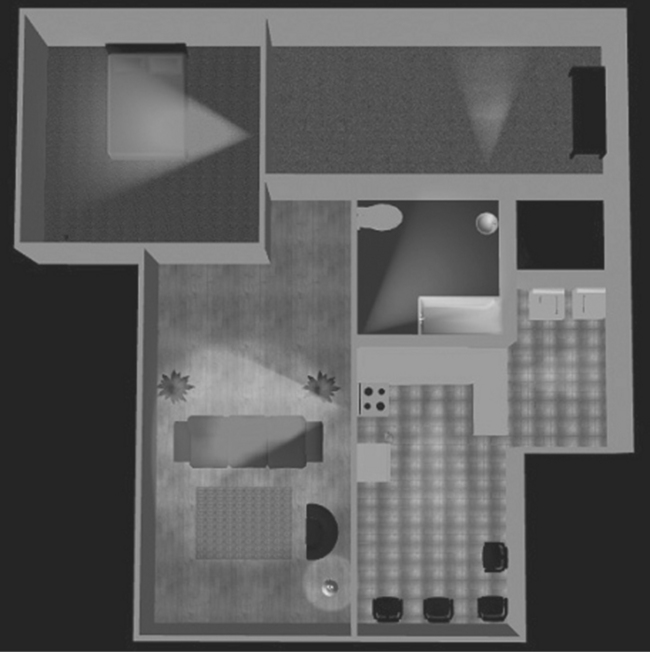
Figure 10-10 SmartHouse conceptualization. Light areas represent sensor field for detecting movement by room. (Courtesy Medical Automation Research Center, University of Virginia, https://smarthouse.med.virginia.edu/index.php.)
The COACH and the smart house are examples of context-aware cognitive orthoses (LoPresti, Mihailidis, and Kirsch, 2004). Each of these systems provides cueing and prompting on the basis of a combination of prestored information and data obtained from sensors in the environment. The use of context-based information can relieve anxiety, reduce the cognitive load, and overcome a lack of initiation by the individual using the device. In terms of the HAAT model, this functionality provides important information about one of the four elements of the model: the context. LoPresti, Mihailidis, and Kirsch (2004) describe other examples of context-aware cognitive orthoses.
Low-tech devices can also aid a user in performing a task by providing concrete feedback as to the proper course of action to undertake. For example, a microwave button shield only lets a user see/use those buttons that are needed for a specific task or raised lines on paper give a user an idea of where symbols should be placed to enhance readability. Task-specific jigs enable people to perform tasks that they may not otherwise be able to perform. For example, weighing and counting tasks in manufacturing and assembly can be difficult for workers who have cognitive disabilities. One approach to modifying weighing and counting is to use a talking scale connected to a controller that provides prompting and feedback as necessary (Erlandson and Stant, 1998). For counting tasks, a bin with a specified number of locations is weighed. If the bin is properly filled, the weight is correct and the user is prompted to proceed with the next step. If the weight is too low, the user is told to check all the bins, and if it is too high the user is prompted to be sure only one element is in each bin. For weighing, objects placed on the scale are compared with stored weight limit values, and the user is prompted if the weight is above or below the weight range. Visual and auditory prompts are included. Erlandson and Stant (1998) describe the successful use of this system in a nail counting task for a construction supply company by a woman with mild intellectual disability.
Prompting systems have been used with autistic individuals for initiation, maintenance, or termination of an activity (Goldsmith and LeBlanc, 2004). Coyle and Cole (2004) reported a decrease of off-task behavior in three autistic students when an auditory timer was used to prompt self-monitoring of on-task behavior in classroom settings. Taber et al (1999) similarly reported a decrease in teacher-delivered prompts and in off-task and inappropriate behavior in a 12-year-old student when a self-operated auditory prompting system was used. Tactile systems were investigated in a few studies to increase verbal initiation (Shabani et al, 2002; Taylor and Levin, 1998) and to seek assistance when lost (Taylor et al, 2004).
Although most of the studies report a positive outcome of a prompting system, these reports consist of mainly preliminary or anecdotal results, with small, if not single numbers of case studies. More systematic studies should be conducted to demonstrate the efficacy of prompting systems in assisting social initiation in individuals with ASD. With the increasing popularity and advancement in small electronic devices (e.g., cell phones, PDAs, MP3 players, etc.), these systems could provide a more cost effective and socially valid assistive technology for ASD.
Stimuli Control.
The family of stimuli control devices includes technologies that address attention or perception problems by limiting or manipulating the information presented to the user. They can be subdivided into three categories that best capture their intended application: noise reduction techniques, visual field manipulation, and media presentation techniques. Auditory (noise reduction) devices are those devices that filter out extraneous noise so the user may focus on one specific source. An example of such a system is a transmitter/headphone receiver link between a student and teacher in a classroom setting similar to those used for students who are hard of hearing (see FM systems in Chapter 9). Visual stimuli can be altered in a similar fashion, through the use of prism glasses or special lenses that correct for double vision or neglect (e.g., in TBI).
Media presentation is an important design consideration for many visual display applications. Web sites, computer monitors, and other visual displays need to be carefully designed to avoid extraneous information that might be distracting to a person with an attention disorder. By reducing clutter, increasing clarity, and simplifying visual displays, information can be presented in a way that is best perceived and understood by a broad target audience. Key concepts in Web design for individuals with cognitive disabilities are shown in Table 10-10. The WebAim project (Center for Persons with Disabilities, Utah State University, www.webaim.org) has many useful resources for making Web sites accessible to individuals who have cognitive disabilities. These include evaluation packages to check Web sites for accessibility, guidelines for developing accessible Web sites, and tools for making Web sites more accessible to this population.
TABLE 10-10
Key Concepts in Web Design for Individuals With Cognitive Disabilities
| Challenges | Solutions |
| Users may become confused at complex layouts or inconsistent navigational schemes. | Simplify the layout as much as possible. |
| Keep the navigational schemes as consistent as possible. | |
| Users may have difficulty focusing on or comprehending lengthy sections of text. | Where appropriate, group textual information under logical headings. |
| Organize information in manageable “chunks.” | |
| One method of input may not be sufficient. | Where appropriate, supplement text with illustrations or other media, and vice versa. |
Data from WebAIM, http://www.webaim.org/techniques/cognitive/.
Internet access for individuals with intellectual disabilities can provide benefits in self-esteem and self-confidence, independence in vocational and living contexts, opportunities for training, self-directed activities, and use of their time for pursuits that are stimulating and informative (Davies, Stock, and Wehmeyer, 2001). Unfortunately, access to the Internet for this population is often limited by standard Web browsers that require high-level cognitive skills, particularly in reading and writing. A pilot project was designed to compare a specially designed Web browser (Web Trek, AbleLink Technologies, Colorado Springs, Col., www.ablelinktech.com/_desktop/webtrek.asp) with a standard browser (Internet Explorer, Microsoft, Inc., Redmond Wash., www.microsoft.com) (Davies, Stock, and Wehmeyer, 2001). Web Trek uses graphics, reduced screen clutter, audio prompts, and personalization and customization to maximize accessibility to individuals with intellectual disabilities. Twelve participants evaluated the two browsers in three tasks: searching for a Web site, saving Web sites to a favorites list, and retrieving sites from the favorites. Three measures of performance were used: independence (fewer prompts), accuracy (errors made), and task completion (completed with three or fewer prompts). All three measures showed statistically significant differences favoring the Web Trek browser, indicating that Internet access for persons with intellectual disabilities is feasible.
Concept Organization and Decision Making.
Concept organization strategies and software packages facilitate the organization, storage, and retrieval of related ideas/facts. An example is Inspiration, a software package for organizing concepts related to a central theme. Devices in this category may be used as a memory aid or as a tool to help with writing. For example, the interconnections drawn between various items are useful for creating a logical flow of thoughts when it comes to writing, or alternatively the graphical representation may be a helpful tool for committing things to memory.
Individuals with intellectual disabilities have a very high unemployment rate. The increasing complexity of the work environment is one of the major reasons for this high rate. People with intellectual disabilities are often not able to learn complex decision-making skills that are essential for work. Davies, Stock, and Wehmeyer (2003) carried out a pilot study with a PDA-based device (Pocket Compass, AbleLink Technologies, Colorado Springs, Col., http://www.ablelinktech.com/_handhelds/pocketcompass.asp) specifically designed to assist in decision making. The Pocket Compass uses graphic and audio prompts to guide a user through a decision-making process when participating in complex tasks. The decision-making process contains a branching sequence of cued steps with decision points based on a task analysis of the desired job activity. In the setup mode the work supervisor or care provider creates cueing sequences described by pictures and recorded audio instructions. Decision points in a decision-making process can be identified with these pictures and audio labels. Once a setup has been entered into the device, the user can move through the sequence of instructions and decision points by using the graphic and auditory prompts and making entries (beginning with START and then NEXT after each choice is presented) through a touch screen on the PDA. Up to four pictures can be presented at decision points. Forty participants who had intellectual disabilities participated in a pilot study of Pocket Compass in an activity developed from a task in which different pieces of software were packaged for shipping (Davies, Stock, and Wehmeyer, 2003). Participants using the device made fewer errors performing the task and fewer errors in decision points, and less assistance was required using the PDA than when they had only a job coach. Davies, Stock, and Wehmeyer concluded that technology can significantly assist persons with intellectual disabilities in accomplishing relatively complicated work-related tasks independently.
The Planning and Execution Assistant and Trainer (PEAT) (Attention Control Systems, Mountain View, Calif., www.brainaid.com/) is a PDA-based personal planning assistant designed to assist individuals with cognitive disorders resulting from brain injury, stroke, Alzheimer’s disease, and similar conditions (Levinson, 1997). PEAT uses artificial intelligence to automatically generate plans and also to revise those plans when unexpected events occur. PEAT uses a combination of manually entered schedules and a library of stored scripts describing activities of daily living (e.g., morning routine or shopping). Scripts can be used for both planning and for execution. Planning involves a simulation of the activity with key decision points presented and necessary prompts (auditory and visual) supplied to aid the individual through the planning process. The plan to be executed can be either the stored script or a modified script based on the simulation. The PEAT artificial intelligence software generates the best strategy to execute the required steps in the plan (LoPresti, Mihailidis, and Kirsch, 2004). PEAT also automatically monitors performance and corrects schedule problems when necessary.
Language Tools.
Many forms of assistive technology are language tools that assist with reading or writing. Many devices focus on the memory requirements of language. For example, word completion programs (see Chapter 7) are useful for people who are poor at spelling. They predict whole words on the basis of the first few letters typed by the user. A list of possible word choices is presented, and the user need only recognize the intended word from that list. Dictionaries and thesauruses are low-tech alternatives to word completion programs because they also operate on the basis of using word recognition to rectify deficiencies in word retrieval. For TBI, word prediction software programs have all shown to be useful in clinical trials (Kim et al, 1999; Van Hulle and Hux, 2005).
Word prediction has been shown to be a promising strategy for improving text entry speed of students with learning disabilities as they move from hand writing to computer writing by using a word processor (Lewis, 2005). Word prediction programs written specifically for students with learning disabilities (for example, Co-Writer, Don Johnston, Inc, Volo, Ill., www.donjohnston.com) include features that make them more effective. In addition to simple word prediction, these programs often include dictionaries to suggest alternatives that increase the richness and interest of the writing on the basis of the topic being discussed, and they can be personalized for an individual student. Another program is WordQ (http://www.synapseadaptive.com/quillsoft/WQ/wordq_description.htm), which takes into account phonetic spelling mistakes.
Studies of the impact of word prediction on writing abilities of students with learning disabilities have led to mixed results (Sitko, Laine, and Sitko, 2005). In small sample studies, word prediction programs have been shown to improve writing by addressing word finding problems. When coupled with speech synthesis, the results are improved further. Results vary for word completion versus word prediction (see Chapter 7), with word prediction being more effective because it includes the context of the sentence as well as that of the word.
Spell checking programs are helpful to students with learning disabilities as editing tools, but grammar checkers are not (Lewis, 2005). Spell checking programs are designed to primarily detect typographical errors, not misspellings resulting from phonetic errors (Ashton, 2006). Thus, the target word for a student with a leaning disability, who is spelling phonetically, is often not the first word listed by the spell checking program. Despite this limitation, students with learning disabilities were able to detect their target word 95% of the time, even if it was not the first word listed (Ashton, 2006). The reason for the lack of success with grammar checkers is that they often rely on text to have correct spelling (Lewis, 2005). When evaluated on the basis of types of spelling errors made by students with learning disabilities, spell checkers vary widely in effectiveness (Sitko, Laine, and Sitko, 2005). Spell checking programs are most effective when they are integrated into a word processing program.
Concept mapping is a process of conceptualizing information by using graphics and text. The Inspiration concept mapping software (Inspiration Software, Inc, Beaverton Ore., http://www.inspiration.com/) is designed to help students in grades 6 through 12 to plan, organize, and write research papers (Figure 10-11). Its alternative format for representing ideas with both text and graphics, its ability to import concepts from the Internet and other sources, and the provision of a large number of templates make Inspiration useful to students who have learning disabilities (Ashton, 2005; LoPresti, Mihailidis, and Kirsch, 2004). Inspiration also allows the student to toggle between text and concept map as they develop their reports. With use of Inspiration, eighth grade students who had LDs produced essays that were significantly above their pretest levels in number of words, concepts included, and holistic writing scores (Sturm and Rankin-Ericson, 2002).
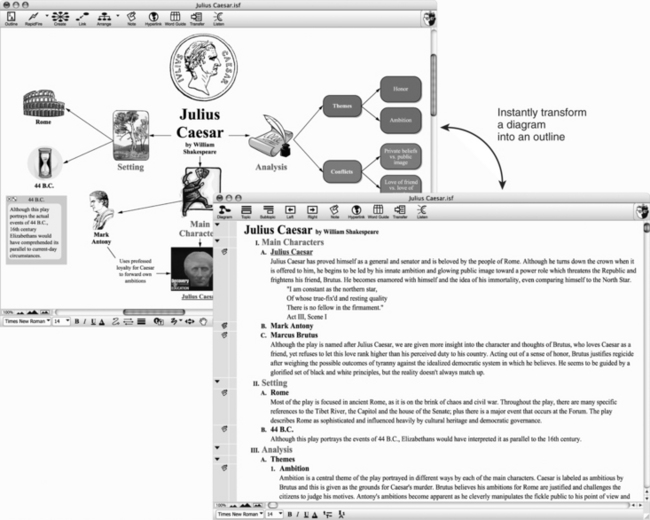
Figure 10-11 Inspiration software allows the development of ideas in a graphical format and automatic conversion to text. (Courtesy Inspiration Software, Inc, Beaverton, Ore., http://www.inspiration.com/.)
Alternative Input.
Alternative input technologies offer the user different modalities for providing input commands or information to a device. One example is voice recognition software (see Chapter 7). Voice recognition can be useful for generation of text input by individuals with cognitive disabilities that limit their ability to write (LoPresti, Mihailidis, and Kirsch, 2004). Users are able to enter information or commands to a computer through voice dictation instead of mouse and keyboard. For TBI, speech recognition programs have all shown to be useful in clinical trials (Kim et al, 1999; Van Hulle and Hux, 2005). Voice recognition can be very effective in improving writing for students with LDs (Sitko, Laine, and Sitko, 2005). A person with an LD may be able to verbally articulate thoughts very well but, because of visual processing problems, may have trouble getting words down on paper: “the words jump all over the page.” Automatic speech recognition provides an alternative for this type of individual.
Voice memo recorders are used in a similar manner, replacing pen-and-paper or keyboard entry as a means of storing messages for future reference. For those who are unable to make the fine motor movements required for handwriting, a portable notebook computer (e.g., Neo by AlphaSmart, www.alphasmart.com/) with abbreviation expansion or word completion/prediction (see Chapter 7) may be more efficient. Buttons with descriptive pictures and text may make the function of input controls more obvious.
The Aurora (AUtonomous RObotic platform as a Remedial tool for children with Autism) Project investigated the feasibility of robotic toys serving therapeutic roles in improving social interaction in autistic children (Dautenhahn and Werry, 2004). Children were presented with an interactive robot toy, which was programmed to sense and imitate the children’s movement. Although the long-term therapeutic effect of the toy is still unknown, preliminary findings and anecdotal reports from the project suggest that robots can potentially serve as a mediator in facilitating interaction between autistic children and their peers or other adults (Dautenhahn and Werry, 2004; Robins et al, 2004) and encouraged playing. Robins et al (2004) reported an increase in mutual gaze and gaze following among three autistic children and the experimenter during interaction with a robotic toy, suggesting that joint attention was established. The Aurora Project is an innovative application of alternative input using robotics as an intermediary through which a person with autism can communicate with others. Because individuals with autism often demonstrate deficits in interpreting and predicting human behavior, interactions with robots can provide a relatively simplified, safe, predictable, and reliable environment.
Alternative Output.
Alternative output technologies offer users a nontraditional means of acquiring feedback or information from a device. Some individuals are more visually oriented, and print or screen displays work well for them. For others information is easiest to access in auditory form. Synthesized or digitized speech output is often used for auditory information. The principles of electronically generated speech and its application in augmentative communication systems are discussed in Chapter 7. Many devices that were originally developed for individuals who have limited vision make use of synthesized speech to enhance or replace a typically visual output. Examples of these devices include text-to-speech screen readers for computer applications, talking calculators, a tape measure with speech output, and bar code scanners (see Chapter 8).
Synthesized speech and digitized speech (see Chapter 7) are both used to provide auditory information to children and adults with intellectual disabilities (see prompting and cueing section in this chapter). Synthesized speech associated with a word processor (for example, Write Outloud, Don Johnston, Inc, Volo, Ill., www.donjohnston.com) for students with LDs can provide an additional modality that is helpful in writing and editing. The greatest benefit may be in reducing the most common misspellings (i.e., those that are “non-real” words such as “thar” for “there” as opposed to word substitutions such as “to” for “two”) (Lewis, 2005). Synthetic speech output also was useful when the spell checker could not suggest any words because of gross misspelling. The impact of speech output is more significant for younger learners than for secondary students. In some cases, the impact of speech synthesizers in providing writing assistance to students with LDs is less significant than the effective use of spell checkers and word prediction (Lewis, 2005). However, as illustrated by the following case study, auditory output by speech synthesis is an effective tool for students with reading or writing difficulties associated with LDs (Sitko, Laine, and Sitko, 2005). Students can often detect errors in their writing more easily if they hear the words as opposed to reading them in written form. Adding speech synthesis to the presentation of screen-based text provides a multimodal output that also assists in reading and writing.
Because many individuals with LDs have greater comprehension of auditory than written information, synthesized speech output in “talking books” or “e-books” has been shown to be effective in improving reading abilities (Ashton, 2005). E-books have a number of features that are useful for students who have LDs. For example, words can be highlighted in the text as they are spoken or the document can be presented in an enlarged font. For students who need spelling practice, a spelling activity can be selected that uses the words from the story. Using software and on-line tools, teachers can create their own e-books (Ashton, 2005).
The Readingpen (WizCom Technologies, Ashton, Mass., www.wizcomtech.com/), an assistive reading device (Figure 10-12), is a hand-held scanner that is designed specifically for school-age reading levels. As the pen is moved across a word or full line of text, the text is spoken aloud. Using a children’s dictionary and thesaurus, the device also provides information to the student about word meaning and alternative words through a three-line built-in display. The pen provides a portable way for people with reading difficulties, LDs, or dyslexia to get immediate word support when they are reading. The scanned text may be spoken word by word or line by line. An earphone connection is available for privacy.
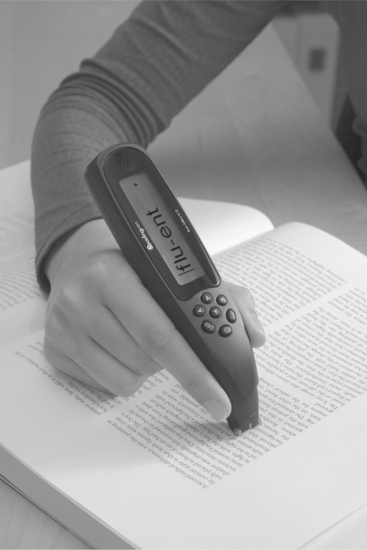
Figure 10-12 The Readingpen. Text is scanned into the pen’s memory. (Courtesy WizCom technologies, Ashton, MA, www.wizcomtech.com/.)
Altering the visual appearance of the computer screen can also aid individuals with disorders such as dyslexia (LoPresti, Mihailidis, and Kirsch, 2004). Changing features such as font size; background/foreground color combinations; contrast; spacing between words, letters, and paragraphs; and use of graphics can all improve access to screen-based information.
Tracking and Identification.
This final category consists of technologies that involve the tracking and identification of people or items. Such devices often provide an extra degree of safety for users who might not have the cognitive skills required to work their way out of problematic situations. For instance, the SmartChip (www.smartchip.com/) ID is a wearable electronic device that stores critical information about the user. If the user became lost, the stored information can be made available to someone who could make use of this information to ensure the user got home safely.
Another method of tracking is home monitoring systems that can keep track of the status of a person with cognitive disabilities. These systems include monitoring of the environment within a house (e.g., gas or smoke detectors), cardiac parameters (heart rate, arrhythmias), objects, and people (e.g., sensors that determine whether a person has left his or her bed by monitoring the weight applied to a pressure sensor place under the bed frame), and emergency call (a button that is pushed and automatically dials a central station). The suppliers (for example, in Canada, www.lifeline.ca/, in the United Kingdom, http://www.tunstall.co.uk/home.asp, and in the United States, http://www.lifestation.com/?ASK=Medical-Alert) of these systems describe many case examples on their Web sites that illustrate how these systems can make it possible for persons with memory loss, wandering, and other cognitive limitations to continue to live at home (see the following case study). These systems are often incorporated into the Smart House concept discussed in this chapter.
Cognitive Assistive Technologies With Multiple Functions
The preceding sections discussed assistive technologies that are designed primarily for one function, although some may be useful for multiple needs. There are also devices designed for multiple functions. These devices are often designed to provide a more comprehensive assistance to persons with certain disorders.
A design concept and prototype for a cognitive prosthesis was developed by the Rehabilitation Engineering Research Center (RERC) on Mobile Wireless Technologies for Persons with Disabilities at Georgia Tech University (Jones, 2006). The prototype was developed on a PDA platform and included three broad mobile wireless technology applications that support community re-entry for people who have cognitive impairments resulting from TBI: These are (1) time management, (2) way finding in the community with use of GPS navigational tools, and (3) prompting and cueing to initiate and sustain engagement in activity. The user interface design was critical to ensure that it was understandable and usable to people with significant cognitive impairments (Haberman, Jones, and Meuller, 2005). A drawing of the user interface is shown in Figure 10-13. The major features of the prototype were an event reminder system, a contact database, a location finder, a list tracker, image capture capability, a medical manager, a money manager, and messaging capability.
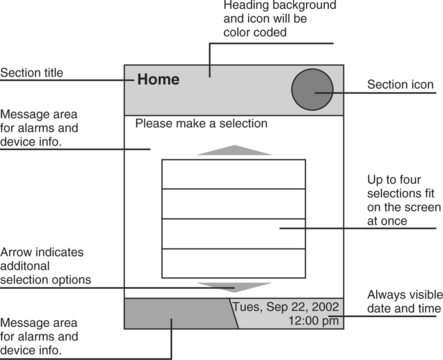
Figure 10-13 User interface for a prototype mobile cognitive prosthesis. (Courtesy Rehabilitation Engineering Research Center for Wireless Technologies, http://www.wirelessrerc.gatech.edu/projects/development/d5_index.htm.)
The European Union Telematics Applications Supporting Cognition (TASC) project developed a device that focused on the areas of need for persons with cognitive disability in guidance, information provision, communication, environmental control, and planning and time management (Fagerberg, 1999). TASC consists of five software modules implemented with Java components that run on standard computers. Information can be presented with text, pictures, symbols, and sound. The guidance module (TASC Prompter) guides the user through steps of daily activities such as clothes selection or meal preparations and reminds when it is time to do a specific activity like catch a bus or go to work. Information such as television or bus schedules and weather forecasts can be introduced directly into the system or can be downloaded from the Internet through the TASC Information Provider presented in the user’s chosen format. The user can receive and make phone calls with the Communicator module, which also supports FAX transmission and allows either dialing in the standard fashion number-by-number or pressing a key labeled with a picture. For environmental control the TASC Supervisor carries out the appropriate action by using data from sensors combined with user instructions. The TASC Planner supports the independent development of plans and schedules by keeping track of details such as time and length of an activity. The user can then schedule and reschedule activities while the Planner keeps track of the details. All the modules can be programmed to fit the needs of the user. Personalized information such as photographs and voice input can easily be introduced into the system. The benefits of the TASC system are that persons with cognitive disabilities can achieve increased independence and self-assurance, improved social contacts, reduction in the need for help from others with daily activities, increased quality of life, and reduced costs for assistance and institutional care.
SUMMARY
Individuals who have cognitive disabilities of various types and severity can benefit from the use of assistive technologies. The implementation of these assistive technologies and strategies is based on the augmentation of or substitution for cognitive skills that are required for the completion of specific functional tasks. Cognitive disabilities represent a wide variety of skill levels and severity, and an equally wide range of types of assistive technologies are available to ameliorate these conditions.
1. Pick a specific cognitive disability, an activity, and a context and describe how the HAAT model (as described in Chapter 2) would be applied to determine the best assistive technology approach (hard and soft technologies) for that individual.
2. How do assistive technology approaches differ for congenital and acquired cognitive disabilities?
3. Pick a specific disorder and describe both the cognitive skills that are likely to be available for use of an assistive device and those that may need to be replaced or augmented by such a device.
4. List the major characteristics of mild cognitive disabilities as they relate to the use of assistive technologies.
5. List the major characteristics of intellectual disabilities as they relate to the use of assistive technologies.
6. List the major characteristics of dementia that may be aided by cognitive assistive technologies.
7. In terms of recommendation of assistive technologies, how do CVA and TBI differ from other acquired cognitive disabilities and from each other?
8. How do the considerations for mild cognitive disability, intellectual disability, and acquired disability differ? What are the implications of these differences for the application of assistive technologies?
9. Why is ADHD not considered an LD?
10. What interventions are commonly applied to the treatment of LDs?
11. Describe the differences between remediation and compensation as they apply to cognitive disabilities.
12. How do the terms remediation and compensation differ when applied to sensory (Chapter 8 and 9) or motor (Chapter 7, 11, or 12) disabilities as opposed to cognitive disabilities?
13. What are the currently available assistive technologies that are beneficial to children with ASD? What are the efficacies and feasibilities of these technologies in replacing or augmenting skill deficits?
14. What are the characteristics of PDA-based time management systems for persons with intellectual disabilities?
15. Describe the general characteristics of memory aids.
16. Contrast the use of memory aids in intellectual disabilities, dementia, and TBI.
17. Describe how systems designed to provide prompting, cueing, or coaching are applied to assist persons with intellectual disabilities.
18. How do applications of prompting, cueing, or coaching systems differ between applications for individuals with intellectual disabilities and those with dementia.
19. What is meant by the term stimuli control, and how is this concept applied to Web page design?
20. What are the major challenges in using assistive technologies to address the problems faced by individuals with dementia?
21. How can word completion and word prediction benefit students who have LDs? What are the limitations in this application?
22. What are the most commonly used alternatives to printed text output?
23. What is concept mapping and how can it benefit students who have LDs?
24. What should be considered when recommending a time management device for a stroke patient?
25. What is a cognitive prosthesis? Describe how these devices are applied to assist individuals with TBI.
References
American Psychiatric Association. Diagnostic and statistical manual of mental disorders, DSM-IV, ed 4. Washington DC: American Psychiatric Association, 2000.
Anderson, JR. Cognitive psychology and its implications. New York: Worth Publishers, 2000.
Ashcraft, MH. Fundamentals of cognition. New York: Addison-Wesley, 1998.
Ashton, TM. Students with learning disabilities using assistive technology in the inclusive classroom. In: Edyburn D, Higgins K, Boone R, eds. Handbook of special education technology research and practice. Whitefish Bay, Wis.: Knowledge by Design, Inc.; 2005:229–238.
Atkinson, RC, Shiffrin, RM, Human memory: a proposed system and its control processes. Spence, KW, Spence, JT, eds. The psychology of learning and motivation: advances in research and theory, New York, Academic Press, 1968;vol 2:89–195.
Bergman, MM. The benefits of a cognitive orthotic in brain injury rehabilitation. J Head Trauma Rehabil. 2002;17:431–445.
Bower, B, Mind-expanding machines: artificial intelligence meets good old-fashioned human thought. Sci News Aug 30, 2003. http://www.findarticles.com/p/articles/mi_m1200/is_9_164/ai_108050570. [Accessed May 5, 2005].
Bruno, AA. Motor recovery in stroke. http://www.emedicine.com/pmr/topic234.htm. [Accessed April 6, 2005.].
Chakrabarti, S, Fombonne, E. Pervasive developmental disorders in preschool children. JAMA. 2001;285:3093–3099.
Chen, Z, Sanchez, RP, Campbell, T. From beyond to within grasp: the rudiments of analogical problem solving in 10- to 13-month-olds. Dev Psychol. 1997;33:790–801.
Cherry, EC. Some experiments on the recognition of speech, with one and with two ears. J Acoust Soc Am. 1953;25:975–979.
Cicerone, KD, et al. Evidence-based cognitive rehabilitation: updated review of the literature from 1998 through 2002. Arch Phys Med Rehabil. 2005;86:1681–1692.
Cole E, Dehdashti P: Cognitive prosthetics and telerehabilitation: approaches for the rehabilitation of mild brain injuries, computer-based cognitive prosthetics: assistive technology for the treatment of cognitive disabilities. In: Proceedings of the Third International ACM Conference on Assistive Technologies, ACM SIGCAPH, Marina del Rey, CA, 1998, The Conference.
Cole E, Matthews MK: Proceedings of Basil Therapy Congress, Basel, Switzerland, pp 111-120 (June 1999): http://www.brain-rehab.com/pdf/cpt1999.pdf. Accessed July 27, 2006.
Coyle, C, Cole, P. A videotaped self-modeling and self-monitoring treatment program to decrease off-task behavior in children with autism. J Intellect Dev Dis. 2004;29:3–15.
Daley, D. Attention deficit hyperactivity disorder: a review of the essential facts. Child Care Health Dev. 2006;32:193–204.
Dautenhahn, K, Werry, I. Towards interactive robots in autism therapy: background, motivation and challenges. Pragmatics Cognition. 2004;12:1–35.
Davies, DK, Stock, SE, Wehmeyer, ML. Enhancing internet access for individuals with mental retardation through use of a specialized web browser: a pilot study. Educ Train Ment Retard Dev Disabil. 2001;36:107–113.
Davies, DK, Stock, SE, Wehmeyer, ML. Enhancing independent time-management skills of individuals with mental retardation using a palmtop personal computer. Ment Retard. 2002;40:358–365.
Davies, DK, Stock, SE, Wehmeyer, ML. A Palmtop computer-based intelligent aids for individuals with intellectual disabilities to increase independent decision making. Res Pract Persons Severe Disabil. 2003;4:182–193.
Dawodu SY: Traumatic brain injury: Definition, epidemiology, pathophysiology, WebMD: e-medicine: http://www.emedicine.com/pmr/topic212.htm#top. Accessed August 27, 2006.
Demaerschalk, B, Hachinski, V. Stroke (brain attack), Griffith’s: 5-minute clinical consult: a reference for clinicians:. http://www.5mcc.com/Assets/SUMMARY/TP0175.html. [Accessed August 27, 2006.].
Edyburn, DL. Assistive technology and students with mild disabilities: from consideration to outcome measurement. In: Edyburn D, Higgins K, Boone R, eds. Handbook of special education technology research and practice. Whitefish Bay, WI: Knowledge by Design, Inc.; 2005:239–270.
Edyburn, DL. Remediation vs. compensation: a critical decision point in assistive technology consideration. http://www.connsensebulletin.com/edyburnv4n3.html. [Accessed August 3, 2006.].
Erlandson, RF, Stant, D. Polka-yoke process controller: designed for individuals with cognitive impairments. Assist Technol. 1998;10:102–112.
Fagerberg G: Support software for persons with cognitive disabilities, Proceedings CSUN Technology And Persons With Disabilities Conference (1999): http://www.csun.edu/cod/conf/1999/proceedings/session0275.htm. Accessed July 18, 2006.
Galotti, KM. Cognitive psychology: In and out of the laboratory. Belmont, Calif.: Wadsworth, 2004.
Goldsmith, T, LeBlanc, L. Use of technology in interventions for children with autism. J Early Intens Behav Intervent. 2004;1:166–178.
Golisz, KM, Toglia, JP. Perception and cognition. In: Blesedell Crepeau E, et al, eds. Willard and Spackman’s occupational therapy. ed 10. Philadelphia, PA: Lippincott Williams & Wilkins; 2003:395–416.
Gorman, P, et al. Effectiveness of the ISAAC cognitive prosthetic system for improving rehabilitation outcomes with neurofunctional impairment. Neurorehabilitation. 2003;18:57–67.
Granlund, M, et al. Assistive technology for cognitive disability. Technol Disabil. 1995;4:205–214.
Haberman V, Jones ML, Meuller JL: Design of a mobile wireless technology for individuals with cognitive impairment, Proceedings 2005RESNA Conference: http://resna.org/ProfResources/Publications/Proceedings/2005/Research/Other/Hamberman.php. Accessed August 3, 2006.
Haigh, KZ, Kiff, LM, Ho, G. The independent lifestyle assistant: lessons learned. Assist Technol. 2006;18:87–106.
Hunt, RR, Ellis, HC. Fundamentals of cognitive psychology, ed 6. Boston: McGraw-Hill College, 1999.
Johnson, E, Mellard, DF, Byrd, SE. Alternative models of learning disabilities identification. J Learn Disabil. 2005;38:569–572.
Jones M: Index—a design concept and prototype for a cognitive prosthesis, Wireless RERC: http://www.wirelessrerc.gatech.edu/projects/development/d5.html. Accessed August 3, 2006.
Kautz H et al: Opportunity knocks: a community navigation aid, University of Washington (2004): http://www.cs.washington.edu/homes/kautz/talks/access-symposium-2004.ppt. Accessed July 27, 2006.
Kim, HJ, et al. Utility of a microcomputer as an external memory aid for a memory-impaired head injury patient during in-patient rehabilitation. Brain Injury. 1999;13:147–150.
Levinson, RL. The planning and execution assistant and trainer. J Head Trauma Rehabil. 1997;12:769–775.
Lewis, RB. Classroom technology for students with learning disabilities. In: Edyburn D, Higgins K, Boone R, eds. Handbook of special education technology research and practice. Whitefish Bay, WI: Knowledge by Design, Inc.; 2005:325–334.
LoPresti, EF, Mihailidis, A, Kirsch, N. Assistive technology for cognitive rehabilitation: state of the art. Neuropsycholl Rehabil. 2004;14:5–39.
Mann, WC. Smart technology for aging, disability and independence. New York: John Wiley, 2005.
McKelvey M et al: Performance of a person with chronic aphasia using a visual scene display prototype, J Med Speech Lang Pathol. In press.
Mihailidis, A. The efficiency of an intelligent cognitive orthosis to facilitate hand washing by persons with moderate to severe dementia. Neuropsychol Rehabil. 2004;14:135–171.
Mihailidis, A, Fernie, GR, Barbenel, JC. The use of artificial intelligence in the design of an intelligent cognitive orthosis for people with dementia. Assist Technol. 2001;13:3–29.
Newell, A, Simon, H. Human problem solving. Englewood Cliffs, NJ: Prentice-Hall, 1972.
Novack T: What to expect After TBI, Presented at the Recovery after TBI Conference (September 1999): http://images.main.uab.edu/spinalcord/pdffiles/tbi3pdf.pdf. Accessed October 31, 2006.
O’Sullivan, SB, Schmitz, TJ. Physical rehabilitation: assessment and treatment. Philadelphia: FA Davis, 1994.
Piras, MR, et al. Longitudinal study of cognitive dysfunction in multiple sclerosis: Neuropsychological, neuroradiological, and neurophysiological findings. J Neurol Neurosurg Psychiatry. 2002;74:878–885.
Rabins, PV, Lyketsos, CG, Steele, CD. Practical dementia care, ed 2. Oxford: Oxford Press, 2006.
Reed, SK. Cognition: theory and applications. Belmont, CA: Wadsworth, 2000.
RESNA. Clinical application of assistive technology. http://www.rehabtool.com/forum/discussions/94.html, 1998. [Accessed April 6, 2005,].
Robins, B, et al. Robot-mediated joint attention in children with autism: a case study in robot-human interaction. Interaction Stud Social Behav Commun Biol Artificial Syst. 2004;5:161–198.
Schuck, SEB, Crinella, FM. Why children with ADHD do not have low IQs. J Learning Disabil. 2005;38:262–280.
Shabani, DB, et al. Increasing social initiations in children with autism: effects of a tactile prompt. J Applied Behavior Analysis. 2002;35:79–83.
Shimura, AP. Priming effects in amnesia: evidence for a dissociable memory function. Q J Exp Psychol. 1986;38A:619–644.
Sitko, MC, Laine, CJ, Sitko, CJ. Writing tools: technology and strategies for the struggling writer. In: Edyburn D, Higgins K, Boone R, eds. Handbook of special education technology research and practice. Whitefish Bay, WI: Knowledge by Design, Inc.; 2005:571–598.
Sternberg, RJ. Cognitive psychology, ed 3. Belmont, CA: Wadsworth, 2003.
Sturm, JM. Rankin-Erickson JL: Effects of hand-drawn and computer-generated concept mapping on the expository writing of middle school students with learning disabilities. Learn Disabil Res Pract. 2002;17:124–139.
Szymkowiak, A, et al. A memory aid with remote communication: preliminary findings. Technol Disabil. 2005;17:217–225.
Taber, TA, et al. Use of self-operated auditory prompts to decrease off-task behavior for a student with autism and moderate mental retardation. Focus Autism Other Dev Disabil. 1999;14:159–166.
Taylor, BA, Levin, L. Teaching a student with autism to make verbal initiations: effects of a tactile prompt. J App Behav Anal. 1998;31:651–654.
Taylor, BA, et al. Teaching teenagers with autism to seek assistance when lost. J Appl Behav Anal. 2004;37:79–82.
Tulving, E. Episodic and semantic memory. In: Tulving E, Donaldson W, eds. Organization of memory. New York: Academic Press; 1972:381–403.
Tulving, E. Elements of episodic memory. New York: Oxford University Press, 1983.
Van Hulle, A, Hux, K. Improvement patterns among survivors of brain injury: three case examples documenting the effectiveness of memory compensation strategies. Brain Inj. 2005;20:101–109.
Wehmeyer, ML, Smith, SJ, Davies, DK. Technology use and students with intellectual disability: universal design for all students. In: Edyburn D, Higgins K, Boone R, eds. Handbook of special education technology research and practice. Whitefish Bay, WI: Knowledge by Design, Inc.; 2005:309–323.
Wehmeyer, ML, et al. Technology use and people with mental retardation. Int Rev Res Ment Retard. 2004;29:291–337.
Willingham, DB. Cognition: the thinking animal. Princeton, NJ: Prentice-Hall, 2001.
World Health Organization. International classification of functioning, disability and health (ICF). Geneva, Switzerland: World Health Organization, 2001.