Disabled Human User of Assistive Technologies
INFORMATION PROCESSING MODEL OF THE ASSISTIVE TECHNOLOGY SYSTEM USER
SENSORY FUNCTION AS RELATED TO ASSISTIVE TECHNOLOGY USE
Control of Posture and Position
PERCEPTUAL FUNCTION AS RELATED TO ASSISTIVE TECHNOLOGY USE
COGNITIVE FUNCTION AND DEVELOPMENT AS RELATED TO ASSISTIVE TECHNOLOGY USE
Developmental Disabilities and Cognitive Deficits
Problem Solving and Decision Making
PSYCHOSOCIAL FUNCTION AS RELATED TO ASSISTIVE TECHNOLOGY USE
Assistive Technology Use Over the Life Span
MOTOR CONTROL AS RELATED TO ASSISTIVE TECHNOLOGY USE
Speed and Accuracy of Movements
Development of Movement Patterns Through Motor Learning
Relationship Between a Stimulus and the Resulting Movement
EFFECTOR FUNCTION AS RELATED TO ASSISTIVE TECHNOLOGY USE
Factors Underlying the Use of Effectors
On completing this chapter, you will be able to do the following:
1 Place the human user of assistive technologies in the proper context relative to the activities and contexts of human performance
2 Describe and apply an information processing model of the disabled human operator of assistive technologies
3 Use basic human factors and neuroscience concepts to describe the interaction between persons with disabilities and assistive devices
4 Describe how disabilities, learning (including experience), age, and changing conditions affect the human performance model and the interaction among the human, the activity, and the context
5 Apply basic principles of human performance to specific application areas (activities) and contexts
In the previous chapter the assistive technology system and the interrelationships among its component parts are described. In this chapter the focus is on the human user of assistive technologies. It is assumed that the reader has a general knowledge of normal human physiology and of disabilities, and therefore the emphasis is on those characteristics of disability that influence the use of assistive technologies. The Disability Statistics Center at the University of California, San Francisco, has provided the following statistics based on the National Health Interview Survey, a continuing national household survey consisting of 49,401 household interviews with 128,412 people in 1992 (www.dsc.ucsf.edu). Data collected include information regarding basic personal assistance needs (i.e., whether people need help with activities of daily living such as bathing, eating, dressing, or getting around inside) and routine personal assistance needs (i.e., whether people need help with instrumental activities of daily living such as household chores, doing necessary business, shopping, or getting around for other purposes) as a result of chronic health conditions.
• Approximately 15% (37.7 million) of the United States’ population have a limitation that affects a major life activity such as working or going to school. These individuals report 1.6 conditions per person on average, for a total of 61 million limiting conditions.
• More than 19 million individuals ages 18 to 69 have physical or mental conditions that keep them from working, attending school, or maintaining a household. Women report a higher number of activity-limiting conditions than do men.
• Minorities, the elderly, and those in lower socioeconomic populations have a greater incidence of disabilities and need greater assistance in both activities of daily living (52% more than 65 years old) and instrumental activities of daily living (58% more than age 65 years).
• A newborn infant can be expected to have 13 years of limited activity out of a 75-year life expectancy.
• National disability-related costs are more than $170 billion annually.
These statistics indicate that activity-limiting disabilities are widespread, unevenly distributed across the general population, and expensive. Assistive technologies, if appropriately applied, can help to overcome the activity limitations imposed by disabilities. This requires a thorough understanding of human abilities and skills, especially in the presence of a disability.
In designing assistive technology systems, it is important to build on the skills of the user and provide assistive devices that augment or replace functional limitations. Because the goal is to increase functional independence for individuals with disabilities, it is important to focus on remaining function, rather than on lost function. In this chapter a description of the human user of assistive technologies is developed.
INFORMATION PROCESSING MODEL OF THE ASSISTIVE TECHNOLOGY SYSTEM USER
Human factors engineers and psychologists have developed the model shown in Figure 3-1 to describe the human component of a human-machine interaction (Bailey, 1989). This model is useful for describing the human operator of an assistive technology system. The individual blocks shown in Figure 3-1 delineate functional rather than structural components, and they are used to help identify the important considerations in human-machine interaction. Bailey (1989) lists three things that a system designer must know about the user: (1) what can be done (skills), (2) what cannot be done (limitations), and (3) what will be done (motivation). Motivation is directly related to the person’s goals and needs and how well the assistive technology system meets them.
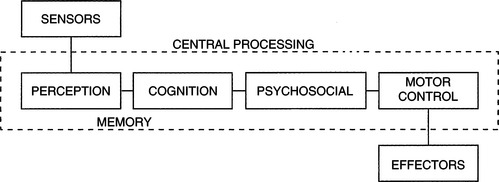
Figure 3-1 An information processing model of the human operator of assistive technologies. Each block represents a group of functions related to the use of technology. Taken together, these components constitute the intrinsic enablers for the human.
Skills and limitations in the three component areas shown in Figure 3-1 are considered when designing assistive technology systems. Taken together, these components constitute the intrinsic enablers for the human. Input from sensors is necessary for obtaining data from the environment, and limitations can arise in both the sensitivity (minimum detectable levels of light, sound, or pressure) and range (allowable variation in size, amplitude, or magnitude of the sensory input). When assistive technology system use is being considered, the visual, auditory, tactile, proprioceptive, kinesthetic, and vestibular sensory systems all play important roles. Sensory data produced by each of these systems are important for the successful use of assistive technologies. Some assistive technologies specifically address sensory loss. For example, reading and mobility systems for the visually impaired and hearing aids for individuals with auditory impairment are designed to compensate for these specific losses (see Chapters 8 and 9). However, sensory function affects virtually all areas of assistive technology application, and it is important to consider sensory function as an integral part of the overall human capabilities required for the successful operation of an assistive technology system.
The term effectors will be used to describe the neural, muscular, and skeletal elements of the human body that provide movement or motor output. The result of the movement of the effectors is motor output. These elements work together to allow movement under the control of central processing and in response to sensory input. Limitations can arise from impairments in any element or combinations of them. Effectors provide the motor outputs that can be used for the control of assistive technology systems. Often, assistive technology systems are controlled by hand movements. For example, powered wheelchairs typically use joystick control activated by hand movements, and computers and augmentative communication systems use hand and finger movements for keyboard use. However, other anatomical sites may be used for control, and the components of postural control and reflexes also contribute to the generation of motor output.
Interposed between the sensors and effectors are the central processing functions of perception, cognition, neuromuscular control (including motor planning), and psychological factors. Perception is the interpretation and assignment of meaning to data received from the sensors, and it involves an interaction between information derived from sensed data and information stored in memory based on previous sensory experiences (Bailey, 1989). As Dunn (1991) points out, sensory and perceptual function provides the mechanisms by which an individual interacts with the environment. It is the combination and interpretation of data from all the sensory systems that provide a meaningful picture of the environment and our interaction with it.
The term cognition refers to attention, memory, problem solving, decision making, learning, language, and other related tasks. As pointed out by Duchek (1991), virtually all aspects of performance are based on cognitive function, including performance that uses assistive technology systems and human performance in general. For example, the use of a powered wheelchair requires several types of cognitive function. The human operator must visually scan the environment, process the sensory data, make decisions as to the direction of movement desired, and activate the corresponding effector to cause the motion of the wheelchair in the desired direction. Once in motion, the user must attend to the environment to avoid obstacles and hazards and make instantaneous decisions regarding speed and direction. The user may also be required to engage in problem solving to negotiate a tight space or recover from an error. Cognitive processes involved in this example include attention, decision making, problem solving, language (e.g., spatial concepts such as left, right, forward, back), and memory. Without these capabilities, it would be difficult to control a powered wheelchair effectively.
It is also sometimes difficult to separate cognitive performance from sensory or motor performance. For example, an individual using an electric feeding device (see Chapter 14) requires sensory input to locate food on a plate, decision making to select the desired food item to be eaten, sufficient motor skills to activate a control interface that directs the spoon to the plate to pick up food and move it to the mouth, and monitoring of the path of the spoon as it travels. Because this is a complex set of tasks, it is difficult to determine whether failure to complete them successfully is caused by a sensory or a perceptual problem (e.g., difficulty in separating the food from the background of the plate), a cognitive problem (e.g., forgetting what the sequence of tasks is or inability to attend long enough to complete the task), or a motor limitation (e.g., inability to activate the control interface or inability to physically remove the food from the spoon because of lack of oral-motor control).
Motor control is the result of the integration of sensory, perceptual, and cognitive components into a motor pattern that is executed by the effectors. This process involves many degrees of feedback and feed-forward control, and there are many current theories relating to the precise mechanisms involved (see Burgess, 1989, for example). The term motor control refers to the central processing components of effector regulation. These components may be in the brain or spinal cord, and smooth, precise movements are possible only through integration of information from the sensors, other central nervous system (CNS) components (e.g., perception, decision making), and feedback from the effectors.
Motor planning is used to describe the process by which purposeful movements are executed to accomplish a purposeful task (Warren, 1991). This is a central processing activity that requires the highest level of motor control. For example, the tasks of writing, eating, using a hand tool, and typing all require motor planning for successful completion. Motor learning occurs as a task is practiced over and over, and many tasks become automatic with practice (i.e., we are not aware of the individual steps in the task). The learner must concentrate on each step to learn the task. However, although the task may become automatic or subconscious, motor planning is still involved; an individual with CNS damage may lose this ability. Thus motor output involves sensory data collection (from internal and external sensors), interpretation and integration of these data (perception), conscious planning of a movement (not always necessary), development of a movement pattern that is responsive to the plan and consistent with the sensory data (motor control), and execution of the movement (effectors). Motor control is discussed in detail later in this chapter.
Psychosocial function consists of identity, self-protection, and motivation. These factors are related to the acceptance of a disability, the approach a person takes to the assistive technology, and how effective the technology can be for the person. Concepts from self-identity and self-protection are used to describe how a person with a disability might interact with assistive technologies and how successful he is likely to be in using them. Motivation greatly influences how much an individual works to develop skill in using an assistive technology and the degree to which he or she is successful in that use.
Limitations in function can occur in any of these areas as a result of trauma, disease, or a congenital condition. A major goal of assessment for the purpose of designing assistive technology systems is to identify the disabled person’s skills in the areas of sensory function, central processing, and motor output and control.
SENSORY FUNCTION AS RELATED TO ASSISTIVE TECHNOLOGY USE
In this section the major sensory systems that are involved in assistive technology system use are described. The emphasis is on human sensory performance and how it affects use of assistive technologies to compensate for sensory limitations. These compensatory technologies are discussed in succeeding chapters.
Visual Function
Visual function is important (but not essential) for the effective use of assistive technology systems, especially regarding access systems. For example, in using augmentative communication systems, individual items must be found in arrays of vocabulary elements, scanning cursors must be tracked, and visual feedback is often used to signify successful message generation. Likewise, to use a powered wheelchair, visual scanning of the environment must be present, and there must be adequate acuity and visual field to guide the chair around obstacles effectively, safely, and efficiently. For individuals who have visual impairments, reading print material or computer displays can be difficult or impossible, and assistive technologies can be of help.
When an individual’s primary disability is visual, it is obvious that the assistive technology must accommodate needs in this area. Often other modalities must be used, typically auditory or tactile senses; general purpose visual substitution systems for mobility and reading are discussed in Chapter 8. However, as Cress et al (1981) point out, the incidence of visual impairment in individuals with severe physical disabilities may be as high as 75% to 90%. Often these visual difficulties are not identified or treated. Because assistive technology application is so dependent on the use of visual input, visual function must be carefully evaluated (see Chapter 4), and it is necessary to specify and design systems to account for special visual requirements. Several types of measurements are typically used to assess visual capability. These include visual acuity (target size), visual range or field size, visual tracking (following a target), and visual scanning (finding a specific visual target in a field of several targets). Each of these is important in the use of assistive technology systems; how they are measured is described in Chapter 4.
Visual Acuity.
The term visual acuity is used to refer to all those aspects of the visual system that are related to focusing an image on the retina and extracting sensory data from that image. Three factors are important in this process: (1) size of the object, (2) contrast between the object and the background, and (3) spacing between the object and surrounding background objects. One way to measure the size of an object is to determine the visual angle formed by that object when it is viewed at a known distance. Figure 3-2 illustrates the concept of visual angle. Visual angles of common objects include 13 minutes of arc for pica-typed letters, 2 minutes for a quarter held at arm’s length, and 1 second for a quarter at 3 miles (Bailey, 1989). The minimal visual angle threshold for the eye is approximately 1 second of arc; however, the recommended visual angle for ease of viewing in normal light is 15 minutes of arc (21 minutes in reduced light) (Bailey, 1989).
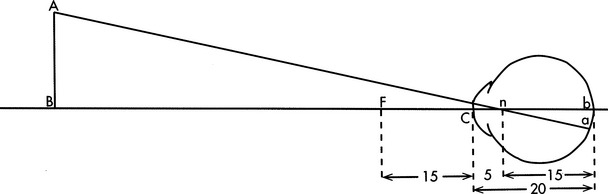
Figure 3-2 The visual angle is the angle just in front of the cornea, C, formed by object AB. (From Ruch TC, Patton HD: Physiology and biophysics, ed 19, Philadelphia, 1966, WB Saunders.)
Visual angle describes only the size of an object that is detectable. Contrast between the object and the background is equally important, and the visual threshold of interest is brightness. The minimal detectable brightness for normal human vision is a single candle seen at 30 miles on a dark, clear night (Bailey, 1989). This distance translates into measurable units of 10−6 millilamberts. For comparison, a tungsten filament light bulb emits 1 million millilamberts, and white paper has a brightness of 10 millilamberts in good reading light. The absolute value of the emission or reflection of light from an object is not as important as the degree to which the object differs from the background. The visual system functions best when contrast is high (Dunn, 1991). Busy visual fields have too many competing objects for the visual system to extract important visual data. In later chapters the implications of these aspects to assistive technology system assessment and design are discussed.
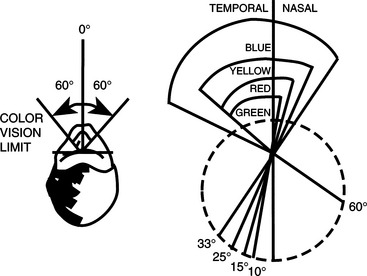
The eye is sensitive to colors in the visual spectrum (from violet to red), but it is not equally sensitive to all colors in this range. Also, different areas on the retina are sensitive to different colors (Bailey, 1989). If the eye is fixed and not allowed to rotate, the limits of color vision are 60 degrees to each side of the midline. Within this range, the response of the retina to colors is not equal for all wavelengths (colors). Figure 3-3 illustrates that blue objects are visible over the entire 60-degree range, whereas yellow, red, and green objects are recognizable only at points closer to the fixed (center) point of vision, which has implications for the design of systems for individuals who rely on peripheral vision or who have difficulty moving their eyes to track objects. If green or red is used, the person’s ability to see the object may be limited; visibility can be increased by using blue or yellow. Contrast can also be created by using different colors for foreground and background.
Visual Field.
With the head and eyes fixed on a central point, the normal range of peripheral vision in the right eye is 70 degrees to the left and 104 degrees to the right (Bailey, 1989). If the eyes are allowed to rotate but the head remains fixed, the range is 166 degrees to each side of the central point.
This typical visual field may be altered in several ways by disease or injury to the eyes, visual pathways, or brain. The most common types of visual field deficits are shown in Figure 3-4. Visual loss may occur in one or more of the quadrants of the left or right field. Dunn (1991) discusses the major causes of these losses. These types of losses are common in persons with disabilities such as cerebral palsy, traumatic brain injury, and diseases affecting the eyes and visual system. When assistive technology systems are specified and designed, the size and nature of the individual’s visual field must be taken into account.
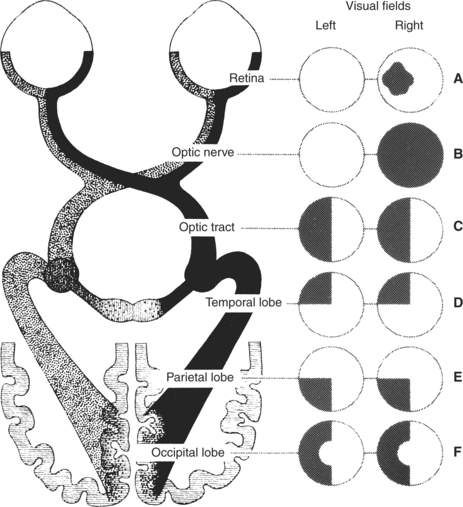
Figure 3-4 Types of visual field deficits. A, Retinal lesion: blind spot in the affected eye. B, Optic nerve lesion: partial or complete blindness in that eye. C, Optic tract or lateral geniculate lesion: blindness in the opposite half of both visual fields. D, Temporal lobe lesion: blindness in the upper quadrants of both visual fields on the side opposite the lesion. E, Parietal lobe lesion: contralateral blindness in the corresponding lower quadrants of both eyes. F, Occipital lobe lesion: contralateral blindness in the corresponding half of each visual field, but with macular sparing. (From Umphred DA: Neurological rehabilitation, ed 2, St Louis, 1990, Mosby, p 721. Courtesy Smith Kline & French Laboratories, Philadelphia.)
Visual Tracking and Scanning.
Visual tracking is the ability to follow a moving object. This skill is necessary for many assistive technology tasks. Visual scanning differs from visual tracking in that the object does not move; instead the eyes are moved to different parts of a scene to find a specific object or location within the scene. Oculomotor function is required for normal vision and for assistive technology applications in which the eyes are used as an effector (see the section on motor control in this chapter). Conjunctive eye movements are those in which the eyes move together (e.g., saccades, vestibulo-ocular reflexes, optokinetic reflexes, and smooth-slow pursuit). In disjunctive eye movements the eyes do not track together as in vergence during refocusing. These motor behaviors all need appropriate alignment of the eye muscles in addition to the intact motor system, and this is often not the case in persons with disabilities.
Eye movements are typically classified into two sets of systems: those that stabilize the retinal image and those that transfer gaze to a new target. The optokinetic and vestibulo-ocular reflexes are in the first category. All head movements serve as adequate stimuli for these reflexes; that is, the head movement serves as the input that generates the reflex. These reflexes may be impaired for many individuals with disabilities who have difficulty maintaining a stable head or trunk position. Smooth pursuit eye movements also serve to stabilize the retinal image. Transfer of gaze is accomplished by saccades, vergence, and head movements.
Visual Accommodation.
In the normal eye at rest, distant objects are focused on the retina. As the object is brought closer, the image falls in front of the retina unless the curvature of the lens is changed. The process by which the ciliary muscles change the curvature of the lens and hence the focal point of the eye is called visual accommodation. Accommodation is quantified by determining the change in the power of the lens of the eye as objects are brought closer. The power is calculated as the reciprocal of the focal distance of the eye, and it is measured in diopters (D). The closest point at which an object can still be focused is called the near point. For a person less than 20 years of age with normal visual accommodation, the near point is approximately 10 cm and the accommodation is approximately 12 D. As individuals age, their accommodative ability decreases. For example, at age 50 years the near point is at approximately 30 cm and the accommodation is reduced to less than 2 D; this situation leads to the prescription of reading glasses. Many types of disabilities affect accommodation; limitations in accommodation are referred to as accommodative insufficiency, which can be a significant factor when assistive technologies are used. For example, if a person is using a keyboard device with a visual display, the separation of these two system components may require constant accommodation as visual gaze is directed at the keyboard and then at the display and back to the keyboard. Appropriate placement of the keyboard and visual display can reduce the amount of accommodation that is required and can result in significantly improved overall system performance.
Common Visual Deficits.
Visual limitations are common in many types of disabilities. Two studies in this section illustrate how these limitations can affect the design of assistive technology systems. One example is of a congenital disability (cerebral palsy) and one example is of an adventitious disability (traumatic brain injury).
Duckman (1979) studied ocular function in a population of 25 children with cerebral palsy. He found that 92% of the children had ocular motor dysfunction of some type: 40% had significant refractive errors, 56% had strabismus, 100% had accommodative insufficiency, 100% had poor directional concepts, and 78% had visual perception dysfunction. These results parallel other reports in the literature, and they indicate that the visual system is far from normal in this population. Duckman states that the poor directional concepts were so severe that “most children did not even have a concept of direction on their own bodies” (p. 1015).
The high degree of accommodative insufficiency was not expected by Duckman, and he stated that “these children almost demonstrated ‘paralyses’ of accommodation” (p. 1015). Most of the children were unable to make shifts of as little as 0.25 D in their accommodative systems. This finding has direct bearing on tasks that require frequent redirection of gaze, such as looking at a keyboard to find the desired character and then looking at a display or screen to monitor the selections. It also helps explain the success of systems in which eye gaze is used in one plane only (e.g., vertical) rather than requiring movement horizontally and vertically (Goosens and Crain, 1987).
These considerations dictate that great care must be exercised when persons with disabilities are asked to perform visual tasks. For example, communication systems using eye gaze as a method of indicating choices typically rely on printed targets (e.g., “yes” or “no”) to which the eyes must be directed (Goosens and Crain, 1987). Given the slow movements, tracking asymmetries, and difficulties with accommodation, it is not surprising that the use of these approaches is difficult for severely disabled persons and that development of these skills can take many hours of practice (see Light, Beesley, and Collier, 1988, for example).
Tychsen and Lisberger (1986) have shown that flaws in the visuomotor systems underlie deficits in the processing of visual motion. They note that the misalignment of the eye muscles (strabismus) in early life results in a permanent misalignment of the horizontal axes for both eyes, even after surgical correction of the muscle defect. Further, their tests demonstrate (1) a nasal-temporal asymmetry in the rate of smooth pursuit eye movement, given a horizontally moving target and (2) a vertical asymmetry in smooth pursuit, given a vertically moving target. Psychophysical judgments by their subjects revealed that targets were seen to move more rapidly in one direction than in the other when the targets were traveling at the same speed.
Padula (1988) describes a similar situation for individuals with traumatic brain injuries. He describes a posttrauma vision syndrome with characteristics of exotropia, exophoria, accommodative dysfunction, convergence insufficiency, low blink rate (related to attention level), spatial disorientation, and balance and posture difficulties. Individuals with this syndrome typically have diplopia (double vision), movement of objects located in the periphery, visual memory problems, poor tracking ability, and poor concentration and attention. Padula also describes remarkable improvement in functional ability when prism lens glasses are used by these individuals. These characteristics and symptoms are similar to those described by Duckman (1979) for cerebral palsy.
Auditory Function
Several types of auditory function are important for the use of assistive technology systems. Auditory thresholds include both the amplitude and frequency of audible sounds. The amplitude of sound is measured in decibels (dB). This unit is the logarithm of the ratio of the sound pressure being heard to the smallest sound pressure detectable by the ear (20 micropascals). This minimal threshold is equivalent to the ticking of a watch under quiet conditions at 20 feet away. Because of the logarithmic calculation of decibels, a doubling of the sound pressure level in decibels is a tenfold increase in the amplitude of the sound. Figure 3-5 shows sound pressure levels for a variety of typical sounds (Bailey, 1989).
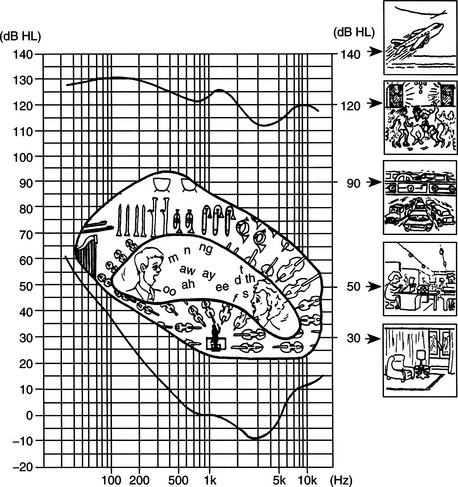
Figure 3-5 The sensitivity of the human ear to frequency is shown on the plot. This curve is normalized to 0 dB at 1000 Hz. The reference pressure is 0.0002 dynes/cm2. Along each side and in the center of the plot are shown frequencies and intensities of common sounds and speech. (From Ballantyne D: Handbook of audiological techniques, London, 1990, Butterworth-Heinemann.)
Butterworth-HeinemannThe concept of sound pressure level and the values shown in Figure 3-5 are particularly important in consideration of the context for assistive technology use. One example of the application of these principles is Carolyn’s use of an augmentative communication device that has voice synthesis output.
Impairment of auditory function has two major effects: loss of input information and inability to monitor speech output. The latter can result in significant difficulties in oral communication. There are several assistive technology approaches to providing oral communication assistance to persons who have an auditory impairment. One approach is to provide feedback, either visually or tactilely, that represents the person’s speech patterns and relates them to typical speech. A second approach is to provide alternatives to oral communication, such as visual displays that are read by the listener. These and other approaches are discussed in Chapter 9
Auditory Thresholds.
The typical range of frequencies that can be heard by the human ear is 20 to 20,000 hertz (Hz) (Bailey, 1989). The ear does not respond equally to all frequencies in this range, however, and Figure 3-5 shows the response curve of a normal ear. The vertical axis of Figure 3-5 is the sound pressure measured in decibels. The horizontal axis shows the frequencies of sound applied. The curve in this figure is the minimal threshold for detecting the sound for each frequency. The tone presented at 1000 Hz requires an intensity of 6.5 dB to sound as loud as a tone presented at 250 Hz with an intensity of 24.5 dB. This curve illustrates why alarms and other audible indicators usually have a frequency near 1000 Hz.
There are several types of tests that audiologists use in assessing hearing. Pure tone audiometry presents pure (one-frequency) tones to each ear and determines the threshold of hearing for that person. The intensity of the tone is raised in 5-dB increments until it is heard; then it is lowered in 5-dB increments until it is no longer heard. The threshold is the intensity at which the person indicates that he or she hears the tone 50% of the time. A typical audiogram is shown in Figure 3-6. On the curve shown in Figure 3-6, all values are displayed as hearing loss, and the “normal” level is shown as 0-dB loss. The curve of Figure 3-5 is incorporated into the plot of Figure 3-6. Thus for 125 Hz, a tone of 90.5 dB was heard 50% of the time in the right ear (45.5-dB threshold from Figure 3-5 added to 45-dB loss from Figure 3-6). At 1000 Hz the threshold presented was 36.5 dB. This test gives the audiologist information regarding the range of frequencies over which the person can hear.
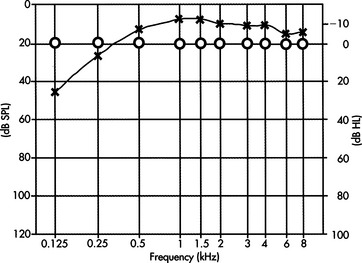
Figure 3-6 Typical audiogram test results for pure-tone testing. SPL, Sound pressure level. (From Ballantyne D: Handbook of audiological techniques, London, 1990, Butterworth-Heinemann.)
Butterworth-HeinemannAlthough the frequencies presented in the pure tone test are in the range of speech (125 to 8000 Hz), this test alone does not indicate the person’s ability to understand speech. To evaluate this function, the audiologist uses a speech recognition threshold test. In this evaluation, speech is presented, either live or recorded, at varying intensity levels, and the person’s ability to understand it is determined. The person is asked to repeat either words or sentences presented at these varying intensities.
Hearing Loss.
On the basis of these and other tests, the audiologist determines both the degree of hearing loss and the type of loss. Four types of hearing loss are typically defined (Mann, 1974). These are (1) conductive loss associated with pathological defects of the middle ear, (2) sensorineural loss associated with defects in the cochlea or auditory nerve, (3) centrally induced damage to the auditory cortex of the brain, and (4) functional deafness resulting from perceptual deficits rather than physiological conditions. Auditory impairment is considered slight if the loss is between 20 and 30 dB, mild if from 30 to 45 dB, moderate if from 60 to 75 dB, profound if from 75 to 90 db, and extreme if from 90 to 110 dB (Stach, 1998). Selection of hearing aids for these types and magnitudes of loss is discussed in Chapter 9.
Somatosensory Function
Somatosensory function plays an essential role in the design and selection of assistive technology systems. One view of the role of the somatosensory system is to provide information regarding “where the body ends and where the world begins” (Dunn, 1991, p. 239). As the major interface for many assistive devices, the somatosensory system plays a critical role in determining the effectiveness of assistive technology interventions. The close relationship between the motor and sensory systems is also evident in the decreased control capability exhibited in the presence of somatosensory impairment. For example, persons who have Hansen’s disease (leprosy) lose peripheral sensation, which results in a loss of feedback to the motor system, and fine motor abilities are significantly compromised. Poor fine motor abilities can result in significantly compromised capabilities relative to the control of assistive technologies. Somatosensory input is received from receptors in the periphery and includes pressure, hot-cold, tactile, and kinesthetic responses.
When sensation is lost, as in spinal cord injury, somatosensory input is absent and tissue damage can result from externally applied pressures such as those generated in sitting. The inability to perceive pressure or discomfort is especially important in the design of seating systems and cushions (see Chapter 6).
Control of Posture and Position
The adequate control of posture and position in space are fundamental to successful use of assistive technologies. Movement of the limbs or head requires adjustment by the internal sensory and motor control systems to maintain a functional posture. Accommodation to external forces such as gravity or movement also requires constant adjustment. This control of posture and body position in space is an integrative function of the visual, vestibular, proprioceptive, and kinesthetic senses and the motor components of the trunk, pelvis, and extremities. As discussed in Chapter 6, a fundamental requirement for the effective use of assistive technologies is that the user be positioned appropriately.
The vestibular system provides information regarding how the body interacts with the environment (Dunn, 1991). This information is integrated with other sensory data to affect control of body position and to accommodate changes brought about by movement or changing environmental data. The sensory data provided by the vestibular system are used to relate internal sensory and motor maps to the external world. Humans constantly change their position in space to achieve greater functional control (e.g., compensating for upper extremity movement or changes in balance when picking up an object) or greater comfort or to move from place to place. When sensory or motor impairments are present, assistive technologies can be used to help compensate for postural deficits. Likewise, the design of assistive technology systems must take into account any postural deficits present.
When changes in body position occur because of internal forces (e.g., reaching for a keyboard) or external factors (e.g., increasing the load on the arm by lifting an object), a sophisticated control system provides the necessary compensatory mechanical, neural, and sensory changes (Lee, 1989). This control system features both feedback (sensory data affects motor output) and feed-forward (internal commands alter the motor system, with sensory changes following) components. Seating and positioning systems can be designed for individuals who lack the motor or sensory system function adequate for postural control to help stabilize the person and facilitate functional tasks (see Chapter 6). However, many of these systems are static, providing only one fixed position for the individual. As Kangas (1991) points out, static positioning is inconsistent with normal posture, which is dynamic and varies widely with different functional tasks. Kangas also defines a functional position, which allows movement but also stabilizes the individual to facilitate function (see Chapter 6).
As discussed earlier, Padula (1988) describes the use of prism glasses, which allow the individual to place visual and vestibular data in the proper relationship to each other. In some cases assistive technologies can be used to alter sensory perception and affect motor performance. In one case an individual had continual neck flexion and only lifted his head for short periods. When he was fitted with prism lenses, he immediately lifted his head and brought it in line with his torso. Similarly, individuals who demonstrate a consistent left- or right-leaning posture have been brought to midline by the use of horizontally oriented prism lens. In motor-disabled children and adults with disabilities such as traumatic brain injury, these lenses have resulted in postural corrections independent of any additional technological intervention such as seating systems.
The visual-vestibular coupling also can be exploited in other ways. Vestibular and visual function is closely related. The degree of this coupling is directly connected to the degree of self-produced locomotion (Campos and Bertenthal, 1987). Self-produced locomotion allows much greater correlation of visual and vestibular feedback, which has obvious implications for dependent versus independent mobility using assistive technologies. Sensory input provided by the vestibular system (in concert with visual and proprioceptive data) is significantly different when an individual is in control of his or her own movement than when a passive “passenger.” A common example of this phenomenon is the observation that the driver of a car on a winding road rarely gets carsick, whereas passengers often do. Likewise, a person with a disability who is pushed in a wheelchair receives different vestibular input than when he or she is propelling the chair.
A recurring theme in this chapter is that prior experiences of the human user of assistive technology systems play a major role in both the specification and design of the system and in its success. A classic study done with newborn kittens illustrates this point for the postural control system (Held and Hein, 1963). Kittens and their mothers were reared in total darkness from birth to the initiation of visual exposure at 8 to 12 weeks of age. A special carousel was used to provide equivalent movement experiences for each kitten. Two littermates were used in each set of experiments. One kitten was allowed to move on its own; the other was moved passively by the motion of the first kitten. Only the kittens that had active movement showed fear of heights, whereas the passively moved kittens did not. These results indicate that development involving movement depends in large measure on the degree to which that movement is self-generated. An example of an assistive technology application in which these concepts are important is dependent mobility (e.g., the person is pushed by an attendant) compared with independent powered mobility.
The importance of postural and position control has other implications for the application of assistive technologies. Given that self-generated movement provides different information than passive movement, it is not surprising that children who are given access to a powered mobility system often initially spend a great deal of time turning in circles. If there is an attempt to “correct” this behavior, the child may be deprived of important vestibular, visual, and kinesthetic development. If, however, the child is allowed to experiment with the powered wheelchair and obtain the new sensory experiences associated with self-propelled locomotion, there will be greater success in getting the child to be accurate and safe with the wheelchair (Kangas, 1991).
PERCEPTUAL FUNCTION AS RELATED TO ASSISTIVE TECHNOLOGY USE
Perception adds meaning to sensory data. Human interpretation of sensory events is based on both physiological function and prior sensory and perceptual experiences. Assistive technologies can affect perceptual experience in many ways, some positive and some negative. Because the use of these technologies is often a new experience, a novice user who has a disability is likely to have significantly different perceptions of events and device interactions than do either more experienced users or nondisabled assistive technology practitioners (ATPs). In this section the implications of perceptual function to assistive technology use are explored.
All sensory systems have both physical and perceptual thresholds. The term threshold is used to describe the minimal level of input that results in an output from a sensory system. For example, the auditory system can be described in terms of the amplitude and frequency of the input information. These are physical parameters that describe the thresholds associated with sensory function. Auditory perceptual thresholds are described as loudness (related to amplitude) and pitch (related to frequency). The perceived loudness and pitch differ from individual to individual and are typical of perceptual thresholds that are often referred to as psychophysical parameters. Sensitivity to sound varies from person to person, and an acceptable sound for one person (e.g., a teenager listening to a rock band) may be perceived as uncomfortably loud by another person (e.g., a parent listening to the same rock music).
A major perceptual task is separating information about one portion of an image from the rest of the image, for example, picking one person out of a crowd or identifying one object in a picture when there are many objects present. This type of task is referred to as figure-ground discrimination because the desired object (figure) is extracted from the background (ground). Good figure-ground skill is important for many assistive technology-related activities, such as selecting one symbol out of an array of symbols on a communication device. Many disabilities interfere with the ability to make figure-ground discriminations.
Auditory localization refers to the ability to identify the spatial origin of a sound; it is based on a comparison of sound from the two ears. Separation of one source of sound from others in a noisy environment is also important for successful task completion and for the effective use of assistive technology devices in varying contexts. For example, a user of a powered wheelchair must be able to identify the location (e.g., street noise, a person approaching, a voice calling to her) of a sound if she is to respond to it. This ability is also what allows us to focus on one speaker at a party in which many conversations are going on simultaneously. Dunn (1991) uses the term auditory figure-ground discrimination to describe this capability.
Making discriminations of physical parameters is a perceptual task. Estimates of length, distance, and time are examples of such discriminations. Time estimates are an important part of assistive technology use, especially when single-switch scanning is used. Accurate estimates of time require active participation in the task (Bailey, 1989). An active person generally overestimates time (i.e., thinks time has passed faster), and a passive person underestimates time (i.e., thinks it has passed slower). This occurrence is a formal recognition of the old saying “time flies when you’re having fun.” It also underscores the importance of making the human user of assistive technologies an active participant in the training process. For example, computer-based games are often used to develop switch skills. In this approach, the disabled child is required to activate a switch to obtain interesting graphic or auditory results. Using this approach, the child may activate the switch many times in a session to obtain new results, and a training session of 30 minutes may pass very quickly. Conversely, if the switch is connected to less interesting results, such as a single light or tone, and the child is asked to practice hitting it, the training session time may drag for both the child and the teacher.
One of the major accomplishments of early childhood development is independent mobility, and early perceptual development is directly related to the acquisition of this skill. In children with motor disabilities, independent mobility is often dependent on the use of assistive technologies. Campos and Bertenthal (1987) studied the relationship between independent locomotion and perceptual development. They point out the importance of considering both growth and learning as important aspects of development. Campos and Bertenthal used an experimental paradigm that measured fear of heights (as determined by heart rate increases) in children who had developed locomotion and in those who were prelocomotor. They found that height wariness was greater in children who were independently mobile than in those who were not. They also found that the height wariness of prelocomotor infants (less than 12 months old) who had used walkers was higher than that of those who had not. In a related experiment, they studied a motorically disabled infant who had a cast and brace preventing independent mobility. When the cast and brace were removed, they found that the infant’s wariness of heights increased. These and other studies demonstrate the relationship between motor experience and perceptual development and the role of assistive technologies in each. Kermoian (1998) describes evidence relating early mobility to cognitive development in young children as they actively engage in their environment. Typically developing children use creeping, crawling, and walking to obtain environmental interaction beyond their arm’s reach. This interaction fosters cognitive and language development. Children who have mobility limitations can achieve similar benefits from the early use of assistive technologies for mobility (see Chapter 12).
Assistive technologies can also provide erroneous sensory data—that is, data that are not consistent with other environmental information available to the person. A classic example of this phenomenon is the use of prism glasses that reverse the image on the eye, creating a mirror image of the environment (Bailey, 1989). When these glasses are first put on, the world is reversed and the person becomes disoriented. However, as the glasses are worn for longer periods, the sensory perception is brought into conformance with the sensory data and the person begins to function as if the visual image was not reversed. When the glasses are removed, the person is initially disoriented, and a period of adjustment is required to bring sensory perception into line with the new, “normal” data.
Bailey (1989) describes another study in which subjects who wore prism glasses that displaced the visual image several inches to the left or right were asked to reach for a target. Once again, they adjusted the sensory perception to match the data, and they were able to access the targets accurately after a few minutes of practice. The most interesting result of this experiment, however, came when the glasses were removed. The subjects consistently missed the targets in the opposite direction from the original displacement provided by the glasses. Analysis of these results revealed that it was kinesthetic perception rather than visual perception that was altered, and the effect persisted for a much longer time than the original visual disorientation had. It was also determined that if one hand was observed doing a task during the wearing of the glasses and the other was not, only the hand that was observed with altered visual input was affected.
These experiments have profound implications for the application of assistive technologies. Because individuals with disabilities often have significantly different sensory experiences and sensory maps of the world than do able-bodied persons, it is difficult to predict the perceptual experience that an assistive technology system will provide to the person. Perceptual differences may result from the sensory input, as in the prism glasses experiment. For example, a person with an altered visual field may not receive visual data that provide a complete picture of the environment. If that person acts on the limited sensory data, he or she may make errors in using an assistive device. Because these errors will be reflected in motor performance, it is difficult to identify them as perceptual rather than motor. An individual who has a motor disability may have difficulty keeping the head aligned with the horizon (i.e., have a tilt of the head to the left or right), which affects sensory input. If the individual then attempts to use a computer input system that requires horizontal and vertical movement (relative to the horizon) to move a cursor on the screen, he or she may have difficulty because the sensory data provided regarding the external world are not consistent with the way in which the cursor moves on the screen. To improve performance, the sensory (visual and kinesthetic) data must be brought into conformance with the perceptual information. This conformance can be accomplished in several ways, such as orienting the screen to the same angle as the head or providing learning time that allows the person to adapt the perception of the computer task to the task of head movement.
COGNITIVE FUNCTION AND DEVELOPMENT AS RELATED TO ASSISTIVE TECHNOLOGY USE
Cognitive performance plays an important role in the use of assistive technologies. In this section those aspects of cognitive performance that most often affect the design and implementation of assistive technology systems are described. There are several problems associated with adequately assessing the cognitive abilities necessary for the control of assistive technology systems. The most important of these is that the assistive technology often provides a function for which the person has no experience base. In the use of a powered wheelchair, the disabled human operator may have never been responsible for his or her own mobility and may not have experience in making the required decisions. A second difficulty is that there are many cases of effective technology use that would not have been expected given the measurable cognitive function of the user.
Cognitive Development
To specify and design assistive technology systems for children, it is important to understand some fundamental concepts of cognitive development and to relate these to the use of assistive technologies by children. With the passage of federal legislation relating to early intervention and special education, services are being provided to very young (birth to 3 years) children (see Chapter 1). Many children in this age group have special needs that can be aided by assistive technologies. Although many of the principles discussed can be applied directly to this population, there are unique characteristics that must also be considered. These characteristics are discussed in this section.
Changes that occur in a child arise from both environmental influences (experience) and biological maturation (Santrock, 1997). Growth can be defined as change arising from physical development of the CNS. The term learning is used to refer to changes that occur because of contact with some environmental influence. Development is a function of both growth and learning. A careful consideration of development, both current status and developmental change, is crucial to the successful application of assistive technology systems.
Although there are many theories of cognitive development, the work of Jean Piaget (see Brainerd, 1978, for example) is particularly useful because of its emphasis on object manipulation in the early years and the consideration of alternative methods of problem solving as the child grows into an adult. The major stages of development proposed by Piaget are shown in Table 3-1. Although there is some controversy regarding the details of Piaget’s theory, the four basic stages shown in Table 3-1 provide a useful framework for us to consider in applying assistive technologies to solve problems of children with disabilities. One of the major factors illustrated in Table 3-1 is the change in problem-solving approaches and abilities as a child develops. The very young child does not approach problems in the same way as the adult, which must be considered in the design of assistive technology systems.
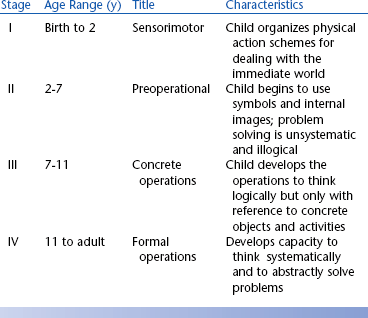
One of the major controversies regarding Piaget’s theory is the age at which symbolic representation emerges. This skill, necessary for cognitive functions such as problem solving, was believed by Piaget to begin with the preoperational stage (stage II in Table 3-1). However, recent work has shown that infants as young as 6 months old develop symbolic representation (Mandler, 1990). These skills are acquired by observation and by direct manipulation of objects. For example, 9-month-old infants have been shown to be capable of imitating actions that they have observed but not practiced. Infants are also able to remember, after a short delay, where objects have been placed. These and other similar results indicate that very young children (less than 9 months old) are capable of forming symbolic representations of objects and manipulating these representations to carry out tasks.
Goldenberg (1979) applies the idea of observational learning to the case of children whose motor abilities are severely limited and who have limited capability for further motor development. He proposes two hypothetical situations: (1) a child whose only motor response is eye movement and (2) a child whose only response is raising an eyebrow. The first child may engage the environment through movements of the eyes that cause an image to move on the retina. This motor action may or may not lead to interaction, depending on whether someone in the child’s environment interprets the eye movements as meaningful and uses them as a basis for communication. In the second case, the child’s action does not manipulate the environment for the child, but again its interpretation by another person may allow interaction with the environment. In each of these cases the provision of an assistive device that is sensitive to the motor actions of the child may enable development. However, in each case the importance of observational learning prevents us from saying that development is not occurring.
From the point of view of assistive technology systems, the early manipulation of objects and the use of tools are of particular importance. Table 3-2 summarizes some of the early skills in these areas. It is clear from Table 3-2 that at a very early age the normally developing child can and does interact with objects and can use an object as a tool to achieve a desired result; thus it is not surprising that assistive technologies have been used successfully with very young children. Brinker and Lewis (1982a) used the concept of co-occurrences, the provision of a contingent result when the child carries out a purposeful action, to foster the development of interaction skills in infants and very young children. They used a microcomputer to arrange events so that they could be consistently controlled by an infant’s behaviors; therefore, the infant was led to believe that the world was controllable (Brinker and Lewis, 1982b). The infant used switch activation to control graphics, toys, and tape recordings of songs or voices. Data on the number of switch activations and observable behaviors (e.g., facial expressions, reaching for a toy) of the infant showed that children as young as 3 months old would develop purposeful movements to cause the contingent result. Given the skills shown in Table 3-2, these results are not surprising.
TABLE 3-2
Early Object Manipulation and Tool Use in Typically Developing Children During the Sensorimotor Period of Development (Birth to 2 Years)
| Developmental Age (mo) | Actions |
| 5 | Reinitiates familiar game during pause |
| 6 | Finds object hidden behind or under screen |
| 6 | Imitates novel body movement |
| 6-8 | Transfers object hand-to-hand |
| 7 | Leans forward to look for a dropped object |
| 8-10 | Anticipates circular trajectory of an object |
| 8 | Drops one object to reach for another |
| 8-9 | Moves to obtain object out of reach |
| 8-10 | Pulls support to obtain object without demonstration |
| 9 | Uses one object as a container for another |
| 12 | Pulls string to obtain object without demonstration |
| 12-14 | Retrieves object by pouring if container is too small for hand |
| 12-15 | Holds mechanical toy that another person has started |
| 13-15 | Uses string to obtain object against gravity |
| 15 | Moves around barrier to obtain object |
| 15-18 | Uses tool as extension of body to obtain object |
| 15-18 | Finds object where last seen or usually kept |
| 15-19 | Opens box to obtain object without demonstration or seeing object placed in box |
| 18-20 | Imitates two action combinations |
| 19-20 | Anticipates result of actions and adjusts behavior accordingly to situations and problems |
| 21 | Attempts to activate mechanical toy without demonstration |
| 22 | Anticipates means/end and result of applied means |
The direct manipulation of objects by robotic systems controlled by the child is an attractive contingent result in a computer-controlled and switch-activated system for very young children. Cook, Liu, and Hoseit (1990) developed a system that allowed a very young child to interact with a small robotic arm by a single-switch activation. They investigated whether both nondisabled and disabled children would use the robotic arm as a tool. Cook et al used a continuous playback mode in which a movement was played back sequentially as long as the switch was depressed, and the arm stopped when the switch was released. Typical tasks used were bringing a cracker within reach of the child and tipping a cup to reveal its contents. If a child was attempting to retrieve an object with the robotic arm, it was concluded that he was using it as a tool if the switch was pressed to bring the object closer (in the continuous mode) and then reached for the object, and if still out of reach the switch was pressed again. Repeated use of this sequence of actions indicated the use of the robotic arm as a tool to retrieve the object. Fifty percent of the disabled children (all those with a standardized cognitive age level score of 7 to 9 months or greater) and 100% of the nondisabled children did interact with the arm and use it as a tool to obtain objects out of reach. Gross and fine motor skill levels were less related to success in using the robotic arm than were the levels in cognitive and language areas. This study illustrates the careful application of assistive technology to match the developmental level.
As children grow and develop, they are able to deal with objects and schemes of action more symbolically. These emerging skills affect the way in which assistive technology systems are specified and designed for children who are between 2 and 6 years of age (in the second stage shown in Table 3-1). For example, augmentative communication systems that require the use of symbols can be designed and the vocabulary included can be expanded over that of the stage I child. More complicated operational features such as two- and three-sequence tasks can also be included. As concepts of time begin to develop, sequential selection of objects, such as that required in scanning, can be used. For the preoperational child, it is also important for us to consider other characteristics (Brainerd, 1978). For example, children in this age range typically exhibit centration, focusing on only one aspect of an object. Often this is a surface feature such as color or flashing lights; thus assistive technology systems must be designed carefully so that the most striking features are also the most important to their use. Children in this stage also exhibit animism, attributing life and consciousness to inanimate objects. This characteristic can be exploited by making devices fun to use and giving them names. A final example is the failure of children in this stage to separate play and reality; they apply the same ground rules to each situation. If this characteristic is taken into consideration, a communication device can be used, for example, to create strange sounds (e.g., a belch), and we will not insist on always saying things properly. This approach can help the child develop skills in an interesting way and then apply them to other situations, such as moving to a given destination. Examples of characteristics of the preoperational child and their implications for assistive technology use are shown in Table 3-3.
TABLE 3-3
Characteristics of the Preoperational Child That Influence Assistive Technology Use
| Characteristic | Assistive Technology Implications |
| Symbolic representation | Augmentative communication, use of language concepts in control of devices |
| Sequencing | Multiple symbol communication, multistep control of systems |
| Centration | Child may focus on color, size, or shape rather than function of assistive device |
| Animism | Give assistive devices a personality with names, etc. |
| Play equals reality | Make use of play routines to accomplish functional goals |
Assistive technologies can play a role in cognitive development for children in this stage as well. Verburg (1987) studied 10 children aged 2 to 5 years who were provided with a miniature powered vehicle. The changes in scores on a developmental profile over the course of learning to use the powered vehicle were used to determine the effect of the device on cognitive development. Changes in scores were calculated in months, and those that exceeded the number of months of the training period were taken to indicate cognitive growth. For example, if a study lasted 3 months and the child’s difference in beginning and ending scores was 5 months, it was decided that development had occurred as a result of the experiment. Five categories of development were used: physical, self-help, social, academic, and communication. The major effects of the use of the vehicle were in the social and academic categories, with 7 of the 10 children showing gains greater than the length of the study. Communication (three children), self-help (two children), and physical (one child) showed smaller gains. This study illustrates the importance of assistive technologies in enabling learning and associated development. An added benefit of Verburg’s study was that parental protectiveness decreased as the children became more independently mobile.
The older child (stage III in Table 3-1) has significantly more ways of using assistive technologies (Brainerd, 1978), and this can be captured in the specification and design process. For example, decentration is now common, and “optional” features that are secondary but useful can be included without the concern that they will distract the child from successful use of the device. For instance, a powered wheelchair controller with a high- and a low-speed feature will be more understandable by a child in stage III than by the child in stage II. A major advance for children in this stage is the ability to apply logical operations to concrete (real and observable) problems. The emergence of these skills has a direct influence on the design of augmentative communication systems to be used for writing in school. Features of word processors that allow editing of text can be included, and the child can be expected to learn to use features such as printing and saving text. It is important, however, that the design of training materials for the use of assistive technology systems be based on concrete, real situations rather than more abstract concepts. Operational principles should also be concrete. This caveat does not mean that they must be “simple” but that they rely on a logical problem-solving approach that focuses on real properties of objects and situations. Among the skills of children in this stage are the ability to carry out complex tasks consisting of several steps and recognizing that the processes are reversible, categorizing objects, combining classes of objects and extracting their common properties, recognizing that problems may be solved in more than one way, and reasoning deductively. Success in specifying and designing assistive technology systems for children in this stage of development is directly related to how carefully these and other characteristics of this age group are considered.
The adolescent (stage IV) is in transition between deductive, concrete problem solving and the inductive, systematic reasoning characteristic of adults. A key change in this stage is that problem solving and reasoning are systematic rather than random as in previous stages. The design of assistive technology systems for individuals in the early part of this age range (11 to 15 years) must include consideration of the transition from concrete to formal operations because most individuals alternate between these two during this period. The problem solving and decision making required for the use of systems can be more inductive, but allowance for basic operation that is concrete must be made.
In summary, the specification and design of assistive technology systems for children are not just a matter of simplifying the features of adult systems. Instead there are specific characteristics of children in various age groups that must be taken into account to ensure the effectiveness of systems selected for them. By taking into account the nature of childhood and its unique “lifestyle,” assistive technologies can be made fun as well as useful. This design feature increases the likelihood that they will be effective. Finally, not only is the human component different in the case of children but there are activities and contexts that are unique to childhood. By incorporating the unique features of these other two components of the total system, its efficacy can be further improved.
Developmental Disabilities and Cognitive Deficits
When developmental delay or cognitive impairment caused by trauma (e.g., traumatic brain injury) is being considered, it is tempting to relate an individual’s functional capability to the stages of development, such as those presented in Table 3-1. From the point of view of assistive technology use, this strategy is undesirable for several reasons. First, the individual who has a disability has a significantly different nervous system than the nondisabled person for whom the developmental sequences have been established. The developmental delay or cognitive impairment is the result of other factors, and these must be taken into account when evaluating the level of cognitive functioning. Second, it is often true that an individual with cognitive impairment exhibits significant skill in one area but has severe deficits in others. Development in the presence of an abnormal nervous system is best considered as divergent from the path considered to be typical. This is in contrast to the view that development is proceeding along the same “typical” path but is delayed. Assistive technology application is most effective when individual skills are determined through assessment (see Chapter 4) and the system characteristics emerge from this assessment.
Individuals with congenital or adventitious cognitive impairments may have difficulties with attention, memory, problem solving, language, and other areas. When assistive technology systems are designed for these individuals, it is important to give careful attention to the cognitive demands that use of the device places on the person and to include learning and operational aids within the total system. It is generally not the goal to make things simpler for someone with a cognitive deficit but to make them different. For example, individuals who have a learning disability may benefit from alternative modes of information presentation. Often auditory information is more easily assimilated than visual information. Examples of approaches for individuals with memory loss and problem-solving limitations are described next.
Memory
Memory is important for effective use of assistive technologies. When assistive technology systems are specified and designed, the role of human memory in successful use must be considered. Human memory is often considered to have three components: (1) sensory memory, (2) short-term memory, and (3) long-term memory (Bailey, 1989). Each type of memory plays a role in the use of assistive technologies. Sensory memory describes the storage of sensory data for a very brief time after the removal of the stimulus. For our purposes, the most important types of sensory memory are visual and auditory. The afterimage that traces the path of a moving sparkler in the dark is an example of sensory memory. Visual sensory memory, typically in the form of an image, lasts for about 250 millisecond (one fourth of a second) (Bailey, 1989). Some assistive devices make use of this type of memory in their design. One example is the Pathfinder (Prentke Romich Co., Wooster, Ohio) augmentative communication system. In this device a set of 128 lights is arranged in a matrix 16 lights wide by 8 lights high. A detector is placed on the user’s head, and when it is aimed at one of the lights, the Pathfinder detects it and the choice labeled by that light is activated. The device turns on the lights one at a time from the upper left corner to the lower right corner, row by row. However, although only one light is turned on at a time, the user actually sees all the lights as being dimly lit. This effect results in part from sensory memory, and without it this input method would not be feasible. Auditory sensory memory is often in the form of an echo of the original input data that lasts for up to 5 seconds (Bailey, 1989).
Short-term memory is sometimes referred to as working memory (Bailey, 1989). Its duration is generally up to about 20 to 30 seconds, and it is used for temporary storage of information necessary to complete a task. This form of memory allows us to carry out many tasks associated with assistive technologies. In assistive technologies, short-term memory is used for seldom-used device operational sequences that are looked up in a manual when needed (e.g., how to replace batteries in a hearing aid) or for remembering a piece of information briefly (e.g., a telephone number to be dialed). Because the capacity of short-term memory is approximately seven items, it is important to restrict the amount of information required to be stored in short-term memory. Individuals have difficulty remembering more than seven items if they do not have the opportunity to rehearse and transfer the information to long-term memory. Information stored in short-term memory arises from both external and internal sources. For example, reading this sentence requires using stored information regarding letters and their combination into words, together with visual input from the page. Information in short-term memory is generally believed to be stored in an encoded form. The code may be a form that makes use of longer-term stored information or one that is more easily recalled than the original form of the information. There is evidence that some visual information, such as words, is actually stored in auditory form, by memory of their sounds rather than what they look like. This evidence has implications for individuals who are unable to use oral language or who have not heard oral language because of a congenital hearing impairment, and this must be taken into account when assistive technology systems are designed for them.
When designing systems, several steps can be taken to help the human operator maximize use of short-term memory. One strategy involves grouping information into short sequences and use of patterns that are related to stored information. For example, an assistive device for writing may have several functions, such as entering text, storing text, and printing. If the system is designed so that each of these tasks follows a similar, consistent sequence of actions, then the use of the system will be more easily learned. Bailey (1989) also discusses the use of rehearsal and patterns in codes as aids to users of systems. Rehearsal is the repeating of a new piece of information (e.g., a phone number) to ensure that it is not forgotten. Another strategy groups number or letter sequences into short (three- or four-character) groups and includes similar patterns in the groups. Examples of useful patterns for numbers are groups that end in the same number; for letters the groups may spell short words or be remembered as acronyms.
Long-term memory stores information that has lasting value. Although short-term memory consists of “throwaway” information that is used only once, long-term memory is important for things used often. Examples of the use of long-term memory in assistive technologies include recalling codes used for storage of information, remembering how to turn on a device and use its features, and remembering where to go and how to get there with a powered wheelchair. Long-term memory differs from the other two types primarily in the duration of the stored information. This type of memory is permanent although we forget it. There is evidence indicating that loss of information from long-term memory is a problem of access rather than actual loss of stored information (Bailey, 1989). Designers of assistive technology systems need to be aware of several memory processes related to remembering and forgetting: (1) encoding, (2) storage, and (3) retrieval. Each of these plays a major role in the design and use of assistive technology systems.
Encoding is the way in which information to be stored is organized, and it is important in retrieval of the stored information. System designers can help with this process by relating steps, tasks, or information to be remembered to the person’s experience. Because each person has unique, and sometimes limited, experiences, careful attention must be paid to assessing the best ways to encode information for easy retrieval. For example, with speed dialing, in which one digit is used as a code for a stored phone number, it may be easier if phone numbers for certain people are recalled by letters instead of by the digit. Mom’s number could be stored under M, sister Tammy under T, work under W, and so on. This method of encoding helps with recall because there is a relationship between the stored number and the code.
There are many theories regarding how and why we forget. From a systems design point of view, these are important, especially in relation to training individuals to use assistive technologies. One of the most important factors affecting forgetting is what the person does between the time the information is learned and the time that it is used (Bailey, 1989). The term interference is used to describe the process of forgetting. Bailey discusses two types of interference: proactive and retroactive. Proactive interference occurs when information acquired before the learning of new material interferes with the use of the new material in performance. This type of interference often occurs in assistive technology system use. For example, Tom has learned to use one type of mechanical feeder, which requires that a switch be pushed to the right to rotate the plate and to the left to raise the spoon to mouth level. The spoon action is automatic once the switch has been activated. A new feeder is introduced that gives Tom more control because the second switch must be continuously pressed to scoop the food and raise the spoon, and it can be stopped at any point and restarted. This process can make eating more efficient because, if the spoon misses the food, it is not necessary to go through an entire cycle before trying again to get food. Tom has proactive interference if he persists in pushing the second switch only once because this was a previously learned strategy rather than maintaining switch activation until the food reaches mouth level. Even if Tom is able to adapt to the new strategy, he may revert to the old strategy if he is tired or stressed.
Retroactive interference occurs when a person learns to do task A, then learns task B, and finally is asked to perform task A. He or she may forget how to do task A because of concentrating on task B. This situation can occur when a person is trained to use an assistive technology system that has multiple functions or tasks. This type of problem can be avoided by allowing enough practice and use time for task A before task B is introduced. For example, a person with a visual impairment is being trained to use a screen reader. This is a device that provides speech output instead of visual output. The person has learned how to scan through the text by using the arrow keys on the keyboard (task A). Now he is trained to save a file and retrieve it (task B). When he goes back to task A, he may have forgotten how to do it or forgotten details of this task. This is called retroactive interference.
It is important to distinguish between recall and recognition. The task of recalling information relies exclusively on the person’s abilities, with no assistance from the system. Recognition requires the person to identify the proper or desired item from a list presented by the device. This difference is evident in two types of computer user displays, which are discussed in Chapter 7. In one type of interface, called the command line interface, the computer screen merely displays a “prompt” and the user must type in the information desired, such as the name of a file to be retrieved or a program to be run. The second type of user interface is called a graphical user interface (GUI). In this approach the user is presented with a series of icons on the screen and a selection is made by moving a pointer to the desired icon and pressing a button. This list then produces a list of items from which the user can choose by pointing at the desired item and pressing a button. The command line interface approach depends on recall, and the GUI makes use of recognition. Because recognition is easier than recall, it should be included in assistive technology system design whenever possible.
Human memory includes information from all the senses. For example, somatosensory long-term memory plays a role in many aspects of assistive technology application. The feel of a switch or joystick is remembered, and a new, improved control may not be as effective because it is unfamiliar. Tactile memory is also important in seating and positioning systems. Often persons who have had one seating system for a long time are not comfortable in a new seating system although it is more functional. The tactile memory of the old system is present, and the new system must be introduced gradually to ensure acceptance.
When an individual has memory deficits, it is necessary for us to alter the way in which we design assistive technology systems. Batt and Lounsbury (1990) present a case study in which they describe the development of computer use by an individual who had memory deficits as a result of a cerebral vascular accident. He and his wife were both concerned that he had no activities other than watching television, and they wished to make use of his personal computer for writing and correspondence. This activity was limited because he could not remember any verbal commands, and his cognitive deficits prevented him from using the owner’s manual supplied with his computer. The word processing program that he wanted to use featured a menu approach with eight options, which perplexed the user because of his impaired memory. A simple color-coded flow chart was designed to break the complex list of options down into a manageable form (Figure 3-7). This chart allowed the user to progress through his choices without having to remember the previous selections or having more than one option for the next choice. By using the flow chart and a training program, the user was able to learn to write letters and his own memoirs. Writing his memoirs helped him deal emotionally with his disability, and it led to an increase in his self-esteem and a perception on his part that his memory and cognitive processing had improved.
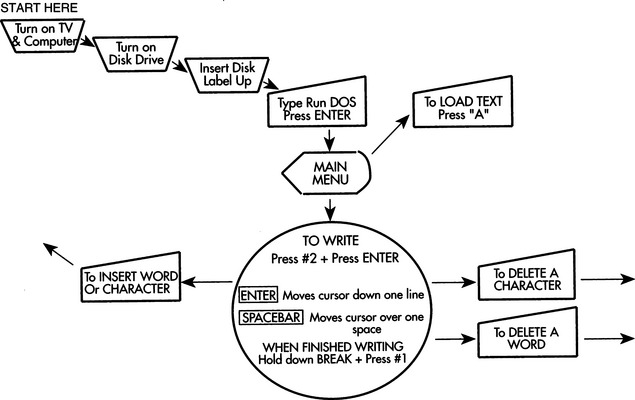
Language
A language is any system of arbitrary symbols that are organized according to a set of rules agreed to by the speaker and the listener (Miller, 1981). This set of symbols may be the familiar alphabetical written language (referred to as traditional orthography) or it may be a set of pictographic symbols conveying meaning (such as hieroglyphics or other special symbols) or a set of hand movements (sign language) or gestures. Speech is the oral expression of language.
Language consists of five basic elements: (1) phonology, (2) morphology, (3) syntax, (4) semantics, and (5) pragmatics. Phonology describes the sounds used in any particular language and the rules for their organization. The smallest group of language sounds that can be considered unique is called a phoneme. To produce English speech with an electronic speech synthesizer requires approximately 60 phonemes (Fons and Gargagliano, 1981). However, different synthesizers or analysis methods may use a larger or smaller number. Phonemes and letters do not have a one-to-one relationship because phonemes represent spoken language and letters portray written language. There are, however, computer programs that convert written text to spoken language (Allen, 1981). Because there is no one-to-one correspondence between phonemes and letters, all these programs require both a set of rules and a large number of exceptions to convert from text (letters) to speech output. (Voice synthesis is discussed in Chapter 11.) Words often have fewer phonemes than they do letters. For example, the word “night” has three phonemes: (1) n, (2) igh, and (3) t. We refer to the generation of language by the selection of phonemes as the segmental characteristic of spoken language. Some electronic speech synthesizers use allophones (combinations of phonemes) rather than phonemes. In this case it may take up to 130 allophones to generate an unlimited vocabulary in English (Smith and Crook, 1981). Prosodic or suprasegmental features such as pitch, duration, and amplitude give richness and add meaning to spoken language (Miller, 1981). These features convert a statement into a question by raising the pitch at the end of a sentence or increasing the amplitude and duration of a word to stress it in a sentence.
Morphology describes the rules for organizing the smallest meaningful units of language, which are called morphemes. Free morphemes are complete words that may stand alone (e.g., run); bound morphemes must be coupled to another morpheme (e.g., -ing) to form a complete word. Words are articulated sounds or series of sounds that are used alone as units of language; they symbolize, communicate, and have meaning. Syntax refers to the rules for organizing words into meaningful utterances. Taken together, morphology and syntax constitute grammar, which is the set of rules for speaking and writing a language. Various grammatical rules are used by linguists to describe language usage (Miller, 1981) and by designers of augmentative communication systems to enhance communicative ability.
Semantics describes the relationship between words and their meaning. This is the “definition” of a word. The lexicon of a language is a list of all the words in that language. Semantics describes the meaning of the words. There are approximately 100 concepts that have a word in every language (Miller, 1981). The relationships between a word and its meaning can be complex. For example, the word gold may mean the color, the metal, or the concept of wealth (e.g., “good as gold”). This flexibility is what makes natural languages (as opposed to computer languages, music, etc.) powerful. These languages allow us to talk about anything, even without precise definitions.
Pragmatics is the relationship between language and language users. By understanding the rules of pragmatics, a user of a language is able to observe social conventions. No matter how many words a person knows, the words are not functional unless the person knows when and how to use them to convey ideas. This use of language is fundamental to effective communication, but the rules are not intuitive, which is especially important when a person obtains an augmentative communication system for the first time. He or she may not understand how effective language is used, and extensive training may be required just to develop adequate strategies of use.
Both semantics and pragmatics are important in applying assistive technology systems. Barnes (1991) uses the term “motoric language” to describe the language necessary to drive a powered wheelchair. She describes two categories of vocabulary that apply to wheelchair use: relational and substantive. Relational vocabulary refers to concepts such as in, on, between, under, or over; substantive vocabulary refers to the appropriate use of nouns, verbs, and adjectives. Interestingly, Barnes and her colleagues have found that a good substantive vocabulary is more predictive of success in powered mobility than is a good relational vocabulary. Because mobility involves the use of spatial concepts, relational concepts would be expected to be more important. However, the relational concepts are generally more complex and difficult to understand, so they may develop later.
Language Development
The development of language begins very early in a child’s life. At 1 or 2 months of age an infant can distinguish between speech and nonspeech sounds, and there is an inherent predisposition to be interested in communication (Miller, 1981). It is generally believed that skill in language use is developed primarily through practice. Children who are unable to speak because of a disability still develop language. First words are typically tied to gestures such as the direction of eye gaze. The direction of gaze leads to arm or other limb movement in the direction of the object, and this leads to vocalizing (e.g., whining) until the object is given to him and he can manipulate the object. The linguistic functions of requesting and asserting that are performed at this early age by gestures are those later performed by oral language. Table 3-4 lists several important stages in the development of early language (Chapman, 1981; Santrock, 1997).
TABLE 3-4
| Approximate Age (mo) | Language Use |
| 8-10 | Communicative intent by gestures |
| 3-6 | Babbling sounds (e.g., “goo-goo,” “ga-ga”) |
| 9-15 | Utterances expressing communicative intent |
| 16-22 | Utterances with discourse function (see Table 3-5) |
| 24+ | Utterances with symbolic function (symbolic play, evoking absent objects or events, etc.) |
Infants show an interest in sounds and respond to voices between 3 and 6 months of age. Babbling (producing sounds such as “goo-goo” and “ga-ga”) follows during the next 3 to 6 months. Babbling is thought to be a result of biological maturation and not hearing, care giver interaction, or reinforcement (Santrock, 1997). The purpose of this early communication is to attract the attention of parents and others. An infant’s receptive vocabulary, or the ability to understand words, begins to develop in the second half of the first year and increases dramatically in the second year.
The first vocalizations begin to appear at 10 to 15 months. Typically, communicative competence (e.g., requesting, asserting, protesting) develops before linguistic competence (e.g., the use of symbolic representations such as words). Vocalizations during the first year are generally more in a play than a communication context, and the child develops a greater variety of sounds than are needed in adult speech. During the second year, vocalizations and communication begin to merge as the child learns to control the vocalizations sufficiently to communicate ideas and to manipulate his or her world. Not surprisingly, the first words uttered by most children fall into one of two categories: (1) names for concrete objects, usually those that have been manipulated and (2) words for social interactions, such as move, up, and bye. At 16 to 18 months, vocalizations have several communicative intents, as listed in Table 3-5 (Chapman, 1981). By 2 years of age the child has begun to develop imaginative uses of language and to explore its manipulative potential. For children who have difficulty speaking, the design of augmentative communication systems must take into account these very early language skills. By providing means of achieving language skills that are alternatives to speech, assistive technologies can have a major impact on both functional competence and long-term development. For example, early communication systems should give the child the opportunity to carry out as many of the communicative intents shown in Table 3-5 as possible, even if the child is unable to speak.
TABLE 3-5
Early Communicative Intents With Discourse Functions
| Intent | Example |
| Instrumental | “I want” |
| Regulatory | “Do as I tell you” |
| Interactional | “Me and you” |
| Personal | “Here I come!” |
| Heuristic | “Tell me why” |
| Imaginative | “Let’s pretend” |
| Informative | “I’ve got something to tell you” |
As the child continues to develop, the conversational use of language increases and the categories of use are expanded. Box 3-1 lists two of several categorizations of speech acts (Chapman, 1981). These primitive speech acts and conversational uses of language are typically learned by the young child through practice. For the child who has difficulty with speech or motor control, the ability to perform these acts becomes a joint venture between the human and the augmentative communication device. In Chapter 11 we discuss the use of augmentative communication systems.
Problem Solving and Decision Making
Problem solving is an important aspect of the use of assistive technologies. Bailey (1989) defines problem solving as “the combination of existing ideas to form a new combination of ideas” (p. 119). This definition emphasizes the importance of prior experience in developing a solution to a new problem. A problem is a situation for which the person has no ready response (Bailey, 1989). Decision making, on the other hand, is choosing between already defined alternatives. Assistive technology systems may require the use of problem solving, decision making, or both. Problem solving is the discovery of a correct solution in a new situation; decision making is the weighing of alternative responses in terms of desirability and the selecting of one alternative. When a novice is learning to use an assistive device, he or she uses problem-solving strategies. However, when an expert uses a system in daily life, he or she applies decision making more frequently than problem solving. Our recommendation and design of assistive technology systems must take into account the skills of the potential user in these two areas. Well-conceived and well-executed training programs can facilitate the development of both problem-solving and decision-making skills in the user. The emphasis of both problem solving and decision making on past events implies a dependence on memory skills.
Bailey (1989) discusses several steps in problem solving that can be aided by computers, and we can apply these to assistive technology system specification and design. These are (1) problem recognition, (2) problem definition, (3) goal definition, (4) strategy selection, (5) alternative generation, (6) alternative evaluation, and (7) alternative selection and execution. To alert the user to the fact that there is a problem (problem recognition), the system must provide information regarding only relevant changes. Assistive devices can facilitate problem recognition in several ways. The most common is through warnings that are displayed to the user. For example, some computer-based powered wheelchair controllers (see Chapter 12) have a visual output that displays a flashing light when there is something wrong (Figure 3-8). This display alerts the user to the existence of a problem. The visual display also shows a code indicating the type of error (e.g., joystick disconnected, battery low). This is the problem definition stage because the device has told the user what the problem is. Strategy selection is based on the first two steps—the recognition of a problem and the definition of the nature of the problem. In this example, a troubleshooting chart in which the error code is listed together with possible causes and solutions may aid strategy selection. This problem-solving aid can then be combined with the user’s experience with similar problems to develop a strategy for solving the problem. The problem-solving strategy generally yields a set of alternatives (alternative generation) from which the most likely cause can be chosen (alternative evaluation). Finally, an alternative is chosen (e.g., disconnected joystick) and the error is corrected. This final stage is alternative selection and execution. If the alternative provides a solution to the problem, then all is well. If not, then additional alternatives must be evaluated and executed until the problem is solved. The problem-solving aids provided by the technology, in this case a warning display and code and a troubleshooting chart, help to convert a difficult problem into a series of decision-making steps. Whenever possible, we should include aids for problem solving in our design of assistive technology systems.
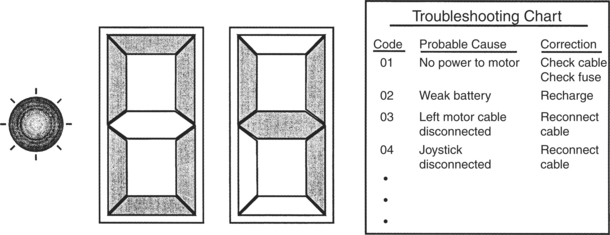
Figure 3-8 A display and troubleshooting chart used in diagnosing a malfunction in a powered wheelchair. The display is part of the wheelchair controller, and the chart is included in the user’s manual.
It is possible to compensate for poor problem solving on the part of the user by incorporating some “intelligence” into the device. For example, in the design of an augmentative communication system for a person with aphasia, the combination of pictures or other symbols and categorization can help avoid the dependence on recalling a specific word. A “food” picture can be selected, which leads to the presentation of different types of food (e.g., fruits, meats) or eating situations (e.g., breakfast, lunch). Once a secondary category is selected, the choice can be more specific (e.g., pear, apple, banana). This approach converts a problem-solving or memory task (recalling the correct word or phrase) to a decision-making process (choosing one of several alternatives). By carefully designing the system to accommodate the possible number of choices and steps in a sequence of activities, the system can provide significant improvement in communicative performance.
PSYCHOSOCIAL FUNCTION AS RELATED TO ASSISTIVE TECHNOLOGY USE
How the human interacts with assistive technology involves more than the physical and cognitive components. Psychosocial factors have a significant influence on assistive technology use as well. Psychosocial function is composed of both intrinsic and extrinsic factors. The intrinsic psychosocial characteristics of an individual are hard to separate from the influences of the person’s social environment. In the human activity assistive technology model, these intrinsic psychosocial factors are discussed in relation to the human, and the person’s social environment is seen as a part of the context (see Chapter 2).
In an attempt to understand the psychosocial factors that influence human performance, Depoy and Kolodner (1991) organize the information into three major areas: self-definition or identity, self-protection or maintenance, and motivation for action. These areas can also be applied to assistive technology and can help us understand how psychosocial factors influence human performance related to assistive technology use.
Identity and Self-Protection
In terms of identity the main question that is asked is “Who am I?” The answer to this question involves notions such as self-concept, locus of control, well-being, emotion, environment, and performance (Depoy and Kolodner, 1991). Of primary importance to the successful use of assistive technology is a clear self-concept on the part of the person with a disability. Robertson (1998) defines self-concept as “our definition of the goals, values, and beliefs that give direction and meaning to life” and states further that “knowing who we are unifies our actions, pulls the various parts of ourselves into a cohesive whole” (p. 452). The individual with a well-developed self-concept has clearly defined goals and expectations for the assistive technology system and is more likely to be successful in using the technology.
An individual’s self-concept is closely linked to physical attributes. Any changes in physical skills and features as a result of illness or disability can have a profound effect on how an individual feels about himself or herself. Individuals who acquire a disability go through various emotional stages of loss before accepting the disability. Different authors have identified these stages as shock, anxiety, denial, depression, internalized anger, externalized hostility, acknowledgment, and adjustment (Livneh and Antonak, 1990, 1991). The sequence in which these stages are experienced and the duration of each stage vary depending on the individual (Livneh and Antonak, 1991). For example, a woman who sustains a stroke later in life will go through the stages in the process of adjusting to her disability. Her ultimate acceptance of the disability requires a balance between acknowledging her loss and appreciating her remaining abilities to participate in activities of daily life (Sabari, 1998). If she is in the stage of depression when it is time to select an assistive technology device, she may not be capable of exercising good judgment (Scherer, 1998). Furthermore, assistive technology that is recommended before acceptance of the disability may be seen as a reminder of the independence that she has lost and consequently may be avoided or abandoned altogether. On the other hand, a person who has grown up with a disability, such as cerebral palsy, does not experience this same type of process. As Scherer (1993) points out, the person who is born with cerebral palsy is more likely to have adjusted to the disability. This individual is inclined to view assistive technology as opening up new opportunities.
A second critical psychosocial factor is self-protection. The fundamental purpose of the self is “to regulate behavior, to maintain mental health, and [to] maximize each person’s productive contributions in valued roles in society” (Robertson, 1998, p. 452). To achieve stability and protect himself or herself from internal and external psychological harm, the individual uses mechanisms of self-protection, such as defense mechanisms and adaptive strategies (Depoy and Kolodner, 1991).
Protecting oneself can factor into assistive technology use as well, particularly if a person does not feel comfortable using the device. For example, there are individuals with spinal cord injuries who may have lived more in their body than in their mind before their injury (Scherer, 1993). As a result, these individuals may have had limited exposure to computer technology and now are being asked to use it for functional activities. If a person is uncomfortable using an assistive technology device, dependency on it can be anxiety producing. To protect himself or herself and reduce the anxiety, this person may avoid or abandon the device.
Motivation
Bailey (1989) defines motivation as “any influence that gives rise to performance” (p. 154). In the context of assistive technology systems, motivation may result from the human, the activity, the context, or the assistive technology components of the system. Lack of motivation by the consumer to use the device or perform the task is one of the principal reasons an assistive technology device is abandoned (Scherer and Galvin, 1996). We can define both internal motivating factors and external factors. Internal factors include desire to succeed, and external factors include praise and task-related effects such as feedback generated by the task. Feedback that results from the performance of a task can serve three purposes: (1) provision of knowledge regarding performance, (2) motivation to continue, which is the current state and does not equal the ultimate goal, and (3) reinforcement. A reinforcer is a stimulus whose occurrence tends to strengthen the response through a close temporal relationship.
Assistive technologies can provide motivation in many ways. It is often useful to couple social interaction with the occurrence of a desired result.
Because motivation is so important to the effective use of assistive technologies, the goals of the potential user must be carefully defined and devices chosen that meet these goals in a manner that is meaningful and motivating to the person. Depoy and Kolodner (1991) provide an overview of the major psychological theories relating to motivation. They define six factors that determine motivation for action: (1) elicitors of behavior, (2) symbols, (3) beliefs and perceptions, (4) cultural norms and expectations, (5) intrinsic motivation, and (6) history of experience (p. 313). Although the major schools of psychological thought view each of these factors somewhat differently, the factors can be used as a basis for discussing motivation as it applies to assistive technologies.
As we have discussed, elicitors of behavior can be either intrinsic (e.g., the desire to please) or extrinsic (e.g., synthetic speech feedback), and they are the forces that cause or trigger behavior. In assistive technology systems, external elicitors of behavior may include those resulting from social outcomes (the context) or successful completion of an activity. Examples of social results include conversational interaction, achieving a goal (e.g., moving a wheelchair to a given location), and reinforcement (e.g., getting a high grade). These social effects result because the individual completes an activity such as conversational communication, mobility, or studying for an examination.
From a psychological point of view, symbols are abstract representations of reality. Many actions in daily tasks are symbolic, and they are carried out to conform to expectations. For example, a major goal of communication is social politeness, in which the content of the communication is less important than the conformance to social norms (Light, 1988). For a person whose goal is social politeness to be motivated to use an augmentative communication system, the device must be capable of providing rapid and simple output that facilitates social interaction. This goal differs from the use of a system for making requests, in which the user’s motivation is to receive a specific result. As Depoy and Kolodner (1991) point out, the degree to which the symbols are shared between the user of the assistive technology system and his or her communication partner has a major impact on the effectiveness of an interaction.
Beliefs have a strong effect on motivation. In relation to assistive technologies, a system must be designed so that is consistent with the person’s belief system for the person to be motivated to use it. Among the most highly valued beliefs is acceptance by others. Assistive technology systems can either facilitate or impede acceptance. A simple example is the choice of color in a wheelchair for a child. If the child is allowed to have a wheelchair whose frame is in his favorite color, he may be more accepted by his peers than if the wheelchair is the standard “hospital chrome.” A more significant problem in acceptance was (and still is to a large extent) presented by the limited availability of female synthetic voices used in augmentative communication systems. Women have often acquired but not used communication systems with male voices, which is at least partially related to the social acceptance of the total assistive technology system when a disparity exists between the person’s characteristics and the quality and gender of her voice.
As emphasized throughout this chapter, experience plays a major role in the successful use of assistive technologies. The ways in which these experiences are perceived can also have a large impact on motivation. Our perceptions give us an understanding of events and also provide the basis by which we ascribe meaning to them. These perceptions can be motivating in several ways. Negative experiences can lead to avoidance of events, tasks, or actions. For example, a child who is introduced to a powered wheelchair without adequate preparation and training may have difficulty using the system and may be frightened by errant movements or collisions. This experience can dissuade the child from attempting to use the system. Alternatively, a child who has a positive experience in his or her first attempt at powered mobility will be highly motivated to repeat the actions.
The final factor underlying motivation is adherence to cultural norms and expectations. Assistive technology systems must foster such adherence if they are to be motivating and useful. Depoy and Kolodner (1991) describe cultural norms and expectations as “shared, common environmental elements that underpin behavior” (p. 317). Many individuals who have disabilities live in segregated group homes and spend the majority of their time in “special” educational or adult programs. This culture differs significantly from the world in which the majority of us live, and these two cultures may have widely different norms and expectations. One of the major goals of assistive technology application is to normalize the performance of an individual with a disability to facilitate greater independence and broader exposure to the world at large. To approach this goal, the influence of cultural norms and expectations on motivation for performance when using the assistive device must be carefully considered. In some cultures—Asian, for example—if an elderly person becomes disabled as a result of a stroke, the person’s continued independence is not viewed as being important. The extended family now perceives their role as taking care of that person. In this situation, outside intervention, including that provided by assistive technology, may not be seen as necessary. As another example, consider devices intended for self-feeding (see Chapter 14). These devices are imperfect, and a severely disabled person who uses one may achieve independence at a cost of neatness. It may be more “acceptable,” in a public place such as a restaurant, for the disabled person to be fed by a human attendant, resulting in less mess. The person may choose to sacrifice independence, as obtained using the mechanical feeder, to achieve cultural acceptance. Alternatively, in a group home setting, an individual may choose independence (the use of the mechanical feeder) over neatness because his or her peers are more accepting than strangers in the restaurant. Another person may be less influenced by cultural acceptance and choose to use the mechanical feeder in both locations. Because no assistive device will be used effectively if the person is not motivated, these factors are important.
In her book Living in the State of Stuck: How Technology Impacts the Lives of People with Disabilities, Scherer (1993) presents the milieu personality technology model, which describes personality characteristics as one aspect influencing an individual’s use of assistive technology. The three factors described earlier (identity, self-protection, and motivation) are all incorporated into these personality characteristics. Optimal use of the technology occurs when the individual is proud to use the device, motivated, cooperative, and optimistic; has good coping skills; and has the skills to use the device. It is predicted that those individuals who are unmotivated, intimidated by technology, embarrassed to use the device, or impatient or impulsive, or who have low self-esteem, unrealistic expectations, or limitations in the skills needed may become partial or reluctant users. Nonuse of the assistive technology occurs when the individual either avoids it altogether or abandons it after initial use. Characteristics of the person who avoids using a device may include someone who does not have the skills to use the device and someone who is depressed, unmotivated, embarrassed to use the device, uncooperative, withdrawn, or intimidated by technology. The personality characteristics related to the abandonment of a device can be attributed to an individual who is depressed, angry, embarrassed to use the device, withdrawn, or resistant; who has low self-esteem or poor socialization and coping skills; or who lacks the skills and or training to use the device. Being aware of the psychological factors that affect assistive technology use can facilitate the matching process for the ATP and optimize use of assistive technology systems.
Assistive Technology Use Over the Life Span
The person’s developmental stage at the time that assistive technology is being considered influences the decisionmaking process and use of the device. Child development and its implications for assistive technology use were discussed earlier in this chapter. In this section, factors that change over the life span and their implications for assistive technology use are considered.
King (1999) characterizes how learners across the life span approach technology. Children from birth to 3 to 4 years of age are eager to explore and play. They will be motivated to engage in assistive technology by this need to explore. It is for this reason that very young children who are being introduced to powered mobility should be encouraged to explore with the mobility device rather than being asked to follow instructions for a particular protocol (Janeschild, 1997). Children of this age may have some fear of sounds or movement, but they have little or no fear of failure and embarrassment (King, 1999). At this age, they will use any and all parts of their bodies to interact with devices. As children age and their motor skills become more refined, so does their ability to control a device. The fingers and hands are then more likely used as control sites.
From childhood to the early teenage years, children remain eager to explore and are interested in trying out control interfaces (King, 1999). As children approach adolescence, they become more motivated by the desire to be competent than by the need to explore (Early, 1993). Consequently, persons at this age will practice over and over even when they fail. They are not embarrassed about making mistakes or worried about the time involved in developing their skills. Their desire to learn how to interact with technology drives them to seek and accept instruction from adults and older or more skilled children.
The next age span described by King (1999) is the young adult to middle-aged adult, which encompasses roughly age 20 years to age 65 to 70 years. Individuals in this phase of the life cycle are typically engaged in job pursuits and are motivated by the need to achieve (Early, 1993). The young adults in this group (age 20 to 30 years) have grown up with technology and in general are not intimidated by it. They remain eager to explore technologies and are fairly confident in their approach. The middle-aged adults in this group (age 50 to 70 years) did not grow up with computer or video games. However, through their work they have most likely been exposed to some type of technology, and in most cases keeping their job depends on their ability to use technology. Those middle-aged adults who use technology are comfortable with it and not intimidated to use it. However, those who are not familiar with technology are uncomfortable using it and can find it threatening. These individuals prefer to learn about the technology and practice it in private, without being observed or supervised while gaining the needed skills.
Older adults (age 65 to 70 years and older) have similar characteristics as the group just described (King, 1999). They may have had little exposure to new technologies and tend to use devices and tools that they are familiar with. When it comes to using a new tool or device, they may be extremely fearful. Part of this fear is related to the belief that they may do something to the technology that will damage it or result in costly repairs. Given one-on-one training, encouragement, and practice, these individuals have the potential to become highly skilled in the use of new technologies. As these individuals age, however, they are likely to have sensory, motor, and cognitive deficits that affect the learning and use of technology. Older adults are motivated by a need to explore the past, review life accomplishments, and investigate current capabilities through leisure activities (Kielhofner, 1980). Someone who is otherwise fearful of using a computer may be motivated to overcome that fear if given the task of writing his life story or using it for genealogy research.
To maximize the use of assistive technology, the ATP must take into consideration the learning characteristics of each stage in the human life span and be able to select technologies and interventions that match the individual’s age group.
MOTOR CONTROL AS RELATED TO ASSISTIVE TECHNOLOGY USE
As stated above, motor control refers to all the central processing functions that lead to planned, coordinated motor outputs. Many aspects of motor control are important in the use of assistive technologies. To perform a control task, the human operator must be able to locate a target, plan a movement to that target, and produce a desired action once the target is reached. This process involves both sensory and motor components. Sensation is involved in both the scanning of the environment to locate the target and in the regulation of the movement through sensory feedback during the task. For example, one of the tasks involved in writing is to pick up a pencil. The pencil is the target, and the steps in picking it up follow the sequence described above. These motor actions to targets are called aimed movements.
As a movement is repeated many times, motor learning takes place, and both the speed and accuracy of the movement improves. Another effect of motor learning is changes that occur in the variability of the path of movement or trajectory. Initially the path used to move to the target varies widely from trial to trial. As the movement is learned, the trajectory becomes much more uniform and consistent from trial to trial. This motor learning is made possible by the formation of engrams, which are preprogrammed patterns of centrally represented muscular activity (Pedretti, 1996). Engrams develop when there are many repetitions of a specific movement or activity. With repeated, consistent movements, the conscious effort of the person is reduced and the movements become more automatic.
For the sensory and motor components of these movements to be integrated, there must be maps of both the person’s own internal neuromuscular system and the external worlds. These maps also consist of engrams, and they are constructed as the person encounters the environment through experience.
This section considers the role of motor control in the use of assistive technology systems and the effects abnormalities may have. The emphasis is on those aspects of motor control that are most important for the successful application of assistive technology systems.
Aimed Movements to Targets
Control of assistive devices is achieved through aimed movements carried out by the user. This control requires the successful completion of a number of sensorimotor tasks. A set of targets (selection set) must be visually or auditorily scanned, the desired element chosen, and the element selected, activated, or manipulated through a motor act. This process applies equally to the use of devices in which several choices are to be made (e.g., a wheelchair joystick with four directions or a television remote control with a group of buttons, in which the targets are physical locations) and to objects to be manipulated (e.g., fork, washcloth). It also applies to systems in which the targets are on a screen (graphic) or spoken (auditory) and are presented one at a time for the user to select. The movement to and activation or manipulation of targets may be through any of the effectors discussed in the next section.
Speed and Accuracy of Movements.
Human factors engineers often use speed and accuracy to measure motor performance in moving to targets (Bailey, 1989). In general, these two parameters are inversely related: as speed increases, accuracy decreases. The level of experience the person has also affects this relationship between speed and accuracy. For a novice, the inverse relationship generally holds. However, for experienced users of systems, increasing speed does not necessarily result in decreased accuracy. For example, Klemmer and Lockhead (1962) found that the fastest (and most experienced) keypunch operators were twice as fast as the slowest (and least experienced) operators. Surprisingly, the fastest operators were also ten times as accurate as their slower colleagues. Thus, it cannot be assumed that because a task is completed faster it is necessarily less accurate.
Fitts (1954) found that the time to move to a target decreases for closer or larger targets and increases for more distant or smaller targets. This relationship, called Fitts’s Law, “appears to hold under a wide variety of circumstances involving different types of aimed movements, body parts, manipulanda [types of controls], target arrangements, and physical environments” (Meyer, Smith, and Wright, 1982, p. 451). Jagacinski and Monk (1985) found that Fitts’s Law was a good predictor of the speed-accuracy tradeoff for control of two-dimensional cursor movements on a video screen. This relationship held for both a helmet-mounted control and a hand-controlled joystick.
Using Fitts’s Law, Radwin, Vanderheiden, and Lin (1990) evaluated both mouse movement and a head-mounted pointer for computer entry. They found that mouse input was faster and generally required less movement than the head pointer for able-bodied subjects. For disabled subjects they found that the speed and accuracy of head control were both dramatically affected by proper trunk stability provided through a seating system. Figure 3-9 is a plot of movement time (the distance from the origin radially outward) versus the direction of cursor movement on a computer screen. Both the dotted and solid lines are for the same subject, who had cerebral palsy. The solid curve represents the speed of head movements when the subject had inadequate thoracic support; the dotted curve shows that movement times were much faster and more symmetrical from left to right when adequate support was provided for the subject. This type of study underscores the importance of providing a stable position as a base of support for control tasks.
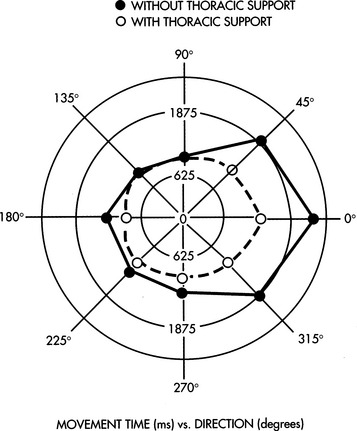
Figure 3-9 A plot of movement time, from the origin radially outward, versus the direction of cursor movement, shown in degrees, for a head pointer controlled cursor on a computer screen (From Radwin RG et al: A method for evaluating head-controlled computer input devices using Fitts’ Law, Human Factors 32, 1990. Copyright 1990 by The Human Factors and Ergonomics Society.)
The Human Factors and Ergonomics SocietyReaction Time.
Although the inverse speed-versus-accuracy relationship holds for movement time to a target, it does not generally apply to reaction times. Reaction time can be broken down into contributions from the major information processing stages, as shown in Table 3-6 (Bailey, 1989). From this table, we can see that the majority of the reaction time is taken up by “cognitive processing,” with much smaller contributions from sensors, neural conduction, and effectors (muscles). Central processing is largely perception and motor control in our stage processing model (see Figure 3-1). The ranges shown in Table 3-6 indicate differences on the basis of the type of sensory input. For example, reaction to an auditory stimulus is faster than that to a visual or tactile stimulus. Fastest reaction times occur when multiple sensory stimuli are available simultaneously.
TABLE 3-6
Reaction Times Related to Stages of Human Processing
Prentice Hall
| Delay | Typical Times (ms) |
| Sensory receptor | 1-38 |
| Neural transmission to CNS | 2-100 |
| Cognitive processing delays (CNS) | 70-300 |
| Neural transmission to muscle | 10-30 |
| Muscle latency and activation time | 30-70 |
| Total delay | 113-528 |
From Bailey RW: Human performance engineering, Englewood Cliffs, NJ, 1989, Prentice Hall, p 43.
The values in Table 3-6 are for nondisabled subjects; the presence of a disability can dramatically affect the results. For example, individuals who have sustained a stroke or head injury or who have cerebral palsy often exhibit apraxia, a motor planning deficit in which the peripheral components necessary to execute the motion are generally intact (Trombly and Scott, 1977). In these cases, reaction time can be significantly increased, and it is often difficult to separate central causes (e.g., apraxia) from peripheral (e.g., sensory or effector) factors. The use of assistive devices that depend on reaction time must take these factors into account. For example, some individuals with motor disabilities find it easier to release a switch than to activate it when asked to choose from sequentially presented choices. Alternatively, a step approach in which the user hits the switch repeatedly to move through the choices works better for some persons because it does not depend on their reactions being rapid. This method brings the operation of the device under the control of the user to a greater degree, and it can result in improved performance. This type of selection method also allows the user to get into a motor pattern that is more automatic. These topics are discussed further in Chapter 7.
Development of Movement Patterns Through Motor Learning
Movement trajectories provide important information regarding motor control and motor learning. Although there are a large number of potential trajectories in an aimed movement task, only a few are actually used (Georgopoulos, Kalaska, and Massey, 1981). To understand this concept, place a pencil or pen on the table. Now think about all the different paths that your arm can take as you reach for the pencil. Although all these paths or trajectories are possible, there are only a few that would ever actually be used. As the movement is practiced over and over, the variability of path trajectory decreases; that is, fewer of the possible trajectories are actually used in accomplishing the movement. Georgopoulos, Kalaska, and Massey also found that reaction times increased as the number of targets increased, but the change in reaction time was smaller than the change in the number of targets. This finding means that use of a keyboard with many targets results in slower reaction times than a single target presented by one switch, which helps to explain why, with some types of disabilities, it is easier for the individual to select from a group of targets once he is positioned near them (e.g., his hand is over the keyboard) than it is to move to the array of targets from a rest position (e.g., his hand is in his lap).
In a similar study, Flash and Hogan (1985) examined the configuration of the arm and hand in space during two-dimensional arm movements. They also found that, with practice, only a few of the many trajectories from a rest position to a target are actually used and that variability decreases with practice in nondisabled subjects. If similar relationships exist in disabled persons, then assessment and training of consumers to use devices that require aimed movements should include tasks designed to identify and emphasize trajectories for which motor performance is optimized. An individual seen at our center presents a striking example of the application of these concepts to augmentative communication system use.
Some assistive technology systems involve uncertainty in target locations, which must be considered if the technology is to be used effectively. An example is augmentative communication systems with dynamic displays in which the selection set on the touch screen changes with each selection. Each time the user makes a choice, he or she is confronted with a totally new set of choices on the display. If the choices are totally random, then motor learning relative to movement to the targets will not occur. However, if the choices are predictable, although they change from screen to screen, then motor patterns can develop and speed and accuracy can both improve with practice.
Relationship Between a Stimulus and the Resulting Movement
In the use of assistive technologies, there are many situations in which a device generates an output that requires a response by the user. This output can be thought of as a stimulus and the user’s resulting movement as a response. For example, most computers now use a GUI that displays a set of small pictures (icons) depicting the action to be taken. There are icons for loading a file, running a program, erasing a file, and many others. An icon is selected by moving an on-screen pointer by using a mouse—an aimed movement to a target. The relationship between the stimulus (in this example, an icon) and the response (movement of the cursor with the mouse) is important. Fitts and Deininger (1954) used the term stimulus-response (S-R) compatibility to describe improvements in motor performance that resulted from a close relationship between the stimulus and the response. Fitts and Deininger used the task of a radial movement from the center of a circle to one of eight targets located around the circle to study S-R compatibility. The subject was asked to move to one of the eight locations as quickly as possible after a stimulus that represented one of the eight locations. Four stimulus sets were used in this experiment: (1) eight lights arranged in a pattern around a circle, corresponding to one of the eight target locations (spatial two-dimensional set); (2) numbers corresponding to locations around a clock face (1:30, 9:00, etc.) (symbolic two-dimensional set); (3) a horizontal string of eight lights (one-dimensional stimulus set); and (4) eight three-letter first names, each assigned to one of the eight locations (symbolic nonspatial set). Fitts and Deininger recorded reaction time and number of errors for each stimulus set to determine whether any of them led to increased performance (faster times and fewer errors). The fastest response times and fewest errors were obtained with the spatial two-dimensional stimulus set (clock face). This set was familiar to the subjects. The symbolic two-dimensional set (common three-letter names) was second best, followed by the one-dimensional and symbolic nonspatial sets. Therefore, the sets with the least similarity to the task were the slowest and least accurate.
The implication for the design and use of assistive technologies is that motor performance can be improved if the correspondence between the stimulus and required response is high. For example, in a GUI a stored file can have a picture of a file folder and the data file system can be portrayed as a filing cabinet. Because of the limited motor experiences of many disabled persons, S-R compatibility may be considerably different from that of subjects without motor impairments (e.g., manipulation of objects may have been limited and file folders may be meaningless). As motor experience increases, the number of available motor responses may increase, and this creates more options for stimuli that match desired responses.
EFFECTOR FUNCTION AS RELATED TO ASSISTIVE TECHNOLOGY USE
The human operator controls the assistive technology through the various effectors, and the effectors enable manipulation of the environment in a variety of ways. The presence of disability dramatically alters the use of effectors. Several factors are important to keep in mind when effector use is considered for the purpose of controlling assistive technologies. First, there are a variety of ways of accomplishing the same task. For example, people type using fingers, toes, head wands, mouthsticks, and many other methods. This diversity in accomplishing tasks opens up many options that would not be considered if we were restricted to the common ways of doing things. Second, effector function cannot be interpreted from the point of view of a nondisabled person. We must attempt to obtain the perspective of the person with a disability; this underscores the importance of including this person in the process of service delivery.
Description of Effectors
Effectors provide the motor outputs that underlie both stabilization and control. The large muscles of the trunk and pelvis provide strength for stabilization of the body. This stabilization is required for manipulation, or control. Control effectors include hand or finger, arm, head, eye (oculomotor control), leg, foot, and respiration and phonation. These effectors are described in this section, and the processes by which an individual person’s capabilities in the use of these effectors are assessed are discussed in Chapter 4.
Figure 3-10 shows the body sites that can be used to control a device. These are referred to as control sites. Each control site is capable of performing a variety of movements. The mouth can be used in a number of ways, depending on the individual’s capabilities. The flow of air can be used as a control signal. This regulation of air flow requires chest muscles and diaphragm control; to use air flow as a control signal, the individual must be able to control his or her respiration. Respiratory flow can be detected by sip (inhaling) or puff (exhaling) switches. Air flow that also includes sound production by the vocal folds is referred to as phonation. Phonation may produce sounds (including whistling) or speech. Sounds can also be detected by various control interfaces. If the individual is able to use speech, we can use speech recognition as a control interface. Tongue movements can also be used for control.
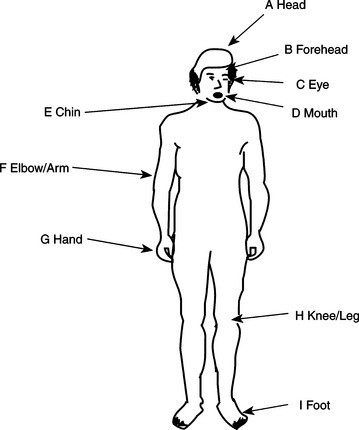
Figure 3-10 Anatomical sites commonly used for control of assistive technologies. (From Webster JW, Cook AM, Tompkins WJ, Vanderheiden GC: Electronic devices for rehabilitation, New York, 1985, John Wiley and Sons, p. 207.)
John Wiley and SonsFor many persons with severe disabilities, eye gaze techniques are the first that are used as control signals in augmentative communication systems, and this method of communicative output can be developed to a high degree of competence (Goossens and Crain, 1987; Nolan, 1987). Often the first communication after a major injury (such as a traumatic brain injury) is yes/no questions answered by eye blinks or eye movement. The eyes can also be used in the control of assistive devices by use of control interfaces that detect eye movements. For these reasons, oculomotor function is included with other effectors. Erhardt (1987) uses the following terms, which emphasize the role of the oculomotor system as an effector: visual approach (localization), visual grasp (fixation), visual manipulation (ocular pursuit), and visual release (gaze shift). When the role of the oculomotor system is considered in these terms, its role as a control site is clear. For example, identification, selection, and indication of vocabulary elements in augmentative communication systems involve all these oculomotor tasks. For eye movements to be used to access an assistive device, the eye movement must be detected and it must be used as a signal for communication or control. Often eye movements are observed by another person, and the control or communication is carried out by that person (see Goossens and Crain, 1987, for example). However, there are also electronic systems that can measure eye position and use it as a control signal. Control interfaces for all these effectors are described in Chapter 7.
The head can be used as a control site in a number of ways. Movements of the head include tilting side to side, vertical movement, horizontal rotation, and linear forward and backward movement. Very few functional movements are purely horizontal or vertical or purely rotational with no tilt; most movements of the head are combinations of these components. Upper extremity sites include the movements of the shoulder, elbow, forearm, and hand and finger. Shoulder movements include elevation, flexion, extension, abduction (away from the body), and adduction (toward the body). The movements of the elbow are flexion and extension. The movements of the forearm consist of pronation (turning the palm down) and supination (turning the palm up). The wrist can flex or extend or move from side to side (radial deviation or ulnar deviation). The fingers can individually flex and extend or, together, perform a grasp and release movement. The thumb can flex and extend, abduct and adduct, and oppose each of the fingers. Control movements used in the lower extremities include raising and lowering of the leg at the hip (e.g., hip flexion and extension), knee flexion and extension or knee abduction and adduction, foot plantar flexion (toes point down) or dorsiflexion (toes point up), and foot inversion or eversion (side to side).
When the interaction between a person with a disability and an assistive device involves relatively fine control, the hand and fingers are the preferred control site because they are typically used for manipulative tasks. Even if hand control is limited, it may still be possible to enhance the existing function by using assistive technologies, which makes it possible to use hand movements for control. If the hand is not controllable, then the use of the head as an interface site is preferred. With pointers of various types as control enhancers (e.g., a head pointer), it is possible to obtain relatively precise control with the head. Oculomotor control is most often used for indicating choices in augmentative communication when no other control site is available for pointing. Eye-controlled switches can be used for gross control by using the eyes. Voice allows for relatively fine control with many possible control signals. Simple air flow with no speech is generally more gross and restricted to a few signals. For some individuals, fine control of the foot is possible. For fine manipulative tasks, the foot is less desirable than the hand or head because visual monitoring can be difficult and the foot is generally not as finely controlled as the hand. The use of the arm or leg is less desirable for precise tasks because these represent naturally gross movements controlled by large muscle groups. For this reason, they are the least desirable for manipulative functions.
Although generally an individual’s “best” available control site is used, in some cases more than one control site must be identified. This situation most often occurs when one person uses several types of assistive technologies. For example, head control may be used for augmentative communication and foot control for a powered wheelchair. In other cases, such as with some neuromuscular disabilities (e.g., amyotrophic lateral sclerosis), multiple sites need to be identified because of progressive paralysis. The course of this progression can vary from months to years. The variation in ability to use effectors over the course of the disease makes it necessary to find flexible control interfaces that can be used with multiple control sites or to find separate control interfaces for several sites initially (see Chapters 4 and 7).
Factors Underlying the Use of Effectors
Two primary factors underlying the use of effectors are automatic movements and muscle tone. The former consists of primitive reflexes, righting reactions, and equilibrium reactions (Hopkins and Smith, 1993).
Primitive reflexes are characterized by immediate and automatic movement performed at a subconscious level (Hopkins and Smith, 1993). They are usually initiated by sensory stimulation. Present at birth or shortly thereafter, these reflexes are inhibited or (more often) integrated into volitional movements to control posture and perform basic movement patterns as the infant develops. Neurological damage before or at birth may affect the degree to which the infant is able to integrate or inhibit these reflex patterns, resulting in delayed motor development and impaired motor control (Fiorentino, 1978). Neurological damage later in life can also reduce the individual’s ability to inhibit some of these primitive reflexes, resulting in impaired postural control and movement patterns.
Hopkins and Smith (1993) tabulate 17 primitive reflexes, including their initiation, stimulus, response, and adaptation in later life. The primitive reflexes that most commonly influence effector use are the asymmetrical tonic neck reflex and the tonic labyrinthine reflex (Trefler, 1984). The asymmetrical tonic neck reflex occurs when the head is turned to one side, the arm on that side is extended, and the opposite arm is flexed. This reflex makes it difficult for the person to hold his trunk and head in midline, prevents use of both hands together, and contributes to scoliosis (Trefler, 1984). The tonic labyrinthine reflex is displayed by increased extensor tone in the supine position and increased flexor tone in the prone position. When sitting, the result is increased extensor tone in the lower limbs, trunk, and neck, causing the person to slide forward in the chair (Davies, 1985).
Righting reactions and equilibrium reactions respond to more global stimuli, and they persist throughout life (Hopkins and Smith, 1993). Righting reactions support the vertical position of the head, alignment of the head and trunk, and alignment of the trunk and pelvis. These reactions are essential for the effective control of assistive technologies. Hopkins and Smith also list nine righting reactions. One reaction that can interfere with assistive technology use is the positive supporting reaction, which is elicited by pressure on the toe pads or ball of the foot. The pressure from the footrest of a wheelchair, for example, can elicit this reaction. Increased extensor tone of the lower extremities follows simultaneously with contraction of the flexor muscles. The result is strong extension of the legs, which affects upright posture.
Equilibrium reactions provide balance when the center of gravity is disturbed, such as by leaning to one side. As the nervous system matures, equilibrium reactions serve to regain balance. These reactions include the counterrotation of the head and trunk away from the direction of a displacement of gravity (e.g., by leaning) and the use of the extremities to gain balance by abduction. Hopkins and Smith (1993) describe 12 equilibrium reactions.
Muscle tone is defined as the resistance to stretch provided by neural activity, viscoelastic properties of muscle and joints, and sensory feedback to the CNS (Brooks, 1986). Normal muscle tone is high enough so that the individual can resist gravity and low enough to allow for movement (Bobath, 1978). Tone varies with age, level of activity, stress, and other factors. Muscle tone in infants is generally decreased, or hypotonic, and infants begin to develop more normal tone as the nervous system develops. As people age, the amount of tone generally decreases for many reasons, including changes in muscle fibers, sensory receptors, and CNS function (Farber, 1991).
Disabilities can also lead to changes in muscle tone. Depending on the level of damage to the nervous system, impaired muscle tone can include flaccidity, spasticity, and rigidity. A reduction in normal muscle tone is referred to as flaccidity or hypotonicity. When muscle tone is increased, it is referred to as hypertonicity or spasticity. Several types of disorders can result in spasticity. Increased muscle tone is often accompanied by exaggerated reflexes and imbalances between the antagonistic muscle pairs controlling joints. With rigidity there is an increase of muscle tone in both the antagonist and agonist muscles at the same time, resulting in resistance to passive range of motion throughout the range and in any direction (Undzis, Zoltan, and Pedretti, 1996). It is possible for a person to exhibit a mixture of types of muscle tone and for the tone to fluctuate throughout the course of a day. This fluctuation has a direct consequence on effector use and therefore on the control of assistive technologies.
Trauma to or disease of the CNS that results in abnormal muscle tone, the presence of primitive reflexes, or abnormal righting or equilibrium reactions affect the individual’s ability to maintain a stable upright posture and perform smooth, coordinated movements. When an individual does not have the ability to stabilize the body, assistive technologies can be used externally to obtain balance and functional positioning (discussed in Chapter 6). Lack of coordinated volitional movements may dictate the use of specialized controls that are enlarged or positioned in locations of maximal control (see Chapter 7).
Characterization of Effector Movements
The movements of effectors can be characterized in several ways, as listed in Table 3-7. By defining the resolution, range, strength, and flexibility for an anatomical site, we can relate these to the skills required for the use of control interfaces.
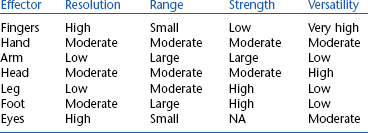
Resolution.
Resolution is used to define the degree of fine control, and it describes the smallest separation between two objects that the effector can reliably control. For example, the spacing of individual keys on a keyboard requires relatively fine motor control and an effector with good resolution. Alternatively, a 6-inch diameter single switch used to turn on a toy requires much lower resolution on the part of the effector. All the components of effector use that we have described contribute to the generation of high-resolution fine movements.
Range.
The maximal extent of movement possible is range. Some tasks require large range and others require small range. For example, the use of push rims on a manual wheelchair requires a relatively large range of movement, whereas the use of a computer mouse requires a relatively small range. The combination of resolution and range allows us to define the workspace of the effectors. These are both affected by disease or injury. For example, contractures, a shortening of the muscles and tendons that limits joint range of motion, may occur as a result of increased tone.
Strength.
Another measure of effector performance is strength of movement. Designers of assistive technology systems must take into account the strength of the effector that is being considered for control of the system. In general, the upper extremities function best when precision and control are required, and the lower extremities are best suited for power and strength. Control of assistive technology systems may require that a minimal level of strength, as reflected by the force required to activate a control interface, be available. Even if the necessary resolution and range are available, there may be insufficient strength to activate the control.
In some disabilities, strength is significantly reduced (or absent). For example, paralysis resulting from a spinal cord injury prevents the use of certain effectors, depending on the level of the injury (Table 3-8). In this case the major goal is to find an effector that is not paralyzed; head or chin control may be required, rather than a control interface activated by hand function. Partial paralysis or paresis is a muscle weakness that makes it difficult to move but does not prevent movement as paralysis does. In this case the assistive technology control interfaces must be modified to accommodate for reduced effector capabilities. For example, an adapted door handle could be used to require less force to be applied to turn the doorknob. In diseases such as muscular dystrophy, fine control is often available but muscle weakness results in very low levels of strength, which may lead to restricted movement over large distances, but fine movements such as those required for a contracted keyboard or a short-throw joystick may be possible.
TABLE 3-8
Motions and Functions Available at Different Levels of Spinal Cord Injury
| Level of Injury | Active Motion Available* | Possible Functions |
| C3 | Neck motion | Unable to perform personal care |
| Chin control | Directs others in transfers, personal care | |
| Uses mouth or chin control for assistive technologies, ventilator on wheelchair | ||
| C4 | Neck motion | Same as C3 except: |
| Shrugs shoulder | No ventilator | |
| Shoulder switch available | ||
| C5 | Some shoulder motions | Assistance for bathing/dressing, bladder/bowel care, transfer |
| Flex elbow, no extension | Uses mobile arm support for feeding, hygiene, grooming, writing, telephone (must be set up by attendant) | |
| Uses chin or mouth control for assistive technologies | ||
| Can propel manual wheelchair short distances with hand rim projections | ||
| C6 | Wrist extension | Independent transfer, dressing, personal hygiene |
| Forearm pronation | Manual wheelchair possible with adapted rims, hand splints for writing, feeding, hygiene, grooming, telephone, typing | |
| Full shoulder motions | ||
| C7 | Wrist, elbow, shoulder motions; no finger grasp | Independent sitting |
| Drive with adapted controls; uses hand splints for manipulation | ||
| C8 | No intrinsic hand muscles; limited sensation in the fingers | Limited hand grasp with splints |
| T1 | Paralysis of intrinsic hand muscles; limited flexibility of hand | Weak unaided grasp |
| T2-T12 | Full use of upper extremities; increasing lower extremity function at lower levels; increasing trunk control at lower levels | Manual wheelchair; may use reachers; trunk supports required for higher levels |
*At each lower level, all the functions of higher levels are available plus those listed for the given level.
Modified from Adler C: Spinal cord injury. In Pendleton HM, Schultz-Krohn W, editors: Pedretti’s occupational therapy: practice skills for physical dysfunction, ed 6, St Louis, 2006, Mosby.
It is also possible that strength is too great for adequate control. This situation often occurs when the foot is used for fine control such as typing on a keyboard. However, excessive strength is not restricted to the lower extremities. Spastic movements are poorly controlled, and they often lead to force in excess of that required for control. Because many control interfaces, such as joysticks, are designed for normal upper extremity levels of force, the excessive forces generated by spastic movements can result in damage to the assistive technology system, as well as to poor performance.
Endurance.
ATPs are also interested in the ability of an individual to sustain a force. In contrast to strength, which is an indicator of the maximal force that can be exerted by an effector, endurance refers to the ability to sustain a force and to repeat the application of a force over time. In other neuromuscular disabilities, such as myasthenia gravis, the problem is one of fatigue, and initial strength may be within a normal range. However, as the individual repeats a movement, there is a continual decrease in performance until total fatigue occurs. Aspects of the assistive technology system design can minimize the effect of fatigue in several ways. First, the interface between the human and the device can be designed to minimize the amount of fatigue by requiring low energy expenditure. The device can also be designed so that it is flexible and reduces the amount of effort as the person tires. An example of the first approach is a joystick for a wheelchair, which requires very little travel and small force. An example of adaptation to fatigue is a variable scanning rate so that when the user is fresh, the scanning is rapid (and selections can be made quickly), but when the person tires, the scan rate slows down to accommodate. The slowdown could be automatically triggered by erroneous entries or manually selected by the user or an attendant. These approaches may be necessary to allow continued functional performance in the presence of fatigue. The careful consideration of the strength and endurance available to move an effector is crucial to the successful application of assistive technology systems.
Versatility.
Some effectors are capable of being used for a variety of tasks and in a variety of different ways for the same task. This characteristic is called versatility. For example, both the hand (fingers) and foot (toes) can be used to press a key or switch. However, the hand can also be used to grasp a handle (e.g., a joystick). Thus the hand is more versatile than the foot. The higher the versatility, the more options provided for the use of the effector to control an assistive device, which is directly reflected in our choice of control interfaces (see Chapter 7) and in the overall design of the human-technology interface.
SUMMARY
The emphasis of this chapter has been on the human operator of assistive technologies. The use of the basic information processing model shown in Figure 3-1 allows us to describe the many components that underlie human performance. This model is also used in succeeding chapters as we discuss specific assistive technology systems. The next chapter explores the assessment of these areas of performance for the purpose of matching assistive technologies to the skills and needs of persons with disabilities.
1. Distinguish between sensation and perception.
2. Assume that you determine the total reaction time for an upper-arm reaching task. Referring to Table 3-6, how would you expect the various components of this total to change (i.e., increase or decrease) given the following conditions: (a) muscular dystrophy, (b) spinal cord injury at the T2 level, (c) traumatic brain injury, (d) cerebral palsy, (e) Hansen’s disease (loss of peripheral sensation)?
3. What is the difference between visual tracking and visual scanning? How do the oculomotor mechanisms that underlie them differ?
4. What is visual accommodation, and how can it affect assistive technology use?
5. What are the three major characteristics that can be changed to increase visual input?
6. If you knew that a person with whom you were working had a severe peripheral visual loss, what color of stimulus would you use to try to maximize visibility (refer to Figure 3-3)?
7. If a person is reported as having a 40-dB hearing loss at 2000 Hz, what was the actual intensity of sound applied to the ear (refer to Figure 3-6)?
8. How is the degree of self-produced locomotion related to integration of visual and vestibular sensory function? Relate this to dependent and independent wheeled mobility.
9. Explain why prism glasses experiments produce the results they do, including the effects on kinesthetic perception.
10. Assume that you are trying to develop a word processing program for use as an augmentative writing system. How would your design differ for a preoperational, concrete operational, and formal operations person? Focus on the user interface (screen commands, loading files, etc.) to the system and special features that you would or would not include. Also include the method you would use to introduce the program to each group.
11. Is motor capability necessary for the development of cognitive skills? If yes, how much capability is required? Explain and justify your answer.
12. What are the major notions involved in self-concept?
13. How is self-concept related to the physical abilities and attributes of the assistive technology user?
14. List and describe the stages of loss typically experienced by a person who has sustained an injury or disease that results in permanent disability.
15. How is the concept of self-protection related to the acquisition and use of assistive technologies?
16. How can difficulties in self-concept or self-protection lead to abandonment of assistive technologies?
17. What are the six factors that affect motivation? How can each of these be incorporated into an assistive technology system? Give an example for each factor.
18. What are the three types of memory distinguished on the basis of time?
19. What is the difference between recognition and recall? How does each apply to assistive technology device use?
20. What are the five basic elements of language? Distinguish between speech and language.
21. What is the difference between problem solving and decision making?
22. Design a flow chart similar to Figure 3-7 for a program of your choice. Assume that the user has short-term memory deficits that make it difficult to follow a sequence of steps.
23. Explain the meaning of the solid and dashed curves in Figure 3-9. What type of curves would you expect if the individual lacked good trunk support to each side?
24. What are the implications of a decrease in motor path variability on assistive technology use?
25. Distinguish between range and resolution for an effector system.
26. How does the age at which an individual is introduced to assistive technology influence acceptance and successful use of assistive technologies?
27. How does the age at which an individual is introduced to assistive technologies relate to the possibility of abandonment of those technologies?
References
Allen, J. Linguistic-based algorithms offer practical text-to-speech systems. Speech Technol. 1981;1:12–16.
Bailey, RW. Human performance engineering, ed 2. Englewood Cliffs, NJ: Prentice Hall, 1989.
Barnes, KH. Training young children for powered mobility beyond the standard joystick. Devl Disabil Spec Interest Sect Newsl Am Occup Ther Assoc. 1991;14:1–2.
Batt, RC, Lounsbury, PA. Teaching the patient with cognitive deficits to use a computer. Am J Occup Ther. 1990;44:364–367.
Bobath, B. Adult hemiplegia: evaluation and treatment, ed 2. London: William Heinemann Medical Books, 1978.
Brainerd, CJ. Piaget’s theory of cognitive development. Englewood Cliffs, NJ: Prentice Hall, 1978.
Brinker, RP, Lewis, M. Discovering the competent infant: a process approach to assessment and intervention. Top Early Child Ed. 1982;2:1–16.
Brinker, RP, Lewis, M. Making the world work with microcomputers: A learning prosthesis for handicapped infants. Except Child. 1982;49:163–170.
Brooks, VB. The neural basis of motor control. New York: Oxford University Press, 1986.
Burgess, MK. Motor control and the role of occupational therapy: past, present and future. Am J Occup Ther. 1989;43:345–348.
Campos, JJ, Bertenthal, BI. Locomotion and psychological development in infancy. In: Jaffe KM, ed. Childhood powered mobility: developmental, technical, and clinical perspectives. Washington, DC: RESNA Press, 1987.
Chapman, RS. Exploring children’s communicative intents. In: Miller JF, ed. Assessing language production in children. Baltimore: University Park Press, 1981.
Cook, AM, Liu, KM, Hoseit, P. Robotic arm use by very young children. Assist Technol. 1990;2:41–57.
Cress, PJ, et al. Vision screening for persons with severe handicaps. TASH J. 1981;6:41–49.
Davies, PM. Steps to follow: a guide to the treatment of adult hemiplegia. New York: Springer-Verlag, 1985.
Depoy, E, Kolodner, EL. Psychological performance factors. In: Christiansen C, Baum C, eds. Occupational therapy. Thorofare, NJ: Slack, 1991.
Duckek, J. Cognitive dimensions of performance. In: Christiansen C, Baum C, eds. Occupational therapy. Thorofare, NJ: Slack, 1991.
Duckman, R. Incidence of visual anomalies in a population of cerebral palsied children. J Am Optom Assoc. 1979;50:607–614.
Dunn, W. Sensory dimensions in performance. In: Christiansen C, Baum C, eds. Occupational therapy. Thorofare, NJ: Slack, 1991.
Early, MB. Mental health concepts and techniques for the occupational therapy assistant, ed 2. New York: Raven Press, 1993.
Erhardt, RP. Sequential levels in the visual motor development of a child with cerebral palsy. Am J Occup Ther. 1987;41:43–49.
Farber, SD. Neuromotor dimensions of performance. In: Christiansen C, Baum C, eds. Occupational therapy. Thorofare, NJ: Slack, 1991.
Fiorentino, MR. Normal and abnormal development: the influence of primitive reflexes on motor development. Springfield, IL: Charles C Thomas, 1978.
Fitts, PM. The information capacity of the human motor system in controlling the amplitude of movement. J Exp Psychol. 1954;47:381–391.
Fitts, PM, Deininger, RL. S-R compatibility: correspondence among paired elements within stimulus and response codes. J Exp Psychol. 1954;48:483–492.
Flash, T, Hogan, N. The coordination of arm movements: an experimentally confirmed mathematical model. J Neurosci. 1985;5:1688–1703.
Fons, K, Gargagliano, TA. Articulate automata: an overview of voice synthesis Gelfan. Byte. 1981;6:164–187.
Georgopoulos, AP, Kalaska, JF, Massey, JT. Spatial trajectories and reaction times of aimed movements: effects of practice, uncertainty, and change in target location. J Neurophysiol. 1981;46:725–743.
Goldenberg, EP. Special technology for special children. Baltimore: University Park Press, 1979.
Goosens, CA, Crain, SS. Overview of non-electronic eye-gaze communication. Augment Altern Commun. 1987;3:77–89.
Held, R, Hein, A. Movement-produced stimulation in the development of visually-guided behavior. J Comp Physiol Psychol. 1963;81:394–398.
Hopkins HL, Smith HD, eds. Willard and Spackman’s occupational therapy, ed 8, Philadelphia: JB Lippincott, 1993.
Jagacinski, RJ, Monk, DL. Fitts’ law in two dimensions with hand and head movements. J Mot Behav. 1985;17:77–95.
Janeschild, M. Early power mobility: evaluation and training guidelines. In: Furumasu J, ed. Pediatric powered mobility: developmental perspectives, technical issues, clinical approaches. Arlington, VA: RESNA Press, 1997.
Kangas, KM. Seating, positioning and physical access. Dev Disabil Spec Interest Sect Newsl Am Occup Ther Assoc. 1991;14:4.
Kermoian, R. Locomotor experience facilitates psychological functioning. In: Gray DB, Quantrano LA, Lieberman ML, eds. Designing and using assistive technology. Baltimore: Paul H Brookes Publishing, 1998.
Kielhofner, G. A model of human occupation, 2: Ontogenesis from the perspective of temporal adaptation. Am J Occup Ther. 1980;34:657–663.
King, TW. Assistive technology: essential human factors. Needham Heights, Mass: Allyn & Bacon, 1999.
Klemmer, ET, Lockhead, GR. Productivity errors in two keying tasks: A field study. J Appl Psychol. 1962;46:401–408.
Lee, WA. A control system framework for understanding normal and abnormal posture. Am J Occup Ther. 1989;43:291–301.
Light, J. Interaction involving individuals using augmentative and alternative communication systems: state of the art and future directions. Augment Altern Commun. 1988;4:66–82.
Light, J, Beesley, M, Collier, B. Transition through multiple augmentative and alternative communication systems: a three-year case study of a head injured adolescent. Augment Altern Commun. 1988;4:2–14.
Livneh, H, Antonak, R. Reactions to disability: an empirical investigation of their nature and structure. J Appl Rehabil Counsel. 1990;21:12–21.
Livneh, H, Antonak, R. Temporal structure of adaptation to disability. Rehabil Counsel Bull. 1991;34:298–319.
Mandler, JM. A new perspective on cognitive development in infancy. Am Sci. 1990;78:236–243.
Mann, RW. Technology and human rehabilitation: prostheses for sensory rehabilitation and sensory substitution. In: Brown JHU, Dickson JF, eds. Advances in biomedical engineering. New York: Academic Press, 1974.
Meyer, DE, Smith, KJ, Wright, CE. Models for the speed and accuracy of aimed movements. Psychol Rev. 1982;89:449–482.
Miller, GA. Language and speech. San Francisco: Freeman, 1981.
Nolan, C. Under the eye of the clock. New York: St. Martin’s Press, 1987.
Padula, WV. A behavioral vision approach for persons with physical disabilities. Santa Ana, CA: Optometric Extension Program Foundation, 1988.
Pedretti, LW. Occupational therapy: practice skills for physical dysfunction, ed 4. St Louis: Mosby, 1996.
Radwin, RG, Vanderheiden, GC, Lin, ML. A method for evaluating head-controlled computer input devices using Fitts’ law. Hum Factors. 1990;32:423–431.
Robertson, SC. Treatments for psychosocial components: intervention for mental health. In Neistadt ME, Crepeau EB, eds.: Willard and Spackman’s occupational therapy, ed 9, Philadelphia: Lippincott-Raven, 1998.
Sabari, JS. Occupational therapy after stroke: are we providing the right services at the right time? Am J Occup Ther. 1998;52:299–302.
Santrock, JW. Life-span development. Madison, WI: Brown and Benchmark, 1997.
Scherer, MJ. Living in the state of stuck: how technology impacts the lives of people with disabilities. Cambridge, Mass: Brookline Books, 1993.
Scherer, MJ. The impact of assistive technology on the lives of people with disabilities. In: Gray DB, Quatrano LA, Lieberman ML, eds. Designing and using assistive technology: the human perspective. Baltimore: Paul H Brookes Publishing, 1998.
Scherer, MJ, Galvin, JC. An outcomes perspective of quality pathways to the most appropriate technology. In: Galvin JC, Scherer MJ, eds. Evaluating, selecting and using appropriate assistive technology. Gaithersburg, MD: Aspen Publishers, 1996.
Stach, BA. Clinical audiology. San Diego: Singular Publishing Group, 1998.
Smith, W, Crook, SB. Phonemes, allophones, and LPC team to synthesize speech. Electron Des. 1981;25:121–127.
Trefler, E. Seating for children with cerebral palsy. Memphis: University of Tennessee Press, 1984.
Trombly, CA, Scott, AD. Occupational therapy for physical dysfunction. Baltimore: Williams & Wilkins, 1977.
Tychsen, L, Lisberger, SG. Maldevelopment of visual motion processing in humans who had strabismus with onset in infancy. J Neurosci. 1986;6:2495–2508.
Undzis, MF, Zoltan, B, Pedretti, LW. Evaluation of motor control. In: Pedretti LW, ed. Occupational therapy: practice skills for physical dysfunction. St Louis: Mosby, 1996.
Verburg, G. Predictors of successful powered mobility control. In: Jaffe KM, ed. Childhood powered mobility: developmental, technical and clinical perspectives. Washington, DC: RESNA Press, 1987.
Warren, M. Strategies for sensory and neuromotor remediation. In: Christiansen C, Baum C, eds. Occupational therapy. Thorofare, NJ: Slack, 1991.