Assistive Technologies in the Context of the Classroom
EDUCATIONAL ACTIVITIES THAT CAN BE AIDED BY ASSISTIVE TECHNOLOGIES
Writing as a Cognitive Process
Mathematics as a Physical Process
Mathematics as a Cognitive Process
IDENTIFYING STUDENT SKILLS AND NEEDS FOR ASSISTIVE TECHNOLOGY
Meeting Educational Goals: The Role of Assistive Technologies
Models for Educational Assistive Technology Assessment
Referral to an Evaluation Center
CONTEXT FOR EDUCATIONAL APPLICATIONS
Social and Cultural Contexts for Educational Use of Assistive Technology
Physical Context for Educational Use of Assistive Technology
HARD AND SOFT TECHNOLOGIES FOR EDUCATIONAL SUCCESS
Technological Description of the Modern Classroom
Considerations in the Use of Assistive Technologies in the Classroom
Internet-Based Educational Resources
Soft Technologies in the Classroom
Training in an Educational Context
Strategies for the Use of Assistive Technologies in the Classroom
On completing this chapter, you will be able to do the following:
1 Describe the context in which assistive technologies are applied in education
2 List the major assistive technologies that are used in educational settings
3 Describe how assistive technologies are used in the classroom to facilitate learning
4 List the major technological approaches used to assist individuals who have learning disabilities
5 Describe how soft technologies are used in education to enhance the use of hard technologies
In preceding chapters we have developed principles for assistive technology application based on the human activity–assistive technology (HAAT) model (see Chapter 2). Two of the major settings in which assistive technologies are used are education and work, and each of these has features that make assistive technology applications unique. This chapter discusses educational applications. Vocational applications are covered in the next chapter. In both cases the HAAT model is used as a framework around which to discuss assistive technology (AT) applications.
Assistive technologies can provide major benefits for children in educational settings from preschool through postsecondary levels (Todis and Walker, 1993). Postural support systems (see Chapter 6) allow children to be positioned for maximal participation in classroom activities. Often this positioning is necessary to allow access to computers for learning (see Chapter 7). Special-purpose input methods or control interfaces (see Chapter 7) are often necessary for use of computers and other electronic devices. Augmentative communication systems (see Chapter 11) play a major role in learning for children who have disabilities affecting speaking or writing. Research has also shown that independent mobility (see Chapter 12) has a significant benefit even to very young children (Butler, 1986). There is an increasing use of “manipulatives” in education. Some assistive technologies (e.g., electronic aids to daily living [EADLs] and robotics; see Chapter 14) can provide assistance to children who cannot independently manipulate real objects. Finally, children who have sensory disabilities (visual or auditory) are aided by the technologies described in Chapters 8 and 9. There are also many hardware and software aids to students who have cognitive disabilities (see Chapter 10). Thus the potential for achieving a positive educational effect is great. However, reaching that potential requires careful planning and policy making to ensure that opportunities and not barriers are created (Merbler, Hadadian, and Ulman, 1999).
Terminology used to describe technology that is useful in achieving educational goals is complicated and often confusing. Edyburn (2003a) describes a number of problems with the current definitions of assistive technology device and service (see Chapter 1) related to the provision of AT in the educational system. Many of these focus on lack of resources available to schools (e.g., personnel, student access to technology, and availability of training). Others relate to legal mandates (e.g., consideration of assistive technology in the IEP). Although these areas do raise issues about the availability of technology and associated resources in schools, they do not mandate a rethinking of the assistive technology terminology as incorporated into U.S. law. The more salient point made by Edyburn is that assistive technologies and instructional technologies (i.e., those used by all students) are often used to accomplish the same goals, and he proposes the term technology-enhanced performance to describe the use of all technologies (assistive and instructional) to place the emphasis on the achievement of educational goals rather than on the technology. We have used the term assistive technology to refer only to those aspects of technology that are matched to an individual need and accomplish broad functional goals for the individual. We have used “educational technology” to describe technology that is intended to aid learning (see Chapter 1). As we have discussed in Chapter 10 technology enhanced performance applies to the classroom setting and is consistent with the use of the HAAT model as we have described it in Chapter 2.
Edyburn (2003a) also makes recommendations for the ways in which assistive technology services should be provided in schools with emphasis on the identification of students with special needs (especially mild cognitive disabilities). He also advocates the development of organized, focused training programs for teachers and other education personnel with appropriate resources attached. Finally, he suggests a comprehensive outcome data collection system to document the use of technology by students with disabilities. These are useful considerations within the educational context.
Now that some of the individual tools for access to education that appear in previous chapters have been identified and some general aspects of their use introduced in the educational setting, we turn our attention to how they are combined and applied to maximize the opportunities for learning by children who have disabilities. That is the subject of the remainder of this chapter. The emphasis is on the way in which assistive technologies can aid students in obtaining access to the curriculum. There are many other sources that describe the application of these technologies in detail, relate them to curriculum development, and evaluate outcomes. One multiauthored source with a wide variety of information is Edyburn, Higgins, and Burn (2005).
EDUCATIONAL ACTIVITIES THAT CAN BE AIDED BY ASSISTIVE TECHNOLOGIES
To discuss assistive technology applications in the classroom, first the activities that characterize educational endeavors must be defined. Having done that, we can then begin to identify the ways that assistive technologies can contribute to those activities. In the following sections, each of the learning activities is described in terms of the tasks that must be accessed to complete the activity. Identification of these tasks will then help to define both the human skills and the technologies required to successfully complete them.
In all these functional areas there are educational technologies (see Chapter 1) that aid in the acquisition of the necessary skills. In many cases the educational technologies are software programs that provide systematic skill development in the various activities. For example, using CD-ROM-based educational software and the Internet, learners can access a much wider range of curriculum material, concepts, ideas, and lessons than are available by print materials and worksheets alone. Because all these sources require the use of a computer, the adaptations described in Chapter 7 are often necessary to ensure access for learners who have motor or sensory disabilities. Because schools often have computers available for general use by learners, it is necessary for the ATP to work with school staff to determine the appropriate access methods for individual learners. The ATP can also work with teachers to integrate appropriate software and hardware into the curriculum.
Reading
Reading requires motor, sensory, and cognitive skills. For print materials, motor skills are primarily associated with acquiring the reading material, positioning it and manipulative tasks (e.g., turning the pages, picking up a book). As shown in Figure 15-1, an aide often assists with manipulation of the reading materials. For reading materials that use electronic media, the motor tasks include mouse or keyboard use to scroll through text, highlight a portion of text, search for particular words or topics, and print out part or all of a document.
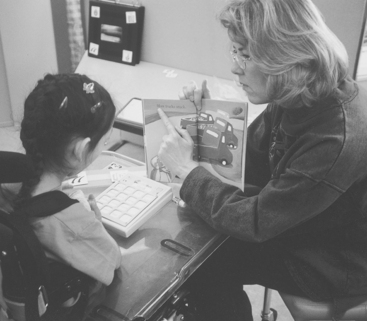
Figure 15-1 An aide often assists with manipulation of reading materials when it is difficult for the student to hold the book.
Success in reading also requires that sensory tasks be completed. Typically we use the visual system to take in information via reading. For this function there must be sufficient visual field, visual acuity, and oculomotor function to scan text and recognize letters and words. If the visual system cannot support these functions, then an alternative format in either tactile (braille) or auditory (speech) form can be used instead.
Conversion between print and electronic forms and between visual and auditory or tactile formats can be aided by assistive technologies. Some of these are described in Chapter 8. The use of digital scanners to aid in this function is described later in this chapter.
Cognitive tasks are those associated with literacy; that is, word identification, spelling, and comprehension. Educational software for assisted reading includes programs that present very simple stories that the child can control, programs with multiple output modes (e.g., visual and auditory), interactive stories that the child can change by pointing and clicking the mouse, and on-line books (including current bestsellers, children’s books, and the classics). A variety of technologies that are used by students with mild disabilities (e.g., learning disabilities) are discussed in Chapter 10.
Strangeman and Dalton (2005) provide a comprehensive review of research relating technology-based approaches for assisting students who have reading difficulties. The key areas that they identify are phonemic awareness, phonics/word recognition, vocabulary, fluency, comprehension, engagement, and universal design for literacy learning. Phonemic awareness is a strong predictor of early reading success. Its development can be aided by computer programs that are based on drill and practice and provide decoding support (recognition of sounds within words), sometimes in a game format. Speech recognition has also been shown to be beneficial in developing reading skills for older students (ages 9-18 years) who have learning disabilities. This benefit occurred only for discrete (word by word) speech recognition not continuous recognition (see Chapter 7).
Difficulties with word recognition or phonics can significantly impact reading ability. Text-to-speech (TTS) software (see Chapter 7) has been used in a number of studies addressing word recognition/phonics with mixed results. The best results occur when teacher training and support are provided with the TTS software, illustrating the importance of using a combination of hard and soft technologies in assistive technology applications (Chapter 1). Jeffs, Behrman, and Bannan-Ritland (2006) describe the characteristics required to provide an appropriate environment for parents and students to effectively use assistive technologies for literacy learning. TTS software can also aid in the acquisition of vocabulary by providing alternative forms of the text (see Chapter 10). TTS combined with other media (hypermedia approaches) have had mixed results in developing increased vocabulary in students with learning disabilities. Synthetic word-level TTS can also aid students who have difficulty with oral fluency when reading. Books-on-tape (see Chapter 8) have also been shown to aid students by providing multi-sensory reading practice. The provision of text in an alternative format using TTS can allow the student to focus on content and improve comprehension (Strangeman and Dalton, 2005). Hypertexts that add strategic prompts, linked glossaries, help files, and other supports have been used to increase comprehension. Computer game formats with a variety of built-in supports, alternative output formats (TTS and text), and curriculum-based activities have also been used to increase comprehension.
For any of these approaches to be effective, the learner must be engaged. Engagement is a measure of the effectiveness of any approach because it directly affects motivation and creation of a challenging and rewarding instructional experience for the student. A second engagement factor is the degree to which the student enjoys reading. If the technology can increase enjoyment and excitement about reading through a variety of activities and features, then the student is more likely to seek out opportunities to read and apply the literacy skills learned through the technology-enhanced performance exercises.
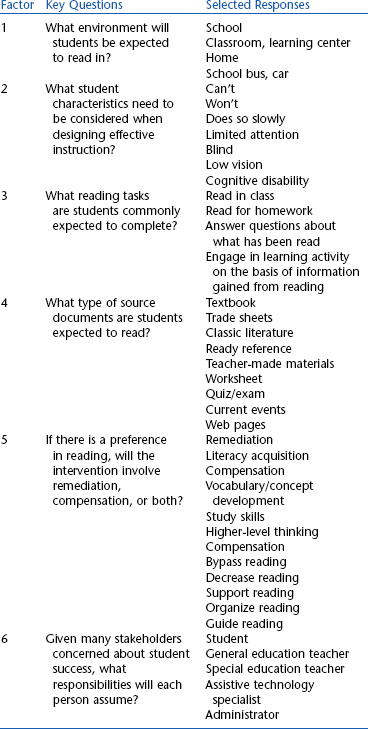
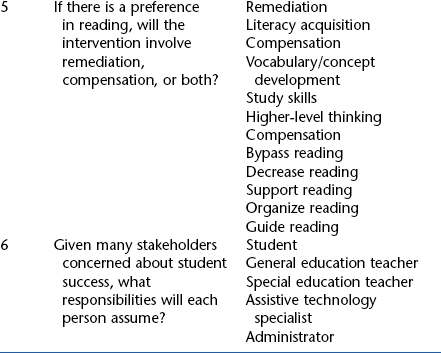
In all of these areas, the research results are mixed and the application of assistive technologies must be individualized to the needs of any specific student. The concept of universal design for learning (an extension of the universal design discussion in Chapter 1) emphasizes applications that are “scalable” for different levels of need, and encompass a range of abilities and needs in learners (Strangeman and Dalton, 2005). Examples include multiple modes of text representation, diverse strategic networks that link to other parts of the learning system, and multiple means of engagement. In all cases the question of remediation (i.e., educational technology designed to teach reading) versus compensation (i.e., assistive technology designed to provide alternative ways of reading) may determine what approaches are taken for any individual student (Edyburn, 2003b). Often a student must fail despite repeated remediation attempts before compensation approaches are considered. To address this dilemma, Edyburn (2003b) has developed the systems approach shown in Table 15-1. The six factors included in Table 15-1 identify the critical questions that must be addressed to attain academic achievement gains as mandated by various legislation (e.g., No Child Left Behind in the United States). Each of the needs (Factor 2) and compensation strategies (Factor 5) identified in the table are based on technologies that are discussed in this or earlier chapters. Edyburn (2003b) lists specific software products for each of those strategies that involve technology.
As in all aspects of assistive technology application, the measurement of outcomes is important to evaluate our approaches. For reading, the challenges are to determine whether reading is more successful and useful to the student with the use of an assistive technology than without it. Reading is a complex activity with many factors that influence its success, and the effectiveness of assistive technologies in aiding reading is not an easy question to answer (Edyburn, 2004).
Writing
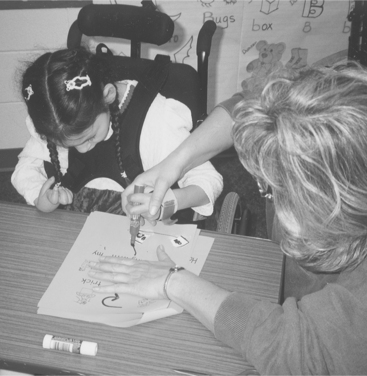
Writing requires motor, sensory, and cognitive skills. Motor skills are primarily associated with acquiring the reading material, positioning it, and manipulative tasks (e.g., turning the pages, picking up a book etc.). The use of pencil or pen and paper requires fine motor control to hold the pen or pencil and to produce letters (Figure 15-2). When the learner’s disability significantly affects these motor skills, it may be necessary to recognize that some skills will not be functional and to develop alternative approaches to writing. This intervention allows the learner to move on to other educational goals rather than working on the functional tasks of handwriting at the expense of these other goals. The assistive technology practitioner (ATP) must use his or her judgment as to when to make the transition from handwriting skill development to electronic alternatives, but in most cases it is desirable to accommodate in the short term to enable learning, even if handwriting might be functional in the long term. For students who have a motor limitation preventing the use of handwriting, assistive technology–based writing requires the ability to use a keyboard or mouse. As discussed in Chapter 7, there are also many alternatives to keyboard/mouse entry, including automatic speech recognition. Sensory skills are primarily used for monitoring what is being written. This task is most commonly done visually, but auditory or tactile monitoring is also possible using various types of assistive technologies (Chapter 8). Cognitive and language skills include spelling (spontaneous, first letter, recognition), grammar, and sequencing (Chapter 10). Learners may only generate a small percentage of the total written work. However, students should be encouraged to use these alternative methods where possible to give them the opportunity to develop this form of reasoning.
Messaging has many of the same requirements as note taking. However, abbreviations and shorthand notations must be understandable to the person’s communication partners. In addition, individuals do not need to generate messages quickly because often the person receiving the message is not present or waiting for it. Instant messaging and e-mail have influenced how we communicate. For students with motor problems, the use of asynchronous communication allows them to compose a message at a slower speed and send it quickly. This method allows communication with classmates and others in a manner like the students without physical disabilities.
Written messages can be developed by using paper and pencil, symbol stamps, e-mail, instant messaging, and chat rooms. They can also be developed with facilitators who can write down what someone is saying and then send the message later. For example, Brodin (1992) developed a way to send messages to families for individuals who have intellectual disabilities, use symbols for communication, and are unable to use voice communication over the telephone. These individuals live in group homes and wish to stay in touch with their families. The approach creates rubber stamps with the appropriate symbols with which the assistive and augmentative communication (AAC) user is familiar. These stamps are used by the person to create a message on paper. This message is then faxed to the significant others as a message.
The most demanding type of writing is formal writing: reports, school homework, writing for publication, and similar applications. Creative writing (prose or poetry) is a very important category of writing that requires assistive technology tools. Here content is most important. For formal writing, the rate of text entry for individuals with motor limitations is important because they may have a typing rate of three to five words per minute, and input acceleration techniques (Chapter 7) are necessary to allow them to keep up with the demands of work or school. The most common adaptation is to make a computer accessible so the student can access word processors for writing. The functions of the word processor must be available to the user regardless of the input method being used (e.g., one-key typing, scanning, Morse code). Smith et al (1989) analyzed the formal written output of a group of adolescents who had congenital disabilities limiting their abilities to speak and who were competent conversational users of AAC (Chapter 11) devices. Each of these individuals had developed language by using Blissymbols (see Vanderheiden and Lloyd, 1986), and they had made the transition to traditional orthography (letters and spelling). Smith and co-workers analyzed the homework produced by these individuals. More than 80% of the homework was produced independently. The rate of production of written output was only 1.5 words per minute, reflecting the amount of planning and thinking time required and the limitations imposed by physical disabilities. As expected, the majority (more than 50%) of the writing was for school assignments. The second largest category was personal correspondence, a finding that Smith et al ascribed to the inability to use a telephone. Currently, this category is served by e-mail. Some difficulties with grammatical structure and form were observed in all the subjects, but there was great variability even in this small sample. This study indicates that individuals who have congenital speaking and writing difficulties because of physical limitations can develop successful writing skills.
Writing as a Cognitive Process.
Writing as a cognitive process has been described as consisting of four phases: (1) prewriting or brainstorming, (2) drafting or organizing and composing, (3) editing, and (4) publishing (Calkins, 1986). Technology can aid all four phases of this process and thereby positively affect the learner’s writing skill development (Rocklage and Lake, 1997). As Rocklage and Lake point out, assistive technology for writing provides both a structure within which the learner can learn to write and a polished finished (or published) product.
Light and Smith (1993) compared the home literacy experiences of preschool children by surveying a group of parents of children who use AAC and a group of parents of nondisabled children. Through a series of questions, Light and Smith determined the functional context (e.g., how reading and writing occur, when they occur, communication during reading), language context (roles of parent and child, nature and degree of participation), and cultural context (parental priorities and beliefs regarding literacy). Both groups of children were interested in literacy activities, but the AAC users had fewer opportunities to read, participated less during reading, and had less access to writing and drawing materials. Although both groups of parents gave high priority to communication, the parents of the nondisabled children gave highest priorities to making friends and literacy activities. The parents of AAC users gave second level priorities to physical needs such as mobility and feeding. Studies such as this one underscore the importance of attitudes, beliefs, and accessibility to materials in the development of cognitive communication skills. A more detailed discussion of literacy issues related to assistive technologies is provided by Light and Kent-Walsh (2003) and Sturm, Erickson, and Yoder (2002), who describe the literacy challenges faced by children who use AAC and offer suggestions for enhancing literacy development through the use of AAC.
Educational software for assisting writing includes programs that allow the child to create his or her own story. Other programs provide monitoring through visual and auditory feedback. Word prediction and completion programs (see Chapters 7 and 11) can aid spelling and word finding. The use of abbreviations and macros (see Chapter 7) that reduce the number of keystrokes can increase the speed of text entry. Chapter 10 (see Language Tools in that chapter) discusses the use of word prediction, spell checkers, concept mapping software, and other technology approaches to aid individuals who have difficulty writing because of cognitive disabilities.
Edyburn (2003c) describes a number of factors influencing the measurement of outcomes of assistive technology supported writing. A major challenge is to recognize that easy to measure characteristics (e.g., rate of typing and written output) may not be as meaningful as more difficult factors (e.g., the quality of the written output). He also describes a number of potential measures that can be used.
Mathematics
Mathematics is an essential part of the school curriculum. In the United States, the National Council of Teachers of Mathematics (NCTM) has developed standards for the teaching of mathematics (Maccini and Gagnon, 2005). Recommended practices include the need to teach all students high-level thinking and reasoning skills and mathematical problem solving. The goals of the standards are to prepare learners to (1) value mathematics, (2) become confident in their mathematical ability, (3) become mathematical problem solvers, (4) learn to communicate mathematically, and (5) reason mathematically. Much like writing, students have difficulties for different reasons. For individuals with motor limitations, the problems are manipulation of concepts through alternatives to pencil and paper. For those with cognitive disabilities, the challenges are to find technological approaches to aid in achieving the five goals listed. These two categories are discussed separately.
Mathematics as a Physical Process.
Imagine learning even the most basic arithmetic without being able to write the numbers down. Although it is possible to become proficient using this strategy, it is certainly more difficult than basic pencil-and-paper mathematics. A scribe can be used to assist in learning mathematics just as in writing. However, many of the same concerns and limitations described for writing apply to mathematics. For mathematics there is the added requirement that thinking mathematically almost always requires having a worksheet on which to solve the problem. Very few people can develop mathematical skills without some visual representation. When this is impossible (e.g., when the learner is blind), other strategies have to be developed. A learner may use an AAC device (Chapter 11) to instruct an aide who is scribing for the learner (e.g., “The answer is 5” or “Move the yellow one to the other pile”).
Seven-year-old Rob has difficulty using a pencil and paper because of his cerebral palsy, but he is able to use a computer for writing by hitting the keys with one finger. He wants to learn math (at least his parents and teacher want him to do so), but this is very difficult using the standard keyboard and cursor movement. After he has two rows of numbers, he must move over to the far right-hand side of the first column of numbers and enter the first correct number (7). Then he must backspace two times to get the cursor in the proper position for the second number (1). The cursor in a graphical communication device is a flashing marker that indicates the location on the screen for the next entry. In writing English text using a word processing program, the cursor always moves left to right and moves down one line at the right margin. In contrast to this convention, the cursor should move left to right for mathematics as numbers are entered to be added, but once there is a column of numbers, the cursor should move right to left as the sum is entered. Figure 15-3, A-B, illustrates this cursor movement. Also, when learning to add or subtract, children are taught to carry or borrow by crossing out the number at the top of the adjacent column and substituting the borrowed or carried value. It is desirable for this type of cursor movement to be available in a math worksheet as well. For example, when in the math mode, the letter C could be pressed to indicate carry, causing the cursor to jump to the top of the next column. All these cursor movements can be very time consuming, especially if a writing device is used and the person must tediously backspace to obtain the right to left cursor movement.
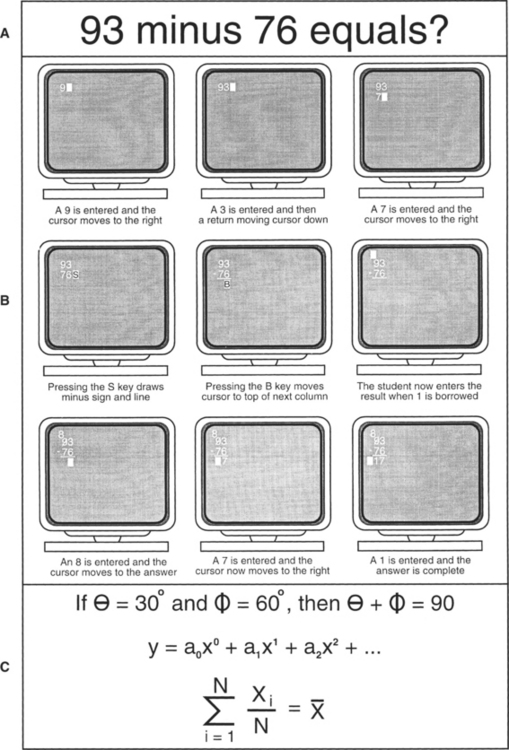
Figure 15-3 Math problems require different cursor movements and symbols than text entry. A, A math problem as it would normally be written. B, The sequence of cursor movements required to enter the problem, create a subtraction notation (line plus minus sign), and complete the problem (including using “borrow”). C, Special symbols such as these are used in higher mathematics.
In algebra, special symbols (e.g., Greek letters) and the use of superscripts and subscripts are also required (Figure 15-3, C). Higher math such as statistics or calculus adds the need to have special symbols like summation signs and integral signs and the need for displaying mathematical formulas in the proper format. There are devices (sometimes as programs for personal computers) that are set up specifically for these math functions. Several commercial AAC devices also include some or all of these mathematical functions.
Mathematical ability, including precursor skills (e.g., counting, sorting), is often developed by use of manipulatives. These are rods, blocks, buttons, beads, or other objects that vary by color, length, and weight and can be sorted, counted, and used to enhance concept development in mathematics. Piaget believed that learners use “concrete operations” (see Table 3-1) to develop many cognitive concepts from 7 to 11 years of age (Brainerd, 1978). Others now believe that concrete operations using manipulatives of various types are an important part of learning for much older learners, including adults (Resnick et al, 1998). To fully benefit from concrete operations, the learner must have control over objects. For example, a simple task with manipulatives might involve being able to see that “I have two pieces in this pile, and I move two more pieces over and now I have four.”
Although the learner typically manipulates real objects, there are also computer programs that substitute computer-generated graphics of manipulatives for persons who cannot use their hands. The computer mouse (e.g., click and drag) or keyboard (e.g., arrow keys) can be used to move these manipulatives. Conceptually this type of manipulation can develop the same skills as manipulation of real objects. Manipulatives can also be switch controlled either by using software specifically designed for that purpose or by using computer adaptations such as SmartClick (see Chapter 7) to create adapted access to standard software.
Mathematics differs from writing in several important ways. The cursor moves right to left rather than left to right for entering sums or differences. The functions of borrow and carry also require unique cursor movements. Higher mathematics requires Greek symbols, superscripts, subscripts, and mathematical symbols (e.g., integral sign, summation sign). Typical symbols are shown in Figure 15-3, C. Some AAC devices (see Chapter 11) have built-in math worksheet software including special symbols. These features of mathematics worksheets differ from calculator functions, and they are intended to facilitate the development of math skills. There is a use for calculators that are adapted for access by learners who have difficulties with the keys on standard calculators. Some enlarged key calculators are available, and some AAC devices also include calculator functions. Calculator functions are also built into Windows and Macintosh operating systems, and they can be used with any of the access approaches described in Chapter 7.
Word processing software often includes the special symbols required for mathematics but lacks the special cursor movements. The required symbol set is selected and inserted into a document or worksheet, which is useful for a teacher creating a worksheet or to a learner using a computer. However, these approaches do not address the special cursor movements required for mathematics. Those functions are available in special computer software (e.g., MathPad and Math Pad Plus, Intellitools, Petaluma, Calif., www.intellitools.com/default.aspx) and some AAC devices (see Chapter 11). The selection of characters can be left open as a window and the user can pick the desired symbol and insert it as necessary. This approach allows the learner to write out the equations, solve them, and print the results. Both direct and indirect (scanning and encoding) access are available to accommodate a variety of motor skill levels in learners (see Chapter 7).
Mathematics as a Cognitive Process.
The primary focus of mathematics is to help students acquire the cognitive abilities to manipulate numbers and to solve routine and novel problems (Edyburn, 2003d). The physical manipulation assists described above help with internalization of mathematical skills, but they do not address possible cognitive limitations. Students with cognitive disabilities often struggle with concepts such as counting, telling time, making change, learning basic mathematical facts, and solving real-world problems (Edyburn, 2003d). The NCTM has recommended that every student have access to a calculator, every teacher have access to a computer, and every classroom have access to the Internet for demonstrations and student’s use and access to “computers and other appropriate technology for individual, small group and whole-class use as needed” (Maccini and Gagnon, 2005). This complement of technologies can be assistive for students with disabilities and is instructional for all students.
Educational software that helps develop math skills from basic counting through higher mathematics is available for both the Windows and Macintosh environments. These programs address skill development through drill and practice and concept development, through the use of computer graphics, games, and word problems integrated into an interesting illustrated story (see Case Study: Assistive Technology Assistance with Mathematics). Calculators and computer programs that help with math problem formulation and solution are also available (Maccini and Gagnon, 2005). Measurement of assistive technology outcomes in mathematics focuses on two areas: (1) the ability to calculate accurately and (2) the ability to use one’s mathematical ability to solve problems (Edyburn, 2003d). Both these questions relate to the student’s ability to independently solve routine and novel problems. The critical assistive technology question is whether the student’s performance is improved with the assistive technology over the no-technology condition. To date, there is insufficient evidence to answer this question in general. However, it can be evaluated in each individual case by establishing a baseline measure for the student and then re-evaluating after proficiency in assistive technology use has been achieved.
Science
Educational activities in science are both theoretical and experimental. The latter is based on hands-on manipulation of objects in biology, physics, and chemistry. Sometimes these concepts and skills are taught with physical objects and laboratory experiments. However, with the increased quality and resolution of computer graphics, a lower cost alternative is computer simulation of experimental situations (e.g., frog dissection in biology, chemical reactions, laws of motion experiments in physics). There are also Internet-based sources from which experiments can be downloaded. Examples of simulated experiments are provided by (Schaff et al, 2005).
There are several ways in which learners with physical disabilities that limit reaching and grasping can participate in science activities that require manipulation. Instructions for manipulation can be given to a peer, aide, or teacher via natural speech or AAC devices. Independent manipulation of objects can be aided by EADLs or robotic systems. In Chapter 14 we describe EADLs in detail. The use of robotic arms to aid in science instruction is also described in Chapter 14. Finally, if suitable computer adaptations are available, learners with disabilities can participate equally in computer simulations, concept development software, and Internet-based science instruction.
There are other technologies that are useful in science instruction for students with disabilities (Schaff et al, 2005): Virtual reality software allows students to experience different environments and conduct experiments without manipulating physical objects and many similar “immersive” experiences. Virtual reality is defined as a three-dimensional, computer-generated synthetic environment that allows students to gain a sense of being immersed in a real world (Schaff et al, 2005). Their use in science education is relatively new and not widespread. The advantages of virtual environments are that the physical requirements for exploration can be altered for a student with a motor disability, the external stimuli can be controlled to avoid over stimulation of individuals with cognitive limitations, and a variety of sensory modalities can be used to accommodate students with hearing or visual impairments. The most exciting feature of virtual reality for education is that it is highly interactive, which can be a motivating factor for students.
Music
Music instruction involves basic rhythm and group participation. Young learners use instruments and their voices to participate in music. Music appreciation through listening is also part of the curriculum. Adaptations (e.g., adapted handles, activation by head or foot movement) can be made for students who cannot use musical instruments as a result of disabilities. AAC devices that use digitized speech (see Chapter 11) can store musical sounds (i.e., an instrument) or a vocal song. Most computers can be equipped with a musical instrument digital interface (MIDI). This interface is a file that is used to store music as a series of notes with volume and duration attached. The file allows music to be played back through a sound card in a computer. If a digital musical instrument (e.g., a piano keyboard) is attached to the MIDI interface, it can be used to store the musical notes so they can be played back on the instrument or through the sound card (Merbler, Hadadian, and Ulman, 1999). With this arrangement, learners can create original songs, learn musical instruments, and explore sounds. With appropriate computer adaptations, the learner who has a disability can also access a MIDI-equipped computer.
Art
Art activities help students develop fine motor control and an understanding of shapes and colors and provide a creative outlet for students. For students who lack the fine motor skill for drawing, adaptations can be provided. For example, a pen, pencil, or paintbrush can be attached to a head pointer or mouthstick (see Chapter 7). One example of such an arrangement is shown in Figure 15-4.
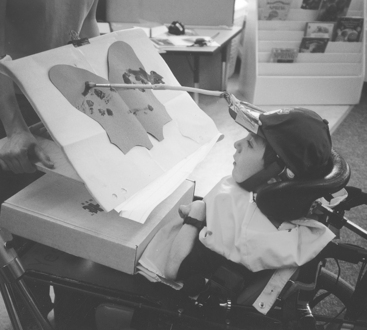
Figure 15-4 For assistance with painting in art class, we can attach the paintbrush to a head-pointing stick or baseball cap.
Handles on drawing instruments can be enlarged and adapted grips can be added (see Figure 14-3). Alternatively, the manipulation of digital images can be substituted for drawing with pencil and paper. This can present challenging art projects in a format accessible by learners with physical disabilities (Merbler, Hadadian, and Ulman, 1999). Computer software for drawing is also used in educational settings. With the appropriate computer adaptations, this software is accessible to all learners regardless of disability.
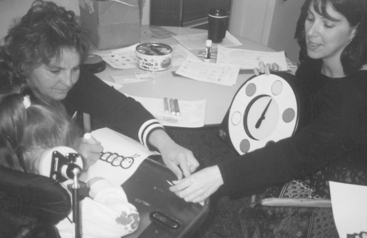
Open-ended tasks such as drawing can also be carried out using single-switch scanning. In one approach the learner selects the color by scanning (Figure 15-5) and the teacher or aide then uses that color to fill in a part of the picture. A more independent method can be achieved with an adapted robotic system (Smith and Topping, 1996) such as the Handy 1, a robotic system specially designed for feeding (Topping, 1996). The Handy 1 is described further in Chapter 14. In the application for art, selection of the color of a pen, the position of the pen, the activity of the pen (move or draw), and its movement are accomplished using single-switch scanning. Using scanning for tasks such as these is cognitively demanding, and Smith and Topping (1996) reported widely different levels of success in the three subjects included in their study.
Drawing and Plotting
Computer software can be used to produce graphical outputs for drawing or plotting for science or art instruction. Current computer software provides many different means of drawing and plotting. Spreadsheet programs include plotting and calculation capabilities. Drawing programs include the ability to sketch an idea or create a finished picture by using mouse movements. Photo editors and digital cameras allow easy manipulation of images for a variety of applications. The key to all of these applications is obtaining computer access for persons with physical disabilities (Chapter 7) and simplifying tasks for individuals with cognitive disabilities (Chapter 10).
IDENTIFYING STUDENT SKILLS AND NEEDS FOR ASSISTIVE TECHNOLOGY
The letter and response on the following page were posted on the Rehabilitation Engineering and Assistive Technology Society of North America (RESNA) assistive technology listserv. They point out some of the issues in assistive technology assessment for education.
This exchange of letters points out the necessity for a team approach, including the learner and her family. It also illustrates the necessity of focusing on need rather than technology. This section describes several commonly used approaches to assistive technology assessment in education. A general assistive technology assessment process is detailed in Chapter 4.
Meeting Educational Goals: The Role of Assistive Technologies
We have defined the activities that are typically carried out in educational settings. Given these activities, it is important to determine the skills and abilities that the learner brings to the process. This evaluation of learner skills is obtained from a systematic assessment process. Chapter 4 describes both the essential information that must be obtained through an assessment process and the major approaches to service delivery in assistive technologies. Assistive technology assessment in education has some unique goals that are discussed in this section. The major approaches used to obtain this assessment information are also described.
The development of services and service delivery in the United States has been significantly affected by federal legislation (see Chapter 1). The Individuals with Disabilities Education Act (IDEA) includes definitions of assistive technology devices and assistive technology services. It mandates that local educational agencies be responsible for providing assistive technology devices and services if these are required as part of a child’s education, as well as related services and supplementary aid or service. These devices and services must be directly related to the child’s educational program.
IDEA also mandates that an Individual Education Plan (IEP), which incorporates the specialized program, be written for each student. The 1997 reauthorization of IDEA mandates that the IEP team must consider assistive technologies as a special factor when developing the learner’s IEP (Merbler, Hadadian, and Ulman, 1999). A policy statement on the rights of a student with a disability to assistive technology under Public Law 94-142 was issued August 10, 1990 (Button, 1990). This policy statement describes a variety of services and devices that may be included in the IEP. The impact of this law has been far reaching, and devices ranging from sensory aids (visual and auditory) to augmentative communication devices to specialized computers have been provided to help children with disabilities access educational programs (Desch, 1986).
Models for Educational Assistive Technology Assessment
There are only a few commonly used models of delivery for assistive technology devices and services. One set of models is built around an assistive technology expert or an expert team that is brought into the classroom. In some cases the assistive technology experience and expertise is not available in the local school, and external assistance is sought. Often a team of assistive technology specialists provides this assistance. In other cases a single external assistive technology consultant is called on to carry out assessment of a child. When a school or local education authority has experience in meeting the needs of a number of their students, they may build local assistive technology resources around this experience and not rely on external consultants. This is often an interdisciplinary team that works together within the local educational authority. Alternatively, a single well-qualified and experienced ATP may also take on this role for a local school district.
Another approach or model is to refer the child to the assessment setting in an evaluation center. Although this assessment is also carried out by a team, this model differs from the first model in that the child is typically seen in the center rather than in the classroom because they have a wide range of equipment to be demonstrated and they can involve specialized staff as the learner’s needs dictate. Each of these delivery models is discussed in general in Chapter 4. This chapter focuses on their use in educational settings.
As Todis and Walker (1993) point out, successful assistive technology outcomes are dependent on a careful and thorough evaluation of the individual learner’s needs. This is true regardless of the type and extent of disability or the format of the evaluation. If we are to ensure that there is “goodness of fit” between the learner’s needs and the recommended assistive technology, then we are required to consider the full constellation of unique abilities and disabilities of the learner during the assessment process. Todis and Walker (1993) present two case studies that illustrate the importance of a thorough evaluation to achieve the desired outcomes for the learner.
Assessment Team
The assistive technology assessment team usually includes a variety of disciplines (e.g., occupational therapist [OT], physical therapist [PT], speech-language pathologist [SLP], ATP, and pediatrician) (Todis and Walker, 1993). The classroom teacher and the local resource specialist in assistive technology may also be included, together with the family (parents and siblings) of the learner who is being assessed. If the assessment team is outside the learner’s school, it is a greater challenge to develop sufficient understanding of the learner’s needs. Ideally the assessment team would carry out their assessment in the school, community, and home, as well as any specialized assessment center (Todis and Walker, 1993). This approach allows the team to determine the preferences and goals (sometimes conflicting) of the learner, the family’s values, and the short- and long-term goals of the educational program for the child.
There are a variety of types of teams that provide assistive technology intervention services in schools. The complexity of the needs served and the possible options for meeting those needs through technology necessitates that a team approach be used whenever possible (Bodine and Melonics, 2005). All members of the team share responsibility for the classroom and for the learning of all students. Teams gain additional strength from group decision making that avoids individual errors in judgment and stimulates group interactions so that one perspective does not prevail without discussion. There are several types of teams defined by Bodine and Melonics. Multidisciplinary teams are based on the medical model of individual disciplines presenting information germane to their areas of specialization with little integration. Interdisciplinary teams have formal channels of communication and team members share information and discuss results. In education these are more effective than multidisciplinary teams because team members share ideas and there is collaboration in reaching decisions regarding assistive technology approaches for a student. The most effective arrangement goes one step further to form a more unified approach to working as a team in which professionals often cross disciplinary boundaries on the basis of their experience and expertise. This approach is called transdisciplinary teaming. These teams are generally family/student centered and include parents, community members, and siblings who are familiar with the student, in addition to the professional team members. These teams have been shown to be more effective in developing and implementing assistive technology approaches for students with special needs. A similar concept is collaborative teams in which interorganizational structures allow sharing of power and authority to bring the team together to solve common problems. The cooperative approach or transdisciplinary or collaborative teams has been shown to be highly effective in meeting student needs (Bodine and Melonics, 2005).
Chapter 7 presents a detailed description of evaluation for access (e.g., use of a keyboard or alternative) to the assistive technologies. This is an area that is often overlooked until late in the assessment process, according to Todis and Walker (1993). Another area of potential concern is that the assessment may only address immediate learner needs and not pay enough attention to future growth and implications for new devices or expanded features (Beukelman and Mirenda, 2005). Assistive technology devices are often expensive, and funding sources will generally not purchase new technology repeatedly for the same child. The tradeoff is that the technology must have growth potential but not be too complicated or sophisticated for the learner to access it now (Todis and Walker, 1993).
As the letter from the mother in the case study illustrates, assistive technology procurement can sometimes become the goal rather than the process or means by which the goal can be achieved. This can place pressure on the assessment team to recommend assistive technology without adequate regard for the learner’s goals.
Finally, the assessment process must carefully evaluate the potential impact of the new assistive technology on the classroom in which the learner’s program is conducted. One of the most widely used assessment formats is called SETT (Zabala, 1996). The SETT framework was developed for use in educational settings. The four elements are Student, Environment, Task, and Tools. For each of these areas there is a set of questions that the team answers to define the needs of the student in terms of the classroom environment, the curricular tasks to be completed, and the tools (low and high technology) to be used. The focus of the SETT framework is on the interrelationship among the four elements. Student questions include the following: What does the student need to do? What are the student’s special needs? and What are the student’s current abilities? Typical environment questions ask the following: What materials and devices are available? What is the physical layout? Are there any special issues? What is the instructional arrangement? Are there any changes planned? What supports are available to the student? and What resources are available to the team supporting the student? Task questions include the following: What activities take place? What activities support the student’s curriculum? What are critical elements of activities? How can activities be modified to meet student needs? How can technology support the student’s participation in the activities? Finally, the Tools questions focus on the following questions: What strategies might be used to increase student performance? What no-tech, low-tech, and high-tech options should be considered? How might tools be tried with the student in environments where they will be used? By answering these questions, the team can ensure that they have not missed important items, that they have adequately related the needs to the curriculum, and that they have focused on the needs of the student.
Specialist Team.
A specialist or, more often, a transdisciplinary team is responsible for assistive technology assessment. The team may be part of the school district or external to it. The role of the ATP in either case is as a consultant to the classroom team and family, not as a part of the learner’s classroom staff. This role places limitations on what the ATP is able to do and how effective he or she is. As an outside consultant, the ATP is able to make recommendations, offer expert advice, and provide information that may not be available to other team members. However, the implementation of assistive technology devices and services is out of his or her control, which means the ATP must carefully evaluate the educational context and take into account the resources, limitations, and expertise available in that setting before making recommendations for assistive technologies. This is especially important when considering soft technologies such as training of the learner and staff, strategy development for the use of the assistive technology, and evaluation of outcomes of the intervention.
One of the most valuable contributions that the ATP can make to the school team is a perspective on what is possible, what is reasonable, and what is technologically feasible. Equally important is to be able to identify situations in which the available technologies are not suitable for the existing problems. Consumers may not appreciate the implications of new technological advances, many of which are reported in the popular press. Also, sometimes things that seem like they should be easy to do technically are really quite difficult and those that seem to a nontechnical person to be difficult may in fact be easy and inexpensive to accomplish. Thus a major role for the ATP as a consultative member of the school team is to provide a perspective on the question of what is and what is not technically possible. This perspective also helps to determine what should be done technologically, as well as what can be done.
To fill the need for technological information, the ATP needs specific skills. These include (1) an understanding of the special and regular educational systems, (2) knowledge of current assistive technologies used to improve access to education for children with disabilities, (3) understanding of the roles of other members of the team (teacher, resource specialists, OT, PT, SLP, parents), and (4) technical knowledge and experience sufficient to apply the assistive technologies (hard and soft) effectively.
Local Resource Specialist.
Many schools have resource specialists who provide expert advice on approaches, curriculum adaptation, and assistive technologies for learners who have special needs. The role of this individual is similar to the ATP role on the assessment team, but the range of experience with assistive technologies may be less extensive. Typically the resource specialist has a number of areas for which he or she is responsible. The specialist’s participation in assistive technology assessment is most effective as a member of the assessment team. Once an assistive technology plan is developed, the local resource person is valuable in helping to implement both the hard and soft technologies. This individual is also often involved in evaluating the success of the assistive technologies provided and in determining when reassessment is warranted.
Referral to an Evaluation Center.
Referral to a center or clinic specializing in assistive technology applications has advantages and disadvantages. The center-based assessment teams may have a clinical orientation. This may make it more difficult for them to relate to the learner’s specific needs unless they have experience with assessment and recommendation of assistive technology for children. However, a center of this type is more likely to have a broad knowledge of available assistive technologies for trial and loan, and their experience with a large group of clients provides a rich source of soft technologies such as strategies and approaches to training. It is important that a center-based assessment include the teacher and other school staff, as well as the learner and his family, in the evaluation process. The center-based assessment team needs to ensure that everyone’s goals for the learner are identified. Typically assessments are carried out over several sessions, with some assessment taking place in the school (to focus on needs and the school environment) and some in the center (to allow access to a wide range of technology for trial and evaluation).
CONTEXT FOR EDUCATIONAL APPLICATIONS
The context portion of the HAAT model describes where the activity is being performed. Chapter 2 defined four types of context: physical, social, cultural, and institutional. Each of these plays an important role in the ultimate effectiveness or ineffectiveness of an assistive technology system. This section examines each type of context from an educational perspective.
Social and Cultural Contexts for Educational Use of Assistive Technology
Education for children who have disabilities used to be carried out in segregated, specially equipped classrooms set up to meet the unique needs of children with disabilities. Increasingly this specialized classroom is a thing of the past, except in cases of children with severe multiple disabilities. The current practice is inclusion of students with disabilities in the regular educational programs. Even when there is a specialized classroom, children are integrated into regular classes for at least part of the school day. Under this model, resource specialists often provide support services related to assistive technology devices and services. However, even if a resource specialist is available, the knowledge and skills of the general classroom teacher must be expanded to include special services and assistive technologies necessary to support learners who have disabilities. One of the implications of inclusion is that there are fewer concentrations of assistive technologies in specialized classrooms and greater diffusion of these technologies throughout the educational system. When there were concentrations of assistive technologies in special education classrooms, relatively few teachers needed to have expertise in their application. With the changing, more diffuse educational model, any teacher may have contact with assistive technologies. The school is now to be adapted to the student, rather than the student adapting to the school (Baker, 1993).
Baker (1993) expresses the concern that some school districts may view the full inclusion policy as a way to deny “expensive” special education support services (e.g., speech pathology, occupational therapy) to students who need them. There are additional benefits that are possible with full inclusion, such as nondisabled peer tutors, cooperative learning, and team teaching (Baker, 1993).
Beukelman and Mirenda (2005) conceptualize academic participation in the school environment as occurring at four levels. The first is competitive, in which the learner who has a disability has the same expectations as the nondisabled peer. The workload may be adjusted at this level, but the learner’s academic progress is evaluated in the same way as it is for nondisabled peers. The second level is active participation, in which the workload is also adjusted and the evaluations based on individualized standards. At this level the academic expectations are less than for nondisabled peers. The third level is referred to as involved. At this level, academic expectations are minimal and inclusion occurs through alternative activities. Academic evaluation is based on individualized standards. At the fourth level there are no academic expectations and the student passively observes learning activities in the regular classroom. The role and nature of assistive technology devices and services vary across these four levels.
In considering the educational setting, it is also important to be aware of the learner-teacher interactions occurring in the classroom (Beigel, 2000). The way in which teachers present information can be an important factor when considering assistive technologies for the classroom. In settings that are primarily lecture based, note taking and writing take on greater importance. Teachers who place an emphasis on discussion value oral communication skills, and the assistive technology must support this type of interaction. Learning styles are also important. In settings in which small group interaction is the focus, oral communication and social interaction skills are more important. If the teacher uses group or individual projects, the learner must also organize materials, communicate with peers, and develop time management skills. All these factors influence the type and effectiveness of assistive technologies that are recommended.
In the context portion of the HAAT model, we use social and cultural contexts to describe important aspects of both interaction and acceptance of assistive technologies. These two contexts play important roles in the use of assistive technologies in an educational setting. Social and cultural factors also include local policies and attitudes toward technology and toward disability by school personnel. These factors can impose barriers to successful assistive technology application. For example, a policy that prevents school-purchased assistive technologies (e.g., AAC device or laptop computer) from being taken home will significantly compromise the opportunities the student has to complete homework and to apply developing communication skills in the community. Likewise, if a teacher has a negative attitude toward a blind student’s use of a computer to complete tests, then the student may be less independent because of dependence on a sighted reader and scribe to complete the test.
The Participation Model developed by Beukelman and Mirenda (2005) (see Chapter 4) provides a useful framework for the identification of potential barriers to educational access, especially those that can be addressed through the application of assistive technologies. Two types of barriers are identified: opportunity and access. The first refers to policies, practices, attitudes, and knowledge and skills of the school personnel (e.g., teachers, aides, and administrators). Access barriers include the learner’s natural abilities, the use of environmental adaptations (discussed under physical context later in this section), and the capabilities or limitations of the learner.
Beukelman and Mirenda (2005) describe an assessment process that leads to identification of the relevant barriers for a learner through a systematic consideration of opportunity and access barriers. Once the barriers are identified, an intervention plan can be developed to overcome the barriers. This plan may involve changing a policy or attitude, training staff, altering the environment, or matching the needs of the learner to assistive technology characteristics based on a capability assessment (see Chapter 4). Any specific situation will likely involve a combination of most or all of these.
Beukelman and Mirenda (2005) also present a categorization of social participation that parallels the academic framework presented earlier. The same four levels are used, but the criteria are participation and social influence rather than academic performance. A student at the competitive social level participates in social interactions and influences nondisabled peers. At the level of active participation, the learner with a disability chooses whether to be involved in social contexts and does not directly influence the activities of the group. The student at the involved participation level also chooses whether to be involved in the social interaction, but participation may be passive. At the fourth level the learner is not involved in social activities with her nondisabled peers. Depending on the type of disability and the level of social participation, assistive technologies may facilitate social interaction.
Another important factor in the cultural context is how willing the learner is to try new activities or tasks. This concept refers to the learner’s personal style (Beigel, 2000). Individual learners and their families and teachers vary widely in their willingness and ability to cope with change and uncertainty. The use of assistive technologies can be intimidating, especially when there is insufficient training and opportunity to develop the necessary skills through practice. The socioeconomic status of the learner and his family also has an impact on the effectiveness of recommended assistive technologies and their ability to affect the learner’s educational experience (Beigel, 2000). Although there are no specific research findings in this area, it is known that the socioeconomic status of a learner has an impact on how teachers view the learner and how the educational program is presented. Learners with low socioeconomic status often have an educational program that focuses on rote learning rather than higher-level cognitive skills (Beigel, 2000). This bias can lead to difficulties when assistive technologies are introduced into the classroom, especially if they require practice and advanced level skills for operation.
Physical Context for Educational Use of Assistive Technology
In an educational setting the physical context for assistive technology use includes a number of factors. Some of these are specific to the physical arrangement and layout of the classroom itself, including the type of furnishings and their locations, physical dimensions of doors, and absence of barriers. Another aspect of the physical context applies to the learner. Appropriate postural support (see Chapter 6) allows positioning of the child in a way that allows the child to attend to classroom activities. In addition to providing safety and comfort, proper positioning promotes independence and allows the child to function efficiently to manipulate objects and activate switches or other technical equipment. A recommended sitting posture is shown in Figure 15-6 (see Chapter 6 also). In this position the feet are supported on the floor or the footrest of the wheelchair; the hips are flexed to approximately 90 degrees. The chair and seat provide adequate thigh support, back support, and lateral support. The ideal classroom work surface is 1 inch below the learner’s bent elbow, with the most frequently accessed items within reach. If the learner uses a computer, the monitor should be located approximately at arm’s length away from the face. The top of the monitor should be at or just below eye level and perpendicular to the light source. If there is a document holder, it should be positioned next to the monitor. For students with severe physical disabilities, learning may take place in other positions, such as side lying or in a stander. These positions may change throughout the day.
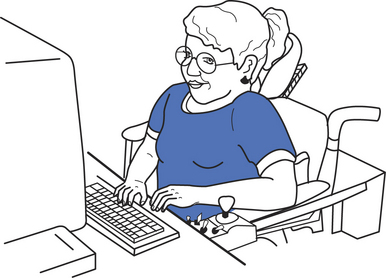
Figure 15-6 A proper sitting posture can promote independence and allow the child to function efficiently in the manipulation of objects or the activation of switches. (Courtesy www.Lburkhart.com.)
The physical environment also includes considerations related to the placement of the learner in relation to the teacher, to the other learners, to her equipment, and to the activity. Ideally the learner with a disability will be integrated into the classroom environment, as shown in Figure 15-7. To provide access to furnishings and materials, it may be necessary to make room modifications that enhance learning opportunities by creating accessible classrooms. For example, it may be necessary to modify or rearrange a classroom to allow space for mobility devices (e.g., wheelchairs and walkers; see Chapter 12) by increasing the width of aisles or the space between desks. Table heights for wheelchair access are also different than for learners who use standard chairs, especially for younger children. A device such as an AAC system (see Chapter 11) mounted to the wheelchair may require even greater clearance, in addition to special considerations for transferring the child to ensure that the chair does not tip as a result of the weight of the mounted device.
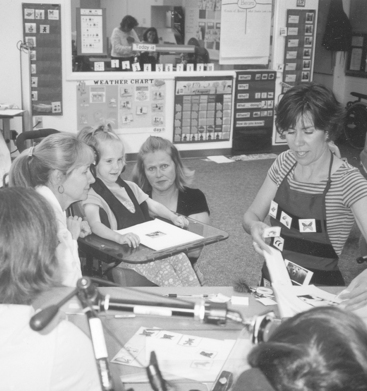
Figure 15-7 This classroom arrangement gives all learners access to the classroom activities. The student with a disability is integrated into the classroom environment.
For learners who are hard of hearing, FM antenna systems (see Chapter 9) may need to be installed. If automatic speech recognition (see Chapter 7) is used, the learner needs to be located in a place that does not disturb the other students. If the learner uses a computer workstation for completion of assignments, it needs to be located in the classroom, not a separate computer room, and it needs to be located with the other students, not off in a corner of the room. If a printer is used for completing computer-generated assignments, it must be located to reduce disturbance of other students as a result of noise.
Lighting is also important when students are using assistive devices in the classroom. If a room is too bright, glare may prevent the reading of computer screens or liquid crystal display (LCD) screens on laptop computers or AAC devices (Church and Glennen, 1991). Antireflective screens can be used when it is not possible to reduce sunlight or natural lighting sufficiently to avoid glare. On the other hand, individuals who have low vision may require special lighting to increase contrast (see Chapter 8). These modifications can enhance participation in class by learners who have physical or sensory disabilities. When modifications such as these are made, it can also encourage learners to participate in activities that involve groups of learners working together.
Important considerations when evaluating the physical context of the classroom include the following questions: (1) Is the student with the other children or physically isolated by his equipment, technology, or other factors? (2) What information or technology is needed to make the learning environment more accessible to the student? (3) How can the student participate? (4) Who can assist in the learning? (5) Can the student safely and easily enter and exit the classroom, school, and other necessary rooms? (6) Is there a clear passage of travel? and (7) Are multimodal signs used for children with sensory impairments?
HARD AND SOFT TECHNOLOGIES FOR EDUCATIONAL SUCCESS
The fourth component of the HAAT model is hard and soft assistive technologies. Many characteristics of assistive technologies were discussed in Chapters 1 and 2. When a unique environment such as education is being considered, some of these are more important than others. This section discusses the major characteristics of assistive technologies that can help ensure their successful application in an education setting.
Technological Description of the Modern Classroom
Assistive technology applications in the classroom include both hard and soft technologies (see Chapter 1) (Odor, 1984). Practitioners generally agree that success of assistive technologies depends on a ratio of 10 to 1 (soft to hard technologies). Funds allocated by schools are likely to be earmarked for hard rather than soft technologies (Blackstone, 1990). When assistive technologies (both hard and soft) were concentrated in a few classrooms with resident experts, development of soft technologies was easier. With diffusion of services throughout the curriculum, this process has become much more challenging. Of particular importance are the implications for how assistive technology training is carried out. Assistive technology service delivery in the classroom setting must address both hard and soft technologies.
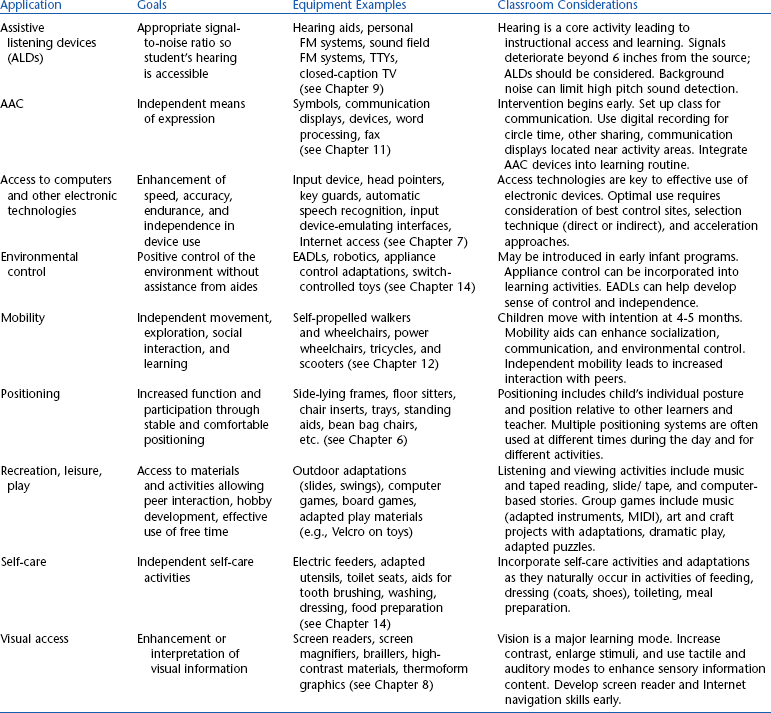
Blackstone (1990) describes areas in which assistive technologies are being used in the classroom (Table 15-2). These include (1) positioning (e.g., seating inserts, side-lying frames), (2) access to electronic assistive devices (e.g., computers, communication devices), (3) environmental control, (4) augmentative communication (writing, speaking, drawing, mathematics), (5) assistive listening devices (e.g., hearing aids, FM systems, teletypes [TTYs]), (6) visual aids (for both print and computer-based text materials), (7) mobility aids, (8) recreation and leisure activities (e.g., hobbies, free time), and (9) self-care (e.g., feeders, aids for hygiene). Blackstone gives examples of equipment and specific classroom considerations for each of these areas. The hard and soft technologies in each area are described in earlier chapters.
Considerations in the Use of Assistive Technologies in the Classroom
Chapter 4 discusses general characteristics of assistive technologies. When assistive technology use is considered in education, some of these characteristics are more important than others. Beigel (2000) lists a series of questions to be asked when considering assistive technologies for educational application. Among the areas he discuses are durability; portability; availability of a trial or loan period; company reputation; and aesthetic acceptability to the learner, family, and teacher. Classrooms are active environments in which a device may be subjected to drops, bumps, spills, and other “insults.” Durability in this environment is a high priority; this property can affect a decision between a specially designed assistive device and the use of a commercially available device such as a laptop computer. Learners move from place to place in the classroom and from classroom to classroom. A device that is not portable severely restricts the benefits to the learner in accessing the standard curriculum. Assistive technologies may be complex devices that require skill to operate and place unique demands on the learner and her environment. It is difficult to assess the impact of these devices in a brief assessment. A long-term (a few weeks to a month) trial of devices can disclose features that make them unsuitable. Utility of the device should be determined before committing funds for purchase if at all possible. There are many companies that supply assistive technologies. Some have been in business for many years and provide high-quality support and service. Others do not. An experienced ATP knows which companies can be trusted to provide the necessary support and follow-up and how well repair and service are handled. Although our focus must be on functionality, it is also important to consider the aesthetics of assistive technologies. Motivation to use an assistive technology can be greatly affected by such things as color, overall pleasant design, size, and weight. As Beigel (2000) points out, one learner may prefer a mouse with a colored ball but another might prefer the traditional mouse. The color of the wheelchair frame can be of great importance to the child and affect his or her self-image in the classroom. Devices that are well designed do not call as much attention to the user and do not seem to be so “different” from what other learners are using.
Merbler, Hadadian, and Ulman (1999) present another set of recommendations that apply to assistive technologies use in the classroom. They recommend that, whenever possible, open-ended devices (i.e., those that can be customized through software) that can be customized be used, which allows changes to be made to the device (e.g., in software or vocabulary) as the needs of the learner and her academic program change. They also recommend minimal technology solutions (see Chapter 1) that can meet the functional need with the least complexity, which can make acceptance more likely and will significantly affect the amount of training required.
Student Workstations
Much of the technology on Blackstone’s list is computer based, and she uses the term student workstation or life station to describe these computer-based setups. The workstation may provide specialized assistance with writing and conversation; an adapted access method for the classroom computer (for software that everyone else is using); access for wheelchair users (manual or power); and possible integration of controls for power wheelchair, computer, environmental control, and augmentative communication device (Caves et al, 1991; Guerette, Caves, and Gross, 1992).
In general, productivity software (word processing, database, drawing, plotting, math) is included in student workstations. For students with oral communication or visual access needs, voice synthesizers may be added. If the student is not independently mobile, a manual or power wheelchair may be included and the workstation may be integrated into the wheelchair system for portability. In cases in which the student is ambulatory, portability can be more of a challenge because the workstation must be carried or pushed from classroom to classroom. Blackstone describes a logical and systematic process for developing individualized workstations on the basis of student needs.
Additional software commonly included in workstations includes programs for skill acquisition in the specific activity areas described earlier in this chapter (reading, writing, mathematics, science, music, and art). Software for desktop publishing (e.g., for a school newspaper, flyers, posters) and digital scanning is often also included (Merbler, Hadadian, and Ulman, 1999). The scanner can be very useful in the classroom. Worksheets can be scanned and then filled in using a computer workstation. Materials to be read can also be scanned and read back by using the computer to enlarge print, convert to alternative form (e.g., braille or speech), or make turning pages easier, as noted earlier. This technology can be beneficial to learners who have sensory, learning, or physical disabilities. Scanners can also be used for other creative projects such as class newsletters, special customized awards with a picture of a student in the background, and similar activities using optical images (Merbler, Hadadian, and Ulman, 1999).
In developing workstations it is important to consider the concept of functional equivalency. This concept refers to the idea that multiple ways of achieving a particular task or outcome are possible. For example, if a student has difficulty turning the pages on a book, a mechanical page turner (see Chapter 14) can be used. Alternatively, books available on computer disk can be loaded into a word processor and the pages can be “turned” electronically. Thus the same function is obtained in very different ways.
Internet-Based Educational Resources
Many schools (some estimates are as high as 90%) have Internet access in the classroom. The Internet provides a rich and exciting resource for learners to do research for class projects, use Web-based instructional materials, and develop effective information search skills. If appropriate consideration is given to accessibility of Web sites (see Chapter 8) and principles of universal design are incorporated (see Chapter 1), the success of Web-based instruction for all learners is enhanced (Romereim-Holmes and Peterson, 2000). Learners who use alternative methods of accessing the Internet must be accommodated in the instructional process when Web-based instruction is used. The principles described in Chapter 8 apply to education as well as to other environments. The use of Web-based instruction and the development of Web content by learners will increase as more and more schools are on-line and teachers develop instructional design principles that incorporate the use of the Internet. Adherence to the principles of accessibility and consideration of universal design during the curriculum process will greatly expand the opportunities for learners who have disabilities.
Soft Technologies in the Classroom
There are two broad types of soft technologies (see Chapter 1) that have applications in education: training and strategies.
Training in an Educational Context.
Training activities in assistive technologies for school personnel may be of two general types: (1) broad-based group or (2) individual study and training that apply to a number of learners or focused training that provides information regarding the use of an assistive technology system for a specific learner (Church and Glennen, 1991). Carefully developed strategies allow the learner to maximize the effectiveness of his assistive technology.
Chapter 1 describes a number of approaches to in-service education. Many of these apply to educational staff (teacher, aide, therapist, SLP). Conferences, journal articles, Internet sources, and on-site in-service presentations by ATPs or specialist teams are the major formats. Church and Glennen (1991) list a number of in-service topics presented in one school district. Shown in Box 15-1, these are examples of the types of presentations that are of interest to school staff.
The second type of training is individualized to meet the needs of the learner, parents and family, and those staff who will be working with the learner and the assistive technology system. Earlier chapters described the nature of this training for specific technologies (e.g., AAC in Chapter 11). It is crucial that the training received by school staff be aimed at how the technology will achieve the goals set for the learner, rather than just focusing on the technical aspects of the device (Todis and Walker, 1993). In an educational setting it is also important that those who will work with the student are familiar with operation of the technology, how to troubleshoot the device in the case of operational difficulties, and specific features for individual technologies (Church and Glennen, 1991). In the latter category are such things as vocabulary selection for educational use of AAC, training in the use of specific educational software, and training related to skill development in such areas as powered mobility.
In education, peers also need to be trained. Peer training introduces the new technology to the classmates of the target learner. It also can be an opportunity to answer questions that peers have regarding the disability and the technology. Another goal of this training is to establish the rules governing the use of the technology (Church and Glennen, 1991). School staff and the family of the learner may decide to implement a “hands-off” policy for other students so as to avoid damage to the assistive technology. As Church and Glennen (1991) point out, this policy can make the device more enticing and arouse the curiosity of the peers regarding how it works. For this reason, some families and teachers allow classmates to experience the device during the familiarization phase of training.
Church and Glennen (1991) suggest that the student who will be using the assistive technology be part of the in-class training session in which her technology is introduced to the rest of the class. This peer training session is also an opportunity for a presentation on how the peers can appropriately help the student who will be using the assistive technology. This is a chance to emphasize the need for the learner to be independent and to not have things done for him or her by classmates, as well as to introduce the new technology. Rules can also be established regarding the new device and how much access the learner and the family want to give the peers. In all cases the student must have control over the new technology, which includes being able to decide who can try it out (if anyone) and when they can do so.
Strategies for the Use of Assistive Technologies in the Classroom.
Educational strategies are really techniques that increase the effectiveness of assistive technologies in the classroom. There is no specific formula for their development. Rather, they arise from a thorough understanding of the educational goals and the skills of the learner. Most often strategies are based on innovative ideas generated from careful observation, experience, and consultation with other team members. This section describes several examples of specific strategies to illustrate how many different learning strategies can be used to meet the same educational goals. Some specific approaches to the generation of strategies are also presented.
One systematic approach is the Technology Integration Plan (Church and Glennen, 1991). The development of this plan begins with a team meeting in which an analysis of the student’s daily schedule is carried out. Emphasis is placed on the identification of target activities for technology intervention. Church and Glennen suggest that activities meeting the following criteria be chosen (1991, p. 217):
2. They are motivating and enjoyable
3. They present opportunities for independence in one of several areas (verbal or written communication, mobility, self-care, vocational skills, control of the environment)
4. They are activities that the student cannot effectively complete utilizing their current modes or methods
There are three parts to the Technology Integration Plan: (1) preparation (Figure 15-8, A), (2) action plan (Figure 15-8, B), and (3) review (Figure 15-8, C) (Church and Glennen, 1991). The preparation form is designed as a framework to record the information developed by the discussion of target activities. A three-point rating scale is used to indicate the relative level (high, moderate, or low) for each activity in several areas (see Figure 15-8, A). The action plan (see Figure 15-8, B) is then completed for each identified activity. The action plan is a framework for recording target skills and objectives for each activity. It is also used to identify suggested materials, equipment, motivators, and strategies for each activity. In addition, the required preparation and the projected date for a review are included on this form. The final form, review (see Figure 15-8, C), is used to record any modifications to the plan and to record progress in meeting the goals set out in the plan. An organized format such as the Technology Intervention Plan can help a team to focus on the educational goals first, developing strategies for implementing both the hard and soft technologies required to meet the goals and then monitoring progress. Church and Glennen (1991) present two examples of the use of this approach.
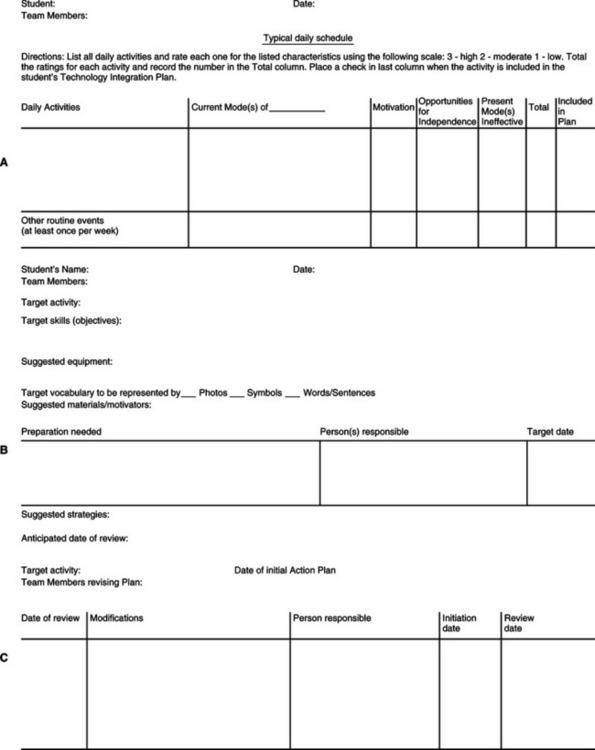
Figure 15-8 The Technology Integration Plan. A, Preparation sheet. B, Action plan. C, Review. (From Church G, Glennen S: The handbook of assistive technology, San Diego, 1991, Singular Publishing Group.)
Singular Publishing GroupStrategies to help a student accomplish learning tasks are often best developed by a team of professionals. Brainstorming and planning from several different points of view can lead to innovation as one idea triggers others. Merbler, Hadadian, and Ulman (1999) recommend that teachers share information regarding assistive technology application. With the myriad devices and strategies available, it is impossible for any one teacher to monitor them all, and sharing expertise can benefit all learners. Collaboration with parents can also ensure that assistive technology devices that go home are properly used and maintained. With the complexity of some current assistive devices, the teacher may place unreasonable demands on himself or herself to completely master a device or software program before using it. This knowledge is often not necessary, and many applications can be successfully accomplished with the device as skill is developed. Merbler, Hadadian, and Ulman also encourage teachers to experiment with the technology. This may lead to the discovery of new applications or strategies.
Even if you do not have a team locally, you can collaborate by using various on-line listservs. One that is often used is the RESNA assistive technology listserv (e-mail address: resna@maelstrom.stjohns.edu). As discussed earlier in this chapter, manipulatives (objects that can be counted, moved, and sorted) are often used in mathematics instruction. When a child lacks the fine motor skills to manipulate the objects, alternatives are required to access the same curriculum as classmates. Here is an example of an on-line “virtual collaboration” involving the use of manipulatives (paraphrased):
One subscriber to the listserv (Y. T., a rehabilitation engineer from New York City) posted the following question:
I’m working with a child with CP [cerebral palsy] in the 3rd grade. He can grasp and manipulate objects with his left hand, but he has extensor tone that makes it difficult to lean or reach forward, or bring his arm across his body. His right side is more involved and he doesn’t use it much. I’m looking for ideas to assist him in using manipulatives in his math class. He has a desk that allows him to pull up close, and he can be placed on a slant. I’m going to give him a tray table to elevate the surface even more so he doesn’t have to reach down. When using manipulatives, the students often have to organize counters into groups and arrange objects on their desk. I was thinking possibly little containers to help with that. Does anyone have any other suggestions?
K. P., an OT in Massachusetts, offered these suggestions:
Use muffin tins of various sizes, paint palette trays, etc., which are easier to scoop from. More important, though, is whether his seating needs have been adequately addressed to maximize dynamic trunk balance and provide as much normalization of tone as possible.
R. G., a rehabilitation technologist in San Francisco, added his thoughts:
I would encourage all involved to step back and look at the educational goals of the activity. Perhaps they can be achieved without using the same objects that are typically used (though he might be strongly motivated to use the same tools as all the other students). The example that comes to mind is the abacus that can help people learn math without requiring a lot of range of motion—though some fine motor ability is needed. Otherwise, plastic organizers for silverware drawers or pencil drawer organizers are two readily obtainable items. Use small containers velcroed to a flat board that can be rearranged as desired. Try putting the containers on a lazy Susan to provide access to more items without reaching.
C. C., an SLP from Nebraska, contributed other ideas:
There are often easier physical methods to accomplish the educational tasks involved in the manipulatives. Manipulatives tend to be used educationally for two or three reasons: they make abstract concepts concrete, they help students make active problem solving decisions, and they are easy to manage for typically developing students. Because the latter is not true for this child, we don’t want him to be spending all of his educational time managing the mechanics of the task and missing the educational point.
I’ve seen this work well by students pairing together. The student with a disability makes decisions about which items go into which groups, and gets to control the physical division of the items by strategies like eye pointing or binary choice making [see Chapter 11] with a peer (i.e., which group?). The peer does the physical manipulation according to the student’s direction, and by third grade most peers can be coached in strategies for getting the student’s input without being directive. This embeds a communication strategy that is both more accessible and interactive for the student, as well as probably already established in other ways.
This example illustrates several points about strategies. First, there are many strategies for any one problem in the classroom. Often the possible strategies are very different. Our virtual team suggests a variety of approaches from making the manipulatives easier to reach and grab to using a peer partner to help with the task. Second, alternative strategies often involve different skills on the part of the student. In this example, the skills range from gross motor to fine motor to communication. The third general point is that strategies may or may not involve technology, and the technology may be high or low, depending on the strategy. In this example, low technologies such as muffin tins and a lazy Susan are suggested by two of the professionals. The third suggests communication, and this intervention/strategy might be no-tech (i.e., speech) or a high-tech augmentative communication device. This example also illustrates the role of innovation and problem solving in the development of useful strategies.
A frequent concern of teachers and classroom aides is that there is not time to add assistive technology use to an already crowded day with many students in the classroom. The time demands of the classroom are high, and this is a legitimate concern; however, it is possible to use strategies for infusing technology into the classroom throughout the day (King-DeBaun, 1999). King-DeBaun suggests integrating assistive technologies into regular classroom activities throughout the day. One example described by King-DeBaun (1999) is Danny, an 8-year-old boy who attends a typical first grade classroom for 75% of his school day and spends 25% of his day in a resource room. Danny uses an AAC device and receives instruction and support from his regular education teacher and part-time classroom aide as well as the resource room teacher and his SLP. Danny’s day begins with story group, and for the class discussion, he uses the IntelliKeys keyboard (see Chapter 7) with an overlay containing simple words related to the story. His SLP made the overlay by using a computer program called Overlay Maker. By use of a talking word processor, Danny is able to participate in the story group discussion. Students also participate in journal writing as an arrival activity. They record the day of the week, school activities, and special events at home or school. Danny uses his augmentative communication device to complete this task, making use of a posted “word wall” (an alphabetical list of words he uses frequently). Later in the day, Danny and his classmates create a story adventure based on a starting line from the teacher (e.g., “One day…”). The teacher bases the story on a familiar theme or a story that the children have often read. Students take turns participating in this activity, and each day one student is selected to help write a part of the class story. Once again Danny uses his augmentative communication device, but this time his aide has prepared a list of words related to the topic of the recent books the class has read, and she has stored them into his device so he can access them to participate in this activity.
King-DeBaun (1999) also describes another student, Anita, who is just learning how to scan (see Chapter 7). She uses her communication device in a circular scanning mode (see Chapter 7) to randomly select a student to be next. This places Anita at the center of attention as the class waits to see whom she will choose. In Dramatics, Danny and Amanda work together to use a drawing program on the computer to create masks for a talking mural. She creates a bird mask and he makes a lizard mask. They work together, with Danny picking a color and Amanda placing the cursor on that color. Amanda cuts out the mask for Danny and places both masks on the mural. For the presentation to the class the following day, Danny uses his augmentative communication device to speak his lines. Musselwhite and King-DeBaun (1997) describe many other activities and adaptations that can be used in the classroom.
There are many sessions at assistive technology conferences that include strategies for introducing and using assistive technologies successfully in the classroom. These are rich with new strategies. Several of the conferences have on-line proceedings. All have other resources available on their Web sites. Three of the most useful conferences are the California State University at Northridge Conference (held in March in Los Angeles; www.csun.edu/cod/); Closing the Gap (held in October in Minneapolis; www.closingthegap.com); and RESNA (June, various locations; www.resna.org).
As the examples in this section illustrate, the most important factors in the development of assistive technology strategies are detailed familiarity with the educational task to be completed and innovative thinking. There are no basic principles or magic formulas.
SUMMARY
This chapter describes the educational application of assistive technologies using the HAAT model as a framework. Learners who have disabilities engage in reading, writing, mathematics, science, music, and art. The primary types of adaptations available in each of these areas involve both strategies and technologies. Several assessment models are used to determine the needs of learners for assistive technologies. Considerations in the cultural and social contexts include learner style, socioeconomic status, and other factors that can dramatically affect assistive technology effectiveness in the classroom. The emergence of inclusive settings in education has affected the way in which assistive technologies are applied and supported. The physical location of the learner in relation to other students and the layout of the classroom in general can affect the success of assistive technologies. Many characteristics of hard and soft assistive technologies are important in ensuring that they are meeting the needs of learners and teachers.
1. What are the major curricular areas (educational activities) in which assistive technologies are used?
2. What tasks must be accommodated for to ensure success in reading instruction?
3. Describe some of the differences between an assistive technology–based writing system and scribing.
4. How can an AAC system be used in mathematics instruction?
5. What are the two primary requirements in making adaptations for alternatives to pencil-and-paper mathematics instruction?
6. How can the concept of manipulatives be included in the mathematics curriculum for learners who lack the fine motor skill to work with physical objects directly?
7. What unique requirements do science, art, and music each place on the educational setting for assistive technologies?
8. List three factors that are essential to an effective assistive technology assessment to meet educational needs.
9. What steps are necessary to ensure that an assistive technology assessment focuses on the needs of the learner rather than the technologies to be used in meeting those needs?
10. How are assistive technologies to meet educational needs incorporated into the IEP?
11. Who are the typical members of an educational assistive technology assessment team?
12. What are the primary models for educational assistive technology assessment, and what are the pros and cons of each?
13. What are the advantages of carrying out an educational assistive technology assessment in the school, family, and community environments?
14. What are the unique contributions that the ATP makes to an educational assistive technology assessment?
15. What are the advantages of an educational assistive technology assessment carried out in a center specializing in assistive technology evaluation and recommendation?
16. What are the implications for assistive technology application presented by an inclusive classroom?
17. What are the levels of academic and social participation defined by Beukelman and Mirenda (2005)?
18. List four aspects of the learner-teacher interaction that are important to the recommendation of assistive technologies for classroom use.
19. What are the major considerations in the social and cultural contexts as applied to assistive technologies use in education?
20. What social factors may affect the use of assistive technology in the classroom?
21. What cultural factors may affect the use of assistive technology in the classroom?
22. How does learning style affect the success of assistive technologies in the classroom?
23. List four factors that affect the physical context for the learner.
24. List the components that make up a student workstation.
25. What are the most important soft technology concerns in the educational setting?
26. What are the two major types of assistive technology training normally provided for school personnel? How do they differ?
27. What are the goals of peer training, and how can the learner who uses the technology be included in this training?
28. What are the most important assistive technology characteristics when considering devices for classroom use?
References
Baker, LA. Educational challenges-strategies for the AAC student. Commun Outlook. Spring 1993:13–16.
Beigel, AR. Assistive technology assessment: more than the device. Interven School Clin. 2000;45:237–244.
Beukelman, DR, Mirenda, P. Augmentative and alternative communication, management of severe communication disorders in children and adults, ed 3. Baltimore: Paul H Brookes, 2005.
Bodine, C, Melonics, M. Teaming and assistive technology in educational settings. In: Edyburn D, Higgins K, Boone R, eds. Handbook of special education technology research and practice. Whitefish Bay, WI: Knowledge by Design, Inc., 2005.
Blackstone, SW. Assistive technology in the classroom. Augment Commun News. 1990;3:1–8.
Brainerd, CJ. Piaget’s theory of cognitive development. Englewood Cliffs, NJ: Prentice-Hall, 1978.
Brodin, J. Facsimile transmission for graphic symbol users. Eur Rehabil. 1992;2:87–92.
Butler, C. Effects of powered mobility on self-initiated behaviors of very young children with locomotor disability. Dev Med Child Neurol. 1986;28:325–332.
Button, C. Fast facts on individualized education programs. AT Q RESNA. 1990;2:5–6.
Calkins, LM. The art of teaching. Portsmouth, NH: Heinemann, 1986.
Caves, K, et al. The use of integrated controls for mobility, communication and computer access. In: Proceedings of the 14th RESNA Conference. Washington, DC: The Conference; 1991:166–167.
Church, G, Glennen, S. The handbook of assistive technology. San Diego: Singular Publishing Group, 1991.
Desch, LW. High technology for handicapped children: a pediatrician’s viewpoint. Pediatrics. 1986;77:71–87.
Edyburn, DL. Rethinking assistive technology. Spec Educ Technol Pract. 2003;5:16–23.
Edyburn, DL. Learning from text. Spec Educ Technol Pract. 2003;5:16–27.
Edyburn, D. Measuring assistive technology outcomes in writing. J Spec Educ Technol. 2003;18:60–64.
Edyburn, D. Measuring assistive technology outcomes in mathematics. J Spec Educ Technol. 2003;18:76–79.
Edyburn, D. Measuring assistive technology outcomes in reading. J Spec Educ Technol. 2004;19:60–64.
Edyburn D, Higgins K, Boone R, eds. Handbook of special education technology research and practice. Whitefish Bay: Wisconsin: Knowledge by Design, Inc., 2005.
Guerette, P, Caves, K, Gross, K. One switch does it all. Team Rehabil Rep. 1992:26–29.
Jeffs, T, Behrman, M, Bannan-Ritland, B. Assistive technology and literacy learning: reflections of parents and children. J Spec Educ Technol. 2006;21:37–43.
King-DeBaun P: Technology all day long: infusing technology into the curriculum: Proceedings of the CSUN Conference 1999: www.dinf.org/csun_99/session1008.html. Accessed December 1999.
Light, J, Smith, AK. Home literacy experience of preschoolers who use AAC systems and their nondisabled peers. Augment Altern Commun. 1993;9:10–25.
Light, J, Kent-Walsh, J. Fostering emergent literacy for children who require AAC. ASHA Leader. 2003;8:4–5. [28-29].
Maccini, P, Gagnon, JC. Mathematics and technology-based interventions. In: Edyburn D, Higgins K, Boone R, eds. Handbook of special education technology research and practice. Whitefish Bay, WI: Knowledge by Design, Inc., 2005.
Merbler, JB, Hadadian, A, Ulman, J. Using assistive technology in the inclusive classroom. Prevent School Fail. 1999;43:113–118.
Musselwhite, C, King-DeBaun, P. Emergent literacy success: merging technology and whole language for students with disabilities. Park City, UT: Creative Communicating Resources, 1997.
Odor P: Hard and soft technology for education and communication for disabled people. In Proceedings of the International Computer Conference, Perth, Australia, 1984.
Resnick M et al: Digital manipulatives: new toys to think with: Proceedings of the CHI Conference, Los Angeles, Calif, April 12-23, 1998: http://www.acm.org/sigchi/chi98/cp/?show252. Accessed December 1999.
Rocklage LA, Lake ME: Inclusion through infusion, Proceedings of the Closing the Gap Conference, 1997: http://www.closingthegap.com/cgi-bin/lib/libDsply.pl?a1049&b3&c1. Accessed December 1999.
Romereim-Holmes, L, Peterson, D. Instructionally sound web-based learning for diverse populations, Proceedings of the CSUN Conf,. http://www.csun.edu/cod/conf2000/proceedings/0032Romereim.html, 2000. [Accessed December 1999.].
Schaff, JI, et al. Science in special education: emerging technologies. In: Edyburn D, Higgins K, Boone R, eds. Handbook of special education technology research and practice. Whitefish Bay, WI: Knowledge by Design, Inc.; 2005:643–661.
Smith, AK, et al. The form and use of written communication produced by physically disabled individuals using micro-computers. Augment Altern Commun. 1989;5:115–124.
Smith, J, Topping, M. The introduction of a robotic aid to drawing into a school for physically handicapped children: a case study. Br J Occup Ther. 1996;59:565–569.
Strangeman, N, Dalton, B. Using technology to support struggling readers: a review of the research. In: Edyburn D, Higgins K, Boone R, eds. Handbook of special education technology research and practice. Whitefish Bay, WI: Knowledge by Design, Inc.; 2005:545–569.
Sturm, JM, Erickson, K, Yoder, DE. Enhancing literacy development through AAC technologies. Assist Technol. 2002;14:71–80.
Todis, B, Walker, HM. User perspectives on assistive technology in educational settings. Focus Except Child. 1993;26:1–16.
Topping, M. The Handy 1, a robotic aid to independence for severely disabled people. Technol Disabil. 1996;5:233–234.
Vanderheiden, GC, Lloyd, LL. Communication systems and their components. In: Blackstone S, Bruskin D, eds. Augmentative communication: an introduction. Rockville, MD: American Speech-Language and Hearing Association, 1986.
Zabala, JS. SETTing the stage for success: building success through effective use of assistive technology. In: Proceedings of the Southeast Augmentative Communication Conference. Birmingham, AL: United Cerebral Palsy of Greater Birmingham; 1996:129–187.